19
14. Sharing access to your Petcube Bites
By default, only you can access your
Petcube video stream, but you can
share access to your Petcube with your
family, friends and anyone who installs
the Petcube app on their smartphone.
Family sharing (fig 4.14.5) will have
almost full control of your camera,
being able to connect to your Petcube
anytime, change camera and sharing
settings and access recorded videos
on Petcube Care timeline.
Friend sharing (fig 4.14.6) allows you
to set friend sharing access
at specifically scheduled times and
days as well as set a permission access
for the treats and 2-way audio controls.
To share access to family members
or friends:
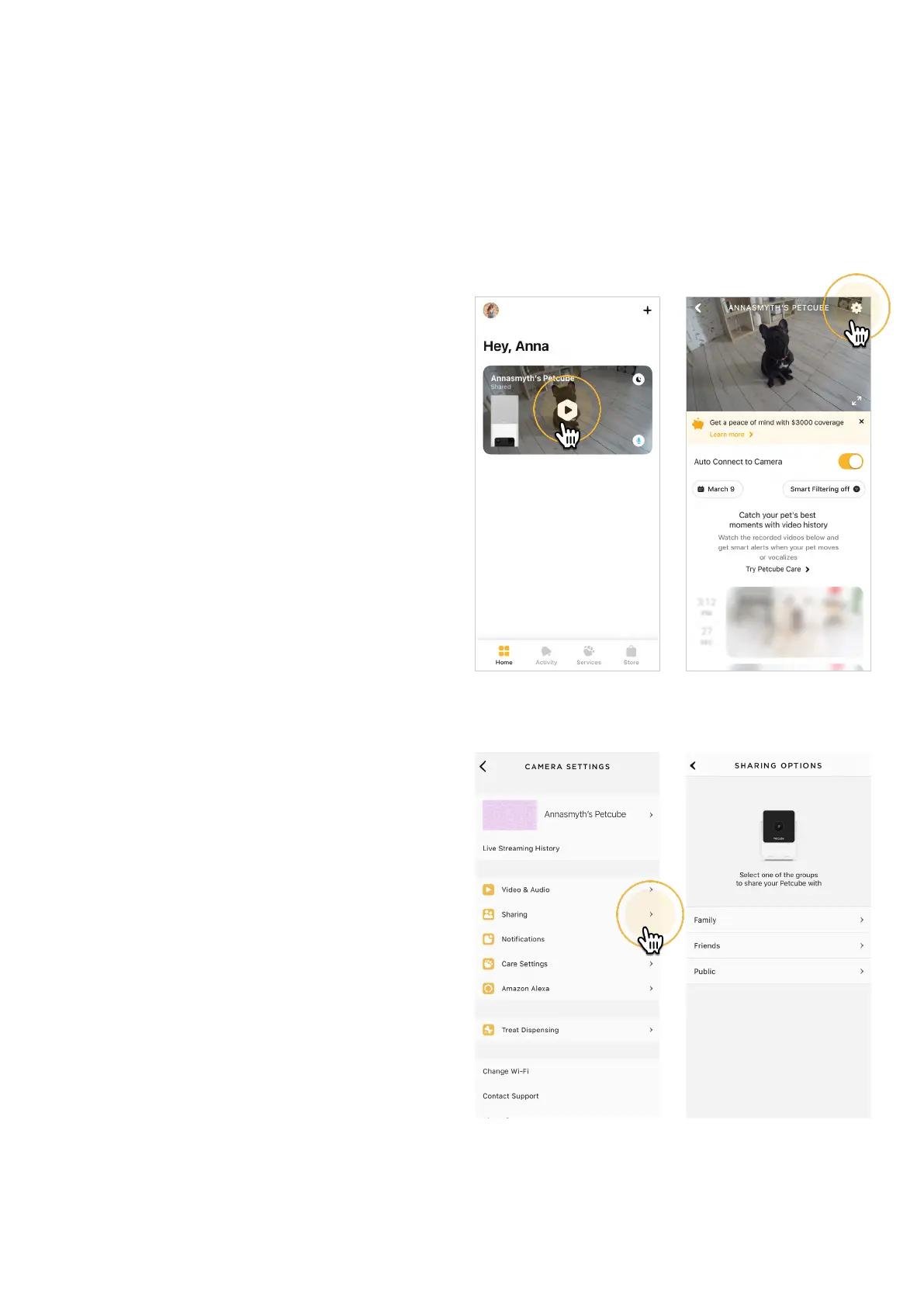
1. Open the Petcube app;
2. Go to the camera profile (fig 4.14.1);
3. Tap the ‘Settings’ wheel in the upper
right corner (fig 4.14.2);
4. Tap ‘Sharing’, select the preferable
sharing option and add the new user
to either ‘Family’ or ‘Friend’ list
(fig 4.14.4) (fig 4.14.5) (fig 4.14.6).
Fig. 4.14.1
Fig. 4.14.3
Fig. 4.14.4
Fig. 4.14.2



 To Next Page