21
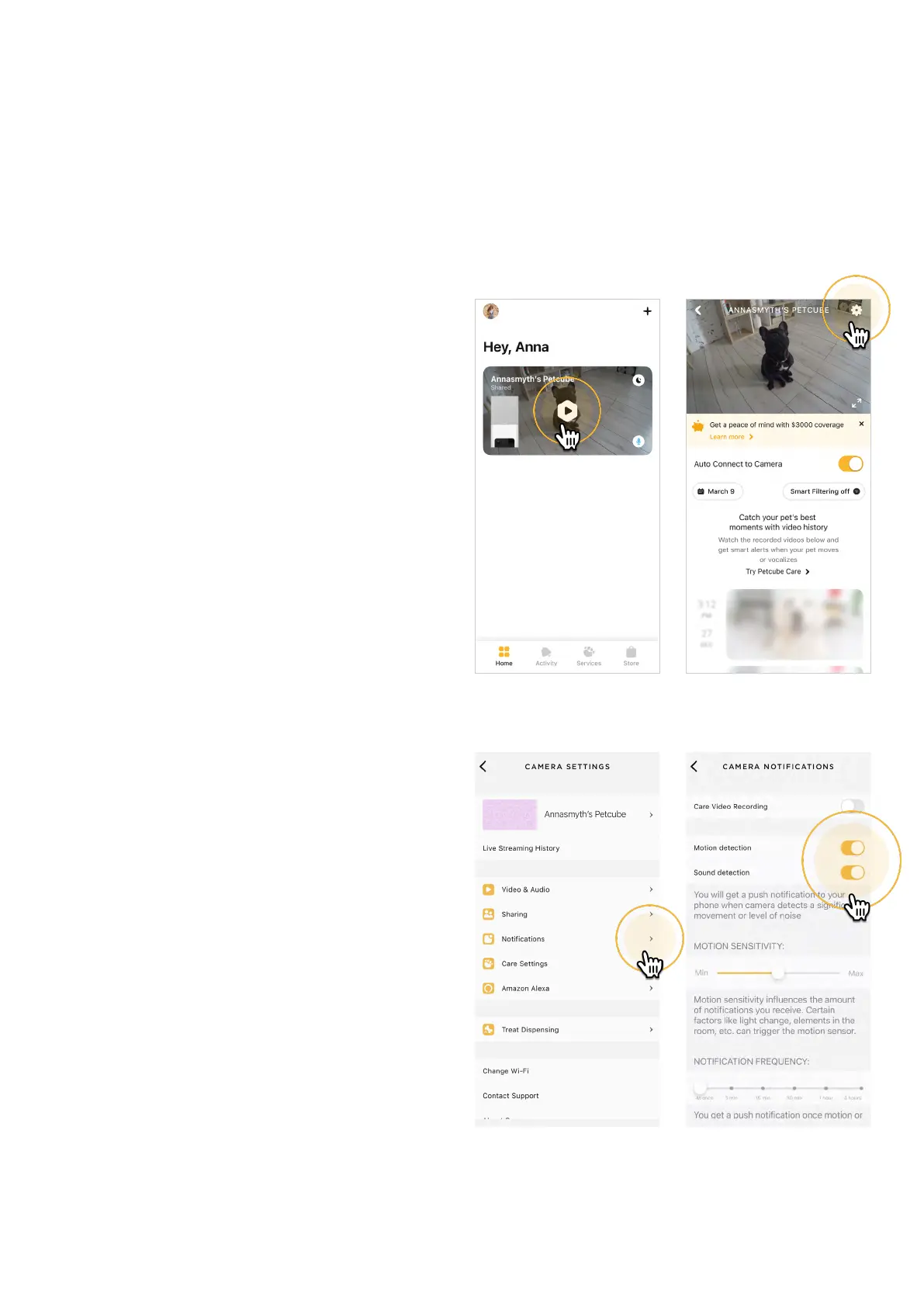
15. Using motion and sound detection
Whether you are using Petcube Care
cloud-based video storage service
or not, the Petcube app can still send
push notifications to your smartphone
whenever motion or sound is detected
on your Petcube.
To enable push notifications:
1. Open the Petcube app;
2. Go to the camera profile, tap
the ‘Settings’ wheel in the upper
right corner;
3. Select ‘Notifications’ (fig 4.15.3);
4. Turn ‘Motion Detection’ and ‘Sound
Detection’ options On (fig 4.15.4).
You can also adjust the sensitivity
of the motion and sound detection
sensors by moving the ‘Motion
sensitivity’ slider (fig 4.15.5).
Keep in mind that in order to be able
to change the settings on your
Petcube, it needs to be in online
standby mode (steady Blue light).
If you are using Petcube Care cloud
history service, the Petcube app
will record videos triggered by motion
and sound and you can configure push
notifications to be sent as soon as new
video recordings are available, enabling
Care Video Recording setting
(fig 4.15.6).
Fig. 4.15.3 Fig. 4.15.4
Fig. 4.15.1 Fig. 4.15.2



 To Next Page