24
19. Deleting the Petcube device
To delete the Petcube from your
account:
1. Open the Petcube app;
2. Go to the camera profile, tap
the ‘Settings’ wheel in the upper
right corner;
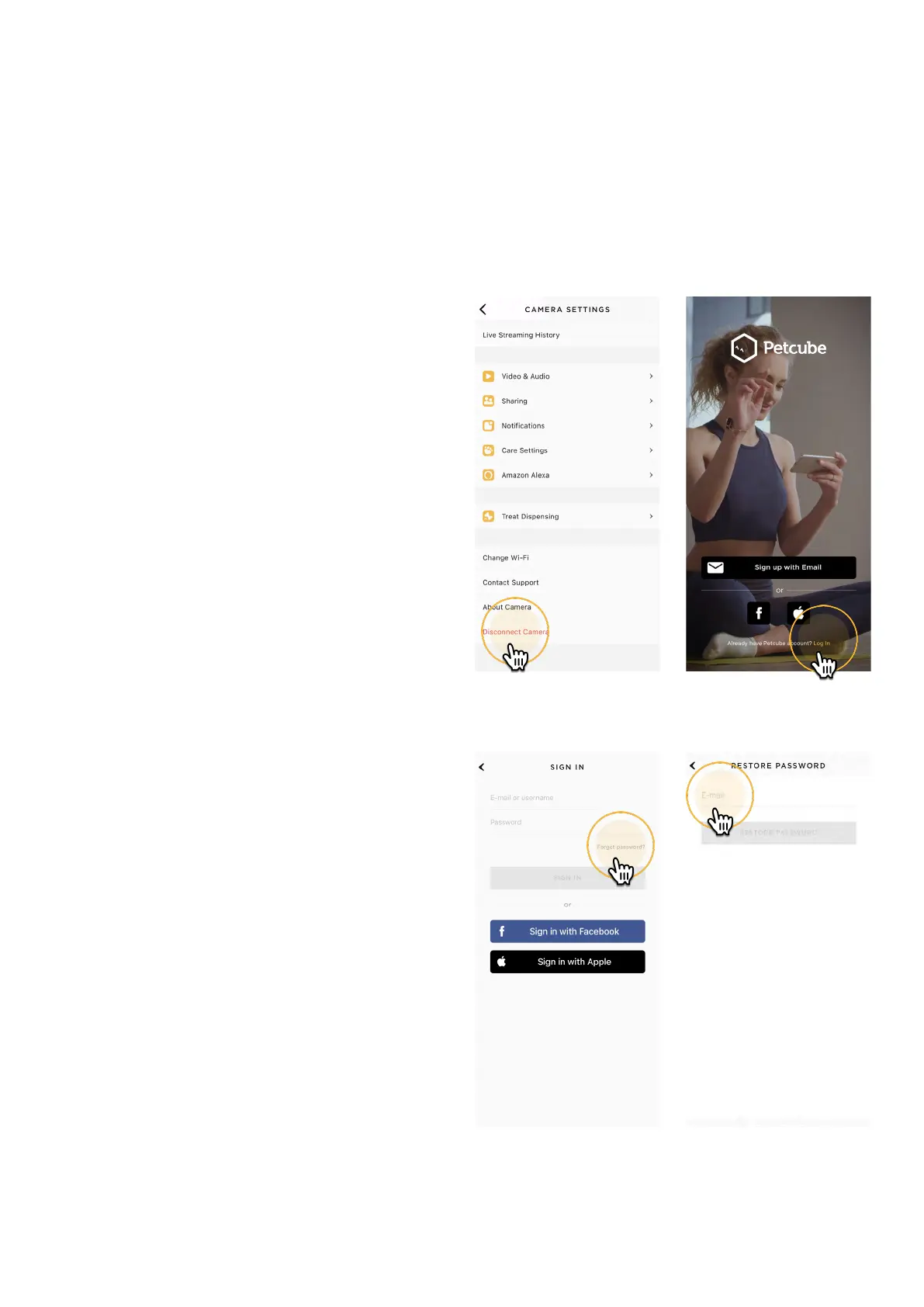
3. Find ‘Disconnect camera’ (fig 4.19.1);
4. Confirm by choosing ‘Delete’.
20. Resetting user account password
If you forgot your password:
1. Open the Petcube app
on your mobile device;
2. Tap ‘Log In’ at the bottom
of the screen (fig 4.20.1);
3. Tap ‘Forgot password’ (fig 4.20.2);
4. Enter your Petcube account
email address;
5. Hit ‘Restore password’ button
(fig 4.20.3);
6. Check your email and follow
the instructions to reset
your password.
Fig. 4.19.1
Fig. 4.20.2
Fig. 4.20.1
Fig. 4.20.3



 To Next Page