25
21. Changing your account name, username, password or camera name
To change your account details such
as your name, username or password:
1. Open the Petcube app;
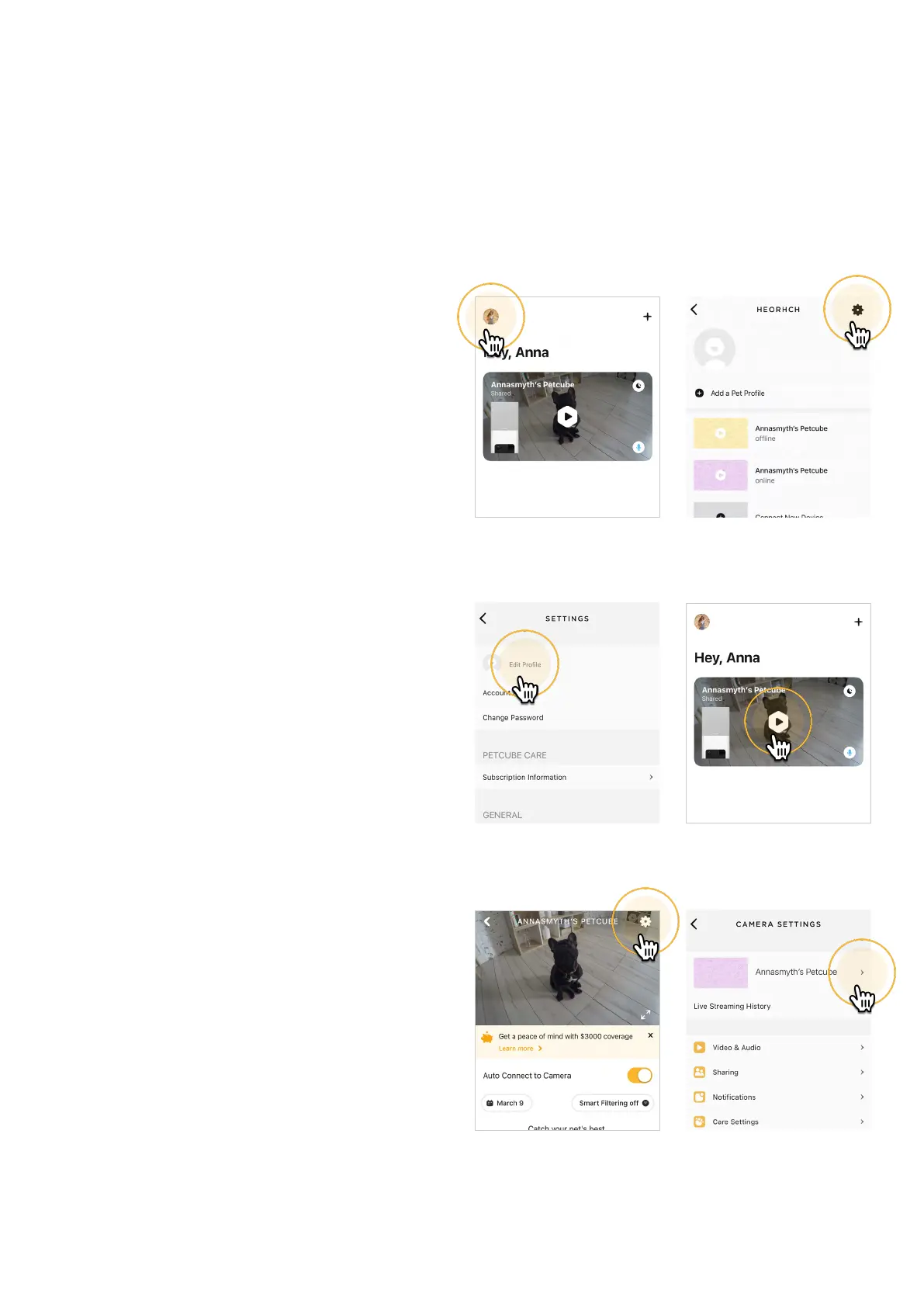
2. Go to the user profile by tapping
your user icon (fig 4.21.1);
3. Tap the ‘Settings’ wheel in the upper
right corner (fig 4.21.2);
4. Hit ‘Edit profile’ (fig 4.21.3) and tap
the values you want to change.
To change your Petcube camera name
or change the camera background:
1. Open camera profile (fig 4.21.4);
2. Tap the ‘Settings’ wheel in the upper
right corner (fig 4.21.5);
3. Hit the arrow next to your Petcube
name (fig 4.21.6) and status and
change the necessary values.
Fig. 4.21.3
Fig. 4.21.5
Fig. 4.21.2
Fig. 4.21.4
Fig. 4.21.6
Fig. 4.21.1



 To Next Page