26
22. Moving your Petcube to a different location or changing Wi-Fi settings
As long as the Petcube is within range
of your wireless network, you can
reposition it according to your needs.
However, if you’re trying to use
it in a different Wi-Fi environment
or want to connect the camera
to a different wireless network,
you need to change the Wi-Fi
settings in the Petcube app.
To do that:
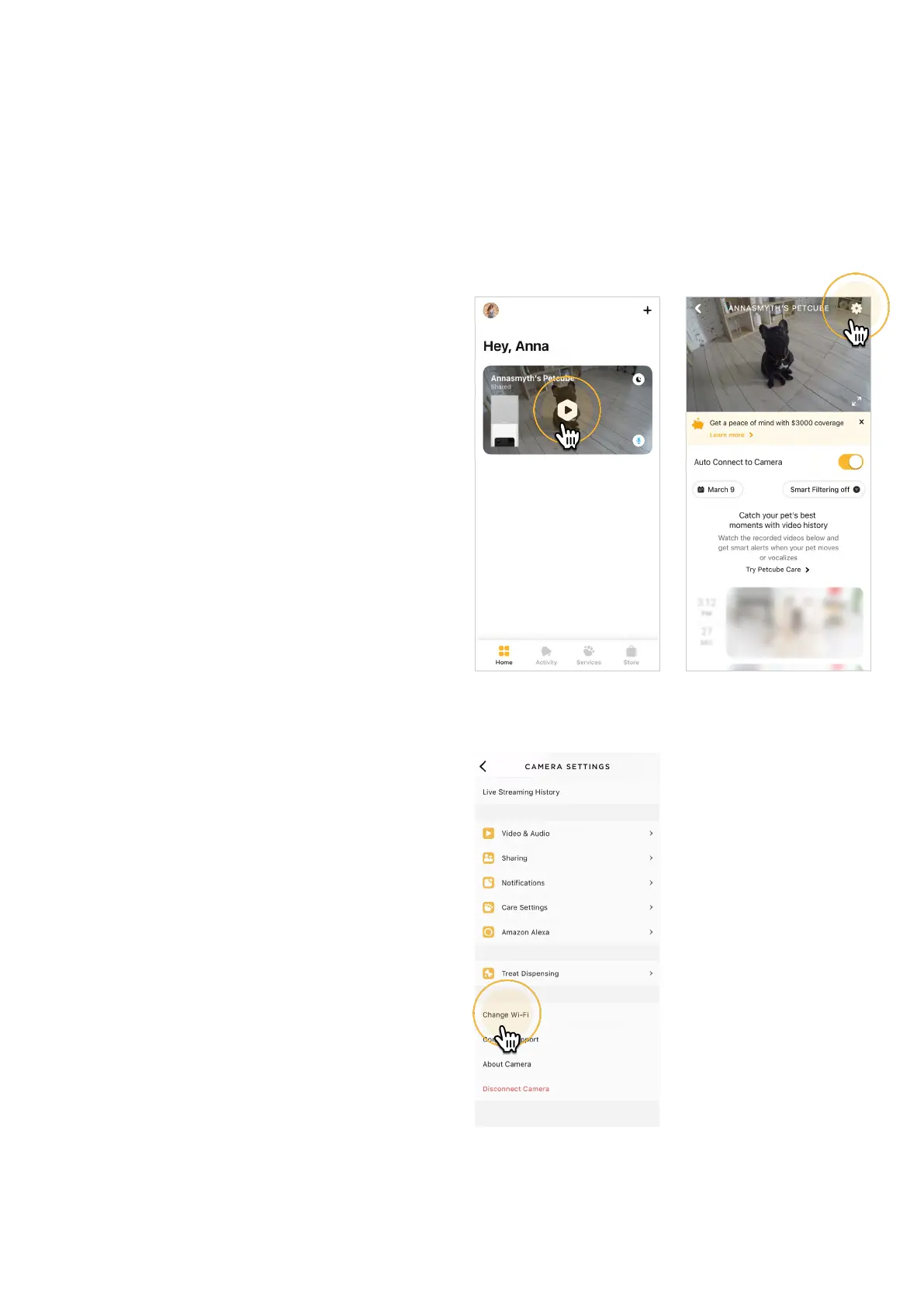
1. Open the Petcube app;
2. Go to the camera profile (fig 4.22.1);
3. Tap the ‘Settings’ wheel in the upper
right corner (fig 4.22.2);
4. Tap ‘Change Wi-Fi’ (fig 4.22.3) ;
5. Power up your Petcube, wait
1 minute until it starts up;
6. Find the small hole above the USB
port on the left side of the device,
push it one with a pointy object and
follow the on-screen instructions.
Fig. 4.22.1
Fig. 4.22.3
Fig. 4.22.2



 To Next Page