TouchScreens
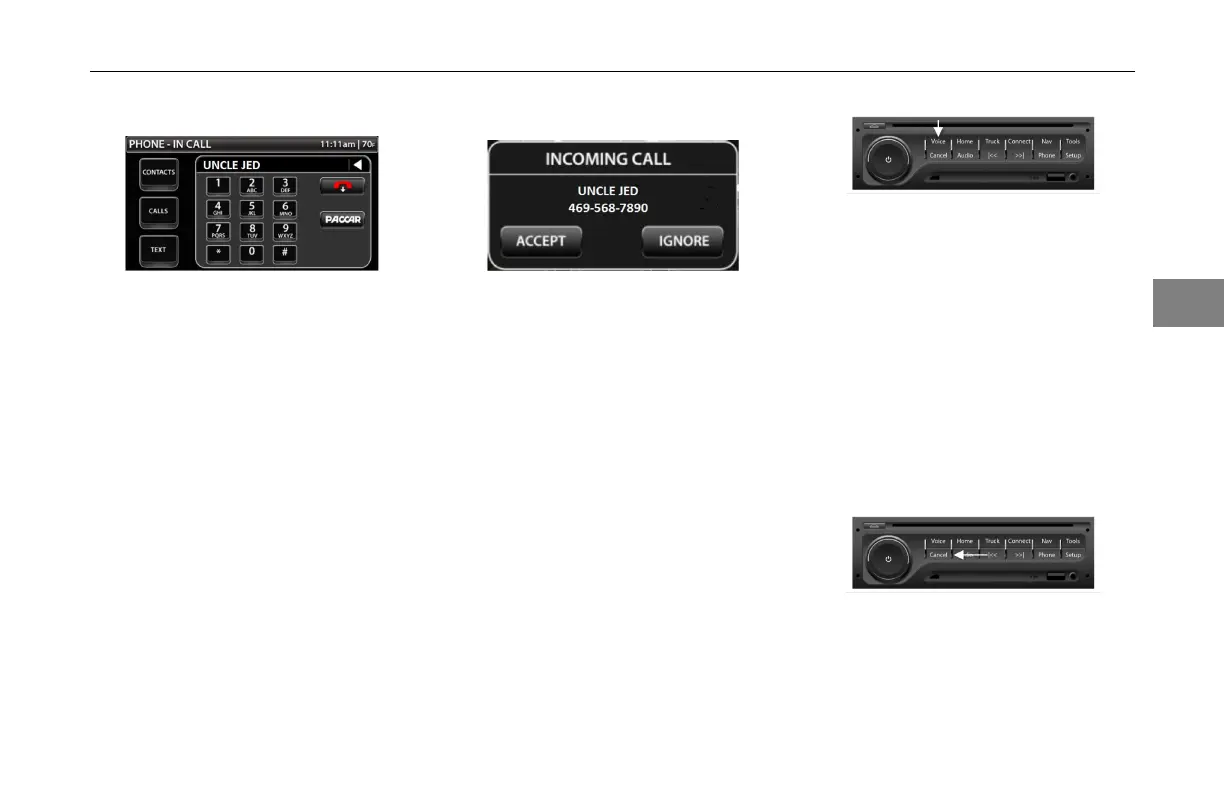
InCall
InCallScreen
ThephonetitlechangestoPhone–In
Calloncethedialingbegins
Toendthecall,presstheredphone
icon.Thiswilldisconnectthecall.
AnycallreceivedwhileInCallwill
simplyshowmissedcallicon(‘X’)on
thequickjumpbarnexttothephone
symbol.
IncomingCall
IncomingCallPopup
Whenanincomingcallcomesinthe
INCOMINGCALLpopupwillappear.
Thenumberwillbedisplayedandif
itisinthecontactlistthecontactwill
appear.Toacceptthecallpressthe
acceptbutton.Ifyouchosenotto
answerpresstheignorebutton.
PhoneVoiceRecognition
Thephonefunctionalsoincludes
voicerecognitionforcertainphone
controls.Toenteracommand,press
the[VOICE]button(asshownbelow),
waitforthevoicepromptandthen
speakyourcommandinaclearvoice.
Thesystemwillacceptasingleword
commandandwillpromptforthenext
command,suchasanameoraphone
number.Thesystemisalsocapable
ofacceptingcomplexcommandsof
“Call”or“Dial”andthenameorphone
numbertocall.
Pressingthe[Cancel]buttonon
thecontrollerwillreturnthevoice
commandbacktothephonecontrol
andwillallowtheprocesstostartover.
Ifthesystemdoesnotrecognizeyour
command,tryspeakinglouderand
reducebackgroundnoisesuchas
3-
15
3



 To Next Page