TouchScreens
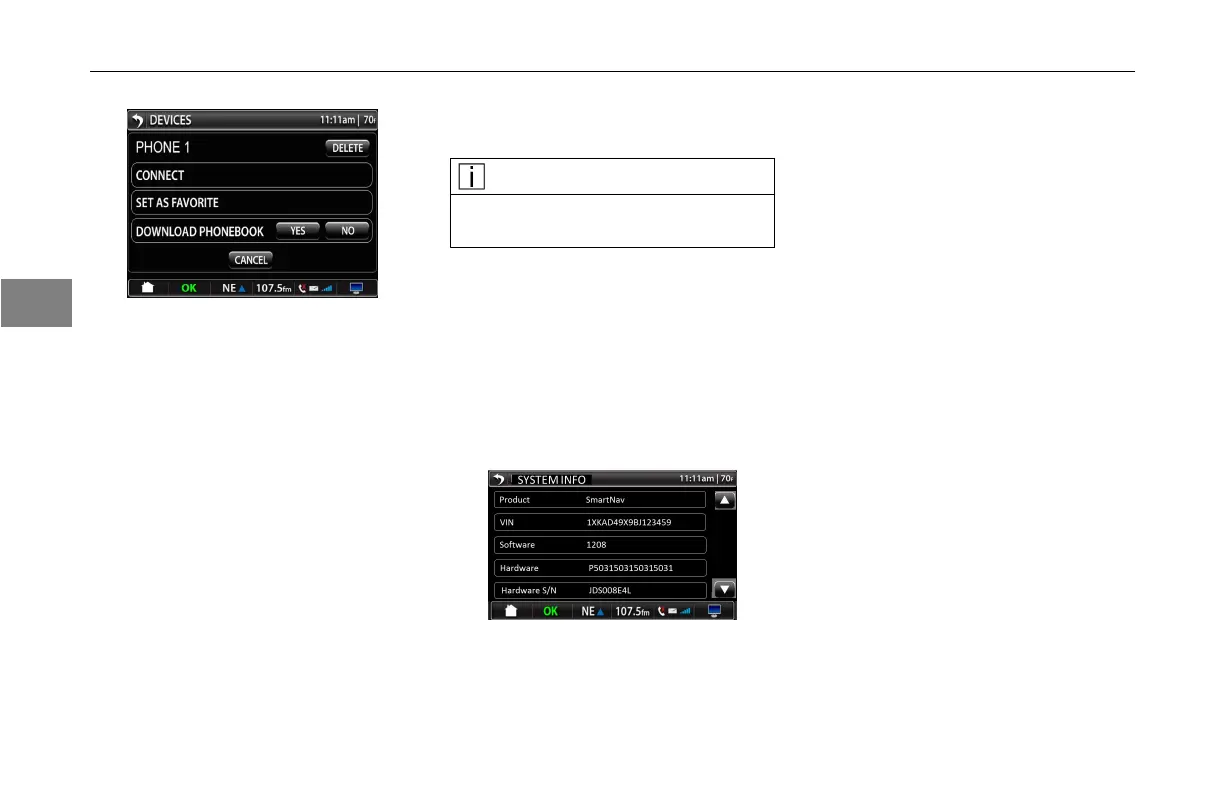
Bluetooth®OptionsScreen
Deleteoption-PressingtheDelete
buttonwilldeletethecurrentpaired
device.
Connect-Thisbuttonwillconnectthe
deviceforuse.(Ifthesystemhasnot
alreadyconnectedthedevice.)
SetasFavorite–PressSetasFavorite
tosetthecurrentpaireddeviceasthe
favorite.
DownloadPhonebook–PressYesto
downloadphonebookfromthecurrent
paireddevice.Pressnoifyoudonot
wanttodownloadphonebook.
NOTE
Thepairedphonemustbecompati-
blewiththesystemforthisoption.
Cancel–PresstheCancelbuttonto
returntomaindevicescreen.
SystemInformation
Gotothesecondpageofthesetup
screenandpressontheSystemInfo
icon.Thisscreenwillappear.
SystemInfo
InformationprovidedinSystemInfo
screenisasfollows:
•Product
•VIN
•Software
•Hardware
•HardwareSerialNumber
•ManufactureDate
•ShellVersion
•Garmin®Software
•Garmin®UnitID
•MAP
•PACCARPOI
•Sirius®Firmware
•Sirius®ESN
3-26
3



 To Next Page