PRODUCT USE
03
Set the temperature, wind and time according to the actual situation.
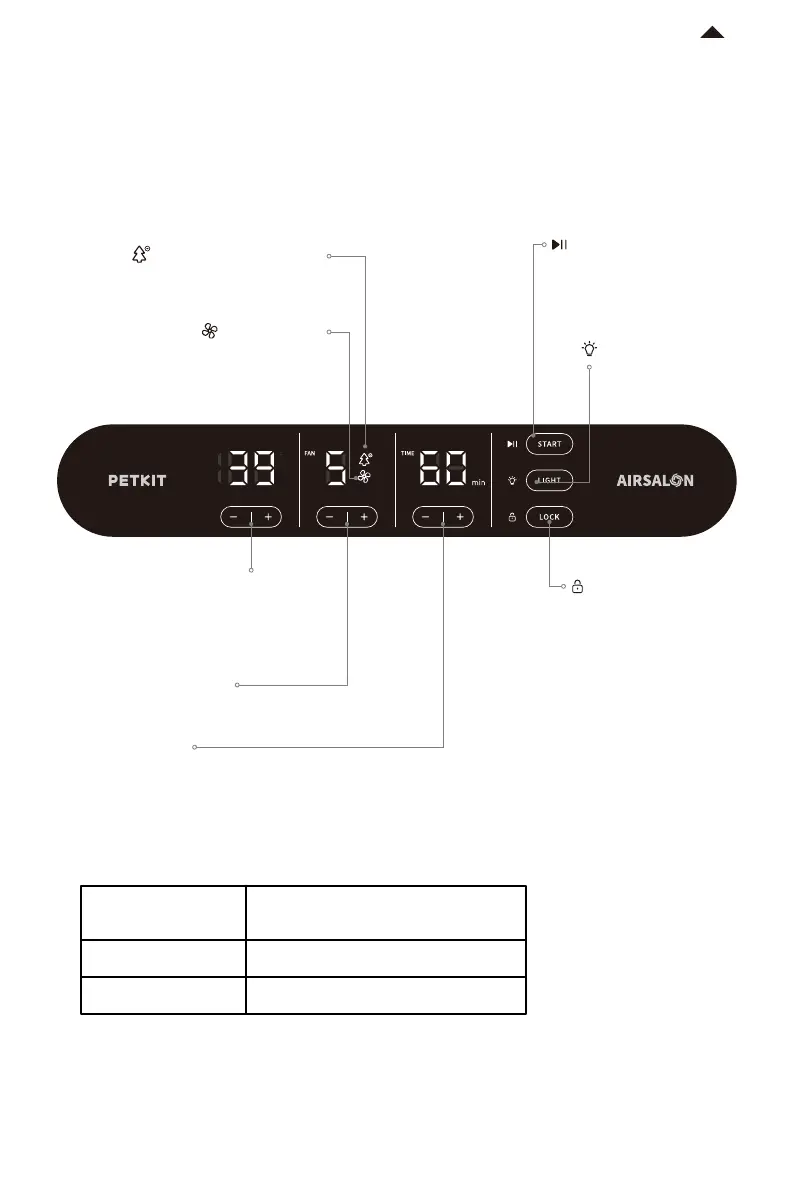
1. LED Control Panel
-9-
2. Drying Temperature Recommendation
* Above is the recommended temperature. Please select the temperature according to
the actual situation.
* When drying short nosed pets (Garfield, Pug, etc.), pay attention to lowering the t
emperature.
36°C~38°C
38°C~40°C
Room temperature above 24°C
Room temperature below 24°C
Recommended
temperature
Applicable condition
RETURN TO
CONTENT
Negative Ion Indicator
Light on: Activated
Light o: Not-activated
Start
Short press:
On (Green light lon)
Pause (White light on)
Long press: Stop Drying
(White light on)
Light
Single click:
On (Light on)
O (Light o)
Screen Lock
Double click:
Lock (Light on)
Unlock (Light o)
Temperature Setting
Single click +/-: Temperature between
36°C to 40°C (Please use PETKIT APP
to convert from Celsius to Fahrenheit
(°C to °F)
Fan speed Setting
Single click +/-: Adjust among 6 levels
Time Setting
Single click +/-: Increase/decrease 1 minute each time
Keep pressing +/-: Continuously increase/decrease the time in 5-minute increments.
Fan Indicator
Light on: Activated
Light o: Not-activated




 To Next Page