EasyManua.ls Logo

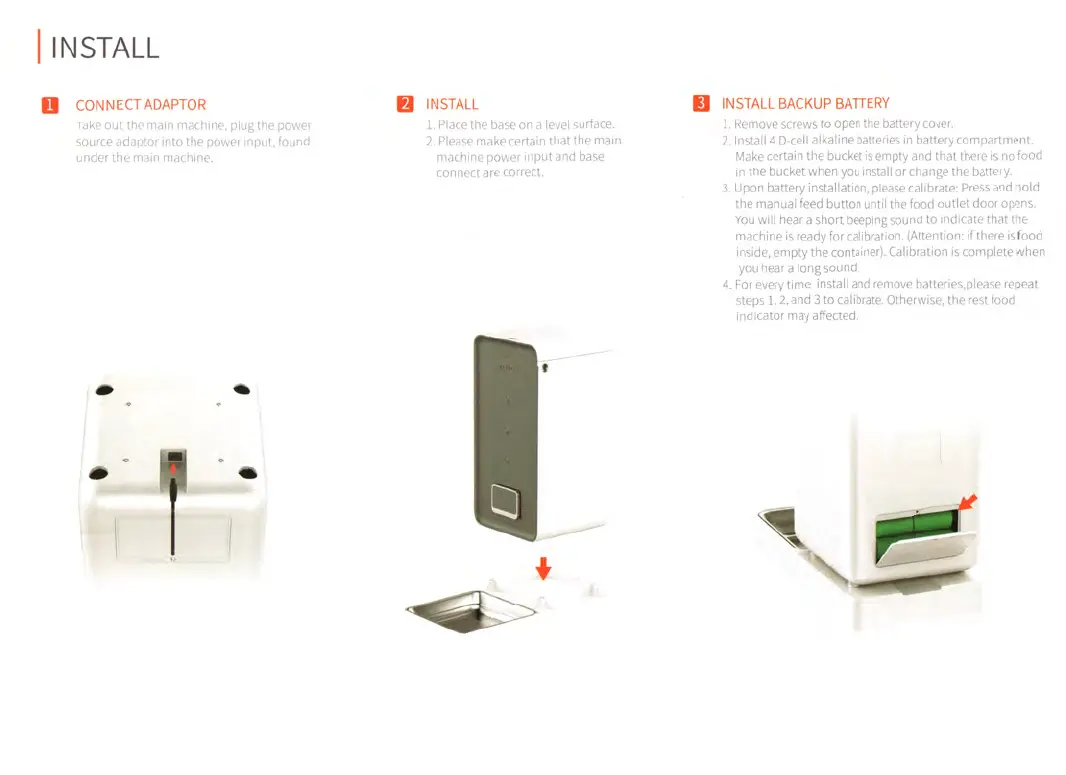
PETKIT FRESH ELEMENT - Installation Guide; Connect Adaptor; Base and Machine Installation; Install Backup Battery and Calibrate

PETKIT FRESH ELEMENT
7 pages
Print Icon
To Next Page IconTo Next Page
To Previous Page IconTo Previous Page
Loading...
I
INSTALL
13
CONNECT
ADAPTOR
IA
INSTALL
Take
out
the
main
machine,
plug
the
power
source
adaptor
into
the
power
input,
found
under
the
main
machine.
1.
Place
the
base
on
a
level
surface.
2.
Please
make
certain
that
the
main
machine
power
input
and
base
connect
are
correct.
Ii
INSTALL
BACKUP
BATTERY
1.
Remove
screws
to
open
the
battery
cover.
2.
Install
4
D
-cell
alkaline
batteries
in
battery
compartment.
Make
certain
the
bucket
is
empty
and
that
there
is
nofood
in
the
bucket
when
you
install
or
change
the
battery.
3.
Upon
battery
installation,
please
calibrate:
Press
and
hold
the
manual
feed
button
until
the
food
outlet
door
opens.
You
will
hear
a
short
beeping
sound
to
indicate
that
the
machine
is
ready
for
calibration.
(Attention:
if
there
isfood
inside,
empty
the
container).
Calibration
is
complete
when
you
hear
a
long
sound.
4.
For
every
time
install
and
remove
batteries,please
repeat
steps
1,
2,
and
3
to
calibrate.
Otherwise,
the
rest
food
indicator
may
affected.

Related product manuals