EasyManua.ls Logo

PETKIT FRESH ELEMENT - How to Use the Feeder; Fill with Food; Manual Feed Operation; Smart Plan Feed Setup

PETKIT FRESH ELEMENT
7 pages
Print Icon
To Next Page IconTo Next Page
To Previous Page IconTo Previous Page
Loading...
I
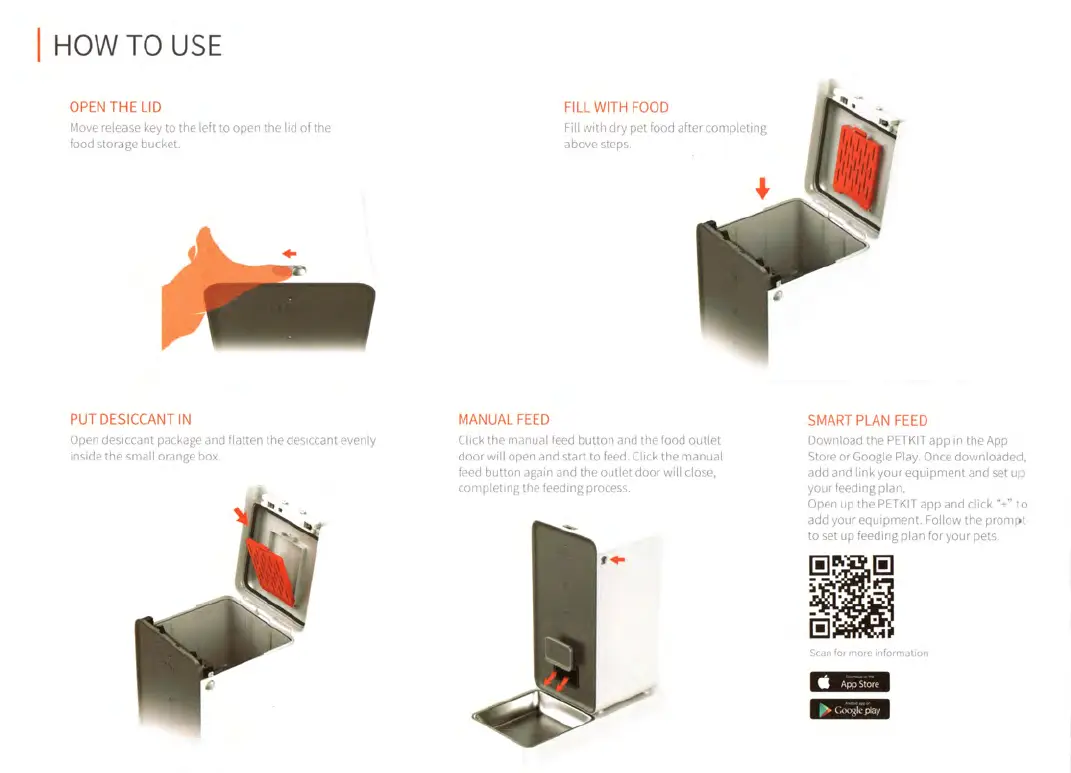
HOW
TO
USE
OPEN
THE
LID
Move
release
key
to
the
left
to
open
the
lid
of
the
food
storage
bucket.
Othi
PUT
DESICCANT
IN
Open
desiccant
package
and
flatten
the
desiccant
evenly
inside
the
small
orange
box.
FILL
WITH
FOOD
Fill
with
dry
pet
food
after
completing
above
steps.
MANUAL
FEED
Click
the
manual
feed
button
and
the
food
outlet
door
will
open
and
start
to
feed.
Click
the
manual
feed
button
again
and
the
outlet
door
will
close,
completing
the
feeding
process.
SMART
PLAN
FEED
Download
the
PETKIT
app
in
the
App
Store
or
Google
Play.
Once
downloaded,
add
and
link
your
equipment
and
set
up
your
feeding
plan.
Open
up
the
PETKIT
app
and
click
"+"
to
add
your
equipment.
Follow
the
prompt
to
set
up
feeding
plan
for
your
pets.
App
Store
Gooslcplay

Related product manuals