6
© Pfaudler GmbH
Corrosion Detector Portable CDP EXProof
4.8 Operating concept
4.9 Start-up
Check the safety provisions and read
the operating instructions completely
before you switch on the CDP. Press the
ON key to switch on the device.
When starting up the unit for the first
time, you are requested to enter the
language, date/time and the new owner.
The owner’s name can be changed
whenever necessary in the SETUP
menu, refer to Section 4.10.5 Owner
Please observe the limits of application
in Section 4.6.
Fill the reactor with water and set the
conductivity value to 1 mS by adding
various chemicals specified in the
device; use the conductivity calculator
for this purpose. Select material and
reactor volume, the quantity of material
is displayed automatically (refer to
Section 4.10.3 Conductivity calculator).
Then switch on the agitator briefly
to mix the reactor content; switch the
agitator off again. Enter yourself as user
in the main menu (refer to Section 4.10.1
User). Immerse the probe in the reactor
content and fix it. Connect the ground-
ing clamp to the reactor’s equalization
strip (refer to Figure 3 Reactor with
CDP) and start the test (refer to Section
4.10.2).
After the test, additional information may
be entered under Note (refer to Section
4.10.4 Archive).
The test results are saved and managed
in the archive. With the aid of the sup-
plied software, the stored data can
be edited and archived conveniently
at the PC (refer to Section 4.12)
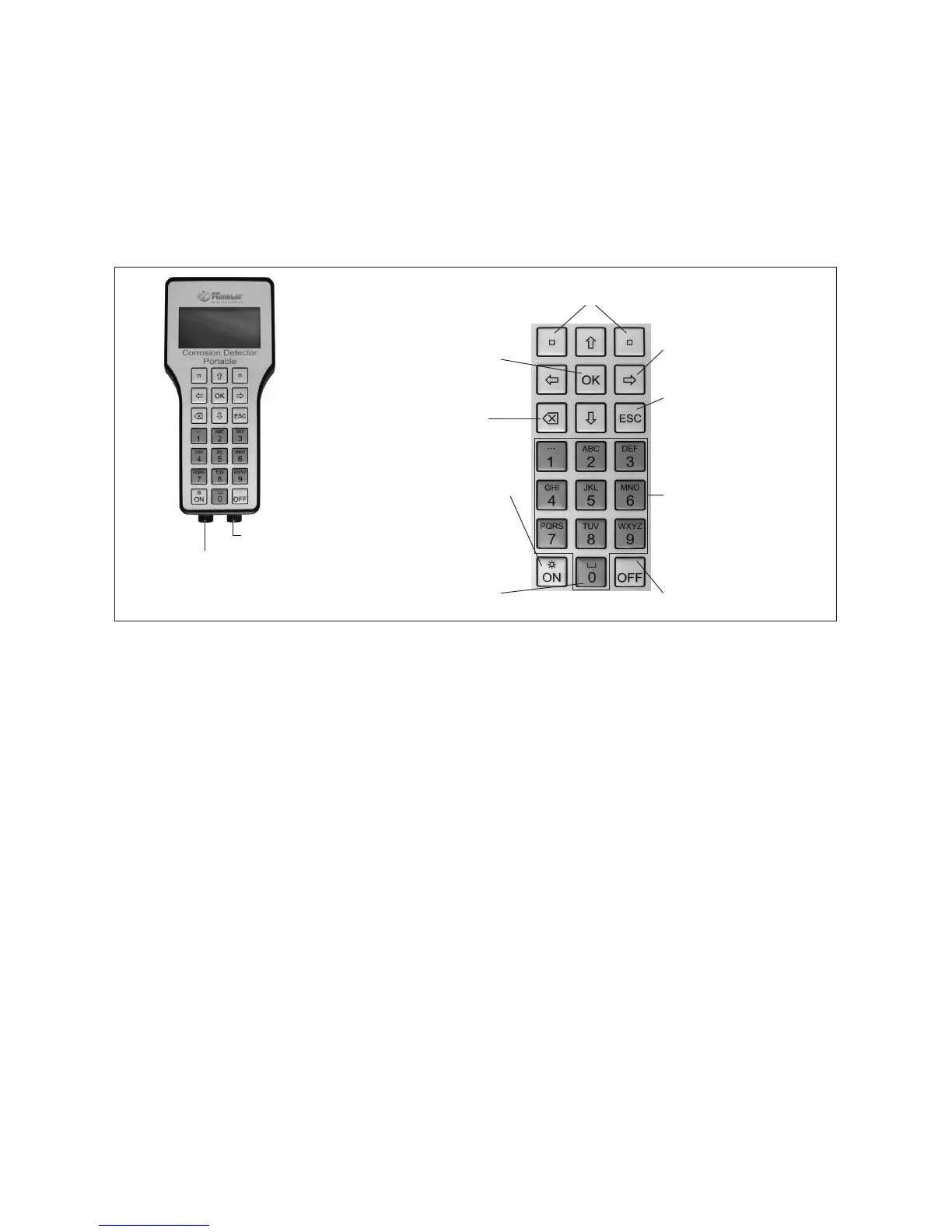
Fig. 2 Connection and keyboard
Immersion probe (red)
The sockets and connectors
are marked by different colors
Grounding clamp
(green)
The respective softkey function
is shown in the display
Arrow or cursor keys are
used to move the cursor
OK is used to select
menu items or
conrm entries
Key to delete
incorrect entries
ON is used to switch
on the device or activate
the display illumination
The 0 key is used
to show measured values
or as space bar
when making entries
ESC is used to abort an action
or return to the main menu
step by step
Keys for entering numbers
or letters
OFF is used to switch
off the device



 To Next Page