Operating Instructions Contador
Page 26 of 40 Revision 6 © 2019 – Pfeuffer GmbH
Use the arrow buttons or. to set the desired parameter.
To exit the setting mode, press the button . Your settings are accepted. The input field is not
flashing any longer.
7.5.1 Menu structure
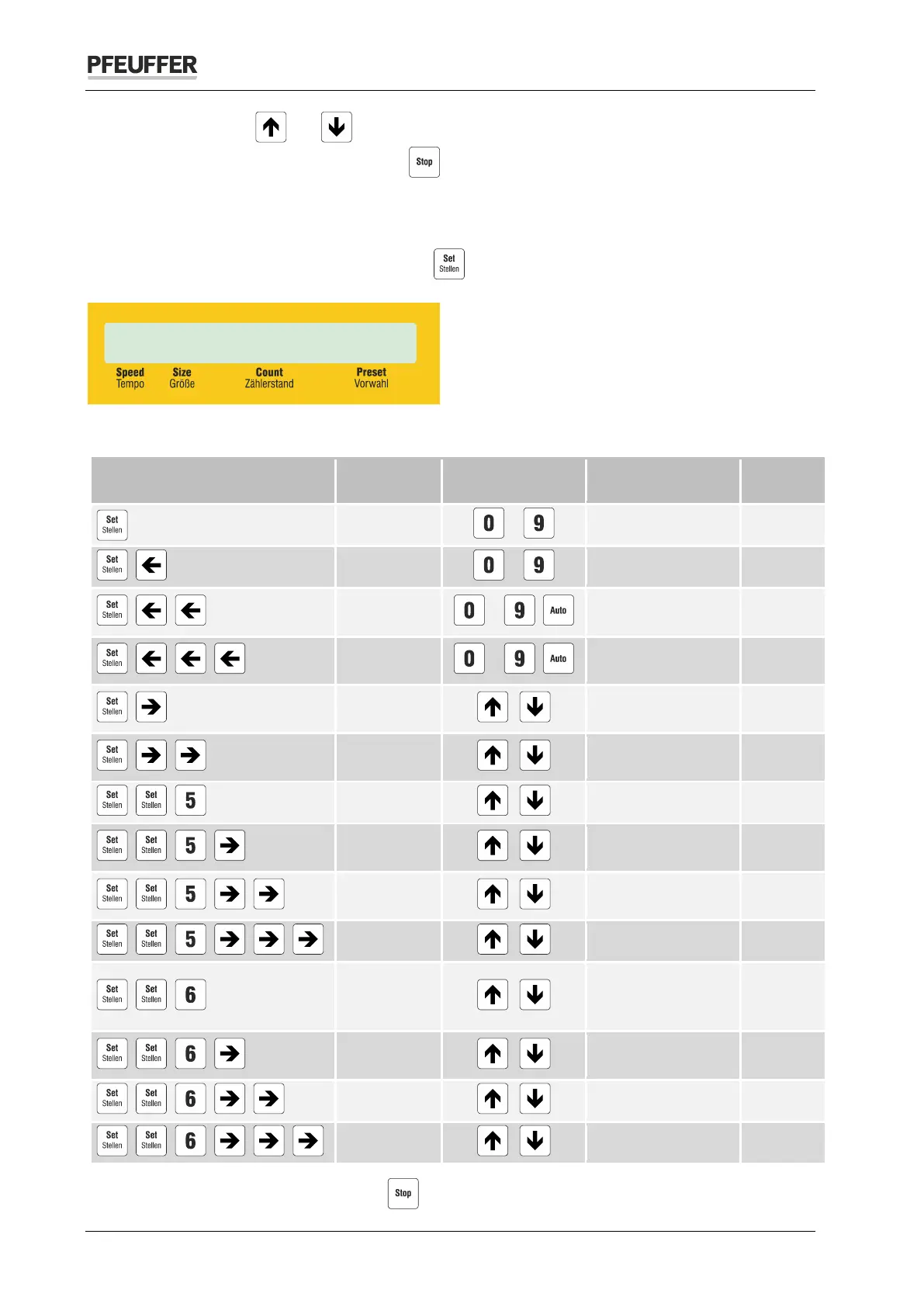
The setting mode is switched on with the button . The field for the preset starts to flash:
You can access the input fields by means of the specified keyboard combinations:
Keyboard combinations Parameters
Possible settings
Preset
1 ... 99950 0
Count
0 ... 99950 0
+ +
Size
… ,
3 ... 150 or # for
automatic mode
#
+ + +
Speed
… ,
0 ... 99 or # for
automatic mode
#
+
single, sum, subtract
single
+ +
Yes, No Yes
Peeper
Yes, No Yes
+ + +
Language
English
+ + + +
Turn-table
1 cycle
Bag-preset
0 … 9999 9999
+ +
Baudrate
2400, 4800,
9600
+ + +
Parity
none
Data-bits
7, 8 8
Stop-bits
1, 2 1
To exit the setting mode, press the button .


 To Next Page