27
Phantom Flex Manual
26
Phantom Flex Manual
The LIVE PRE, (live image preview), mode is the operational state the camera
will be in when it is first powered up. The camera will display a live image
on the monitor or viewfinder screen, but is not yet recording any image data
or frames to the camera memory buffer or Phantom CineMag.
In this state, the user can:
•
View a live image to focus on the subject.
•
Zoom in to 1:1 pixel view to assist in focus.
•
Define the recording parameters.
•
Determine if any image area is over exposed.
•
Examine the recording duration time and the number of frames
that will be recorded within the recording time frame.
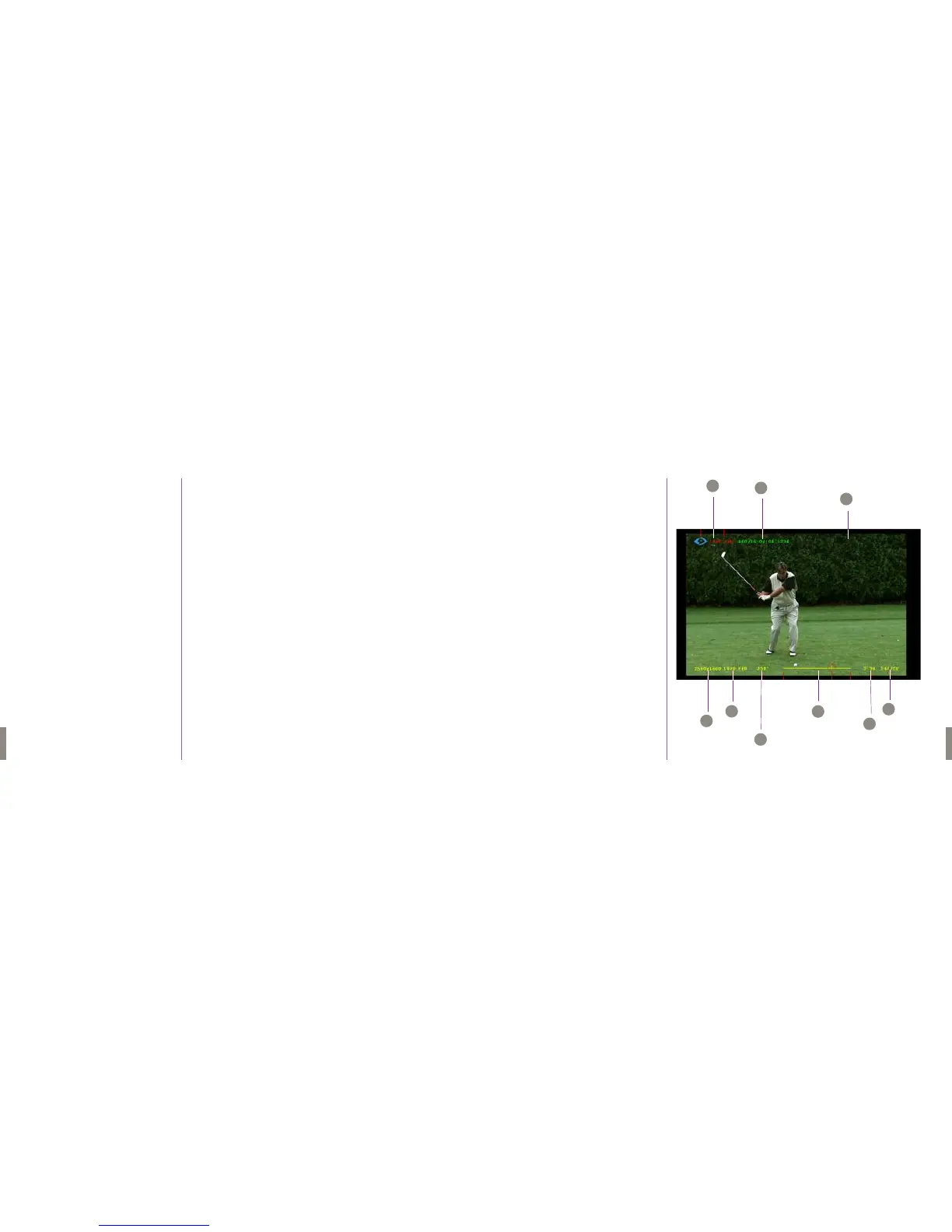
LIVE Display Screens
LIVE
A Camera State Designators
B Time Indicator
C w/ PHANTOM CINEMAG
Phantom CineMag State Indicator
Number of Tak es
Memory Usage/Size
D Resolution
E Sample Rate
F Shutter Angle
G Memory Buffer Graphical
Representation
H Maximum RecordingTime
I Maximum Recording Frames
A
B
C
D
E
F
G
H
I
On-Screen Display


 To Next Page