29
Phantom Flex Manual
28
Phantom Flex Manual
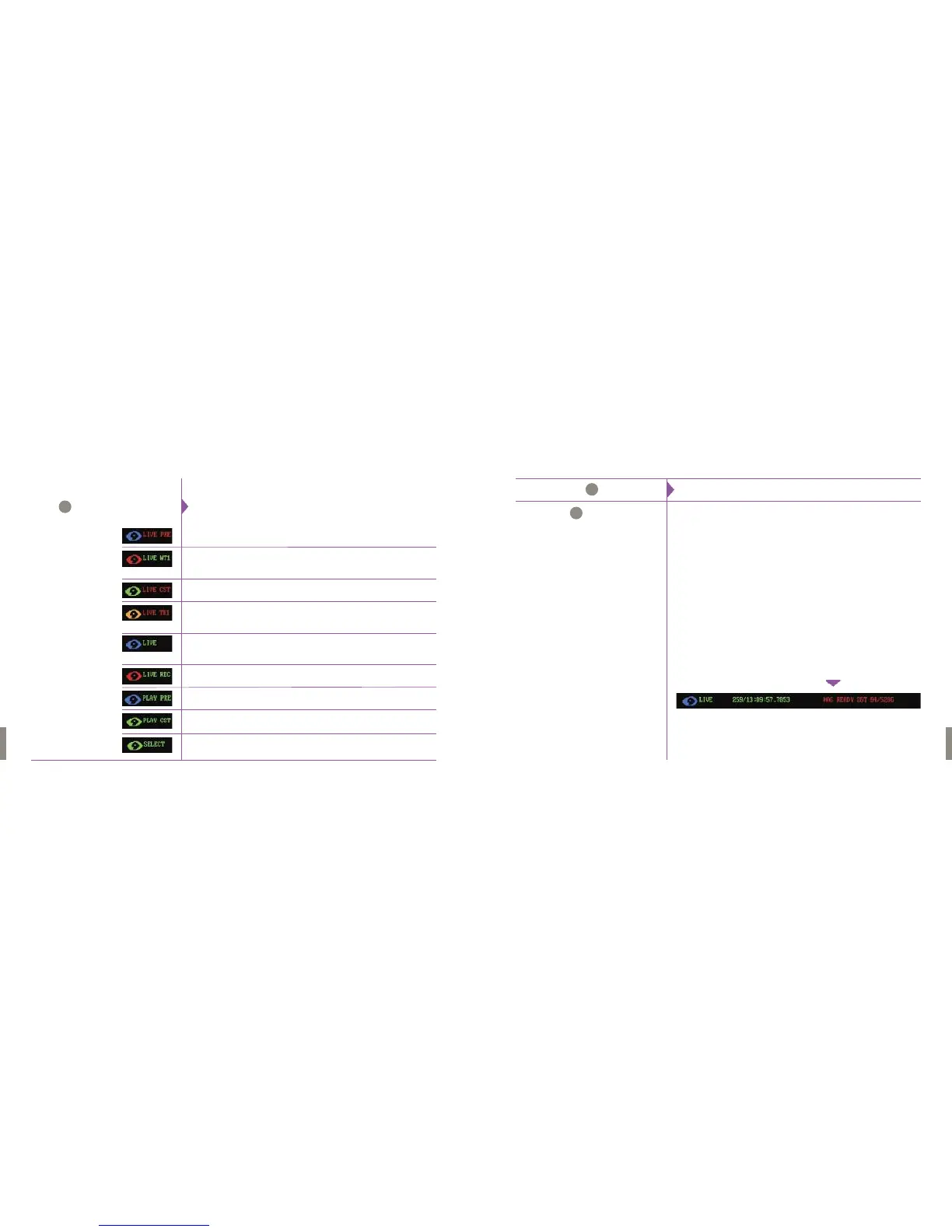
Time Indicator
Phantom CineMag
Status Indicator
TheTime indicator indicates; day number/hour:minute:second:microsecond.
The CineMag Status Indicator shows the operation state of the camera.
Various state designators include:
Mag Off
Indicates the Phantom CineMag is presently in the Off state.
A Phantom CineMag will remain in the Off state until it initiates its power
up diagnostic routine.
MagInit
Indicates the Phantom CineMag has been detected either during camera
power-up, or when a Phantom CineMag has been inserted onto the
camera.
MagScan
Indicates that the Phantom CineMag is running through it’s power-up,
self-diagnostics routines.
Mag Ready
It indicates that the Phantom CineMag has passed its power-up,
self-diagnostics routines and is ready to record a cine.
B
C
Below is a brief description of the information that could be displayed
in the display screen:
The color of the Phantom logo will change based on the state of the camera.
LIVE PRE: In this state the camera is in LOOP mode and will display
a live image from the video output. The camera is not recording.
LIVE WT1: The camera is in LOOP mode and will display a live image from
the video output. The camera is currently recording to RAM and
awaiting a trigger signal.
LIVE CST: The camera is in LOOP mode and will display a live image from
the video output: there is a clip stored in the RAM.
LIVE TR1: The camera is in LOOP mode and recording to the RAM.
It has received a trigger signal is currently recording the
post trigger frames.
LIVE: The camera is in R/S mode and will display a live image from
the video output. The logo will be green if there is a clip stored
in RAM, and blue if not.
LIVE REC: The camera is in R/S mode and will display a live image from the
video output. If attached, it is recording to the cinemag.
PLAY PRE: The camera is in playback mode and there are no clips stored
in RAM.
PLAY CST: The camera is in PLAYBACK mode and there is a clip
stored in RAM.
SELECT: The camera is in PLAYBACK mode and a clip can be selected
to playback.The logo will be green if there is a clip stored in RAM,
and blue if not.
Camera State Designator
Display Fields
A


 To Next Page