Vision Research, Inc. | Phantom Ultrahigh-Speed Camera Manual
SIGNAL ASSIGNMENTS
PCC INTERFACE
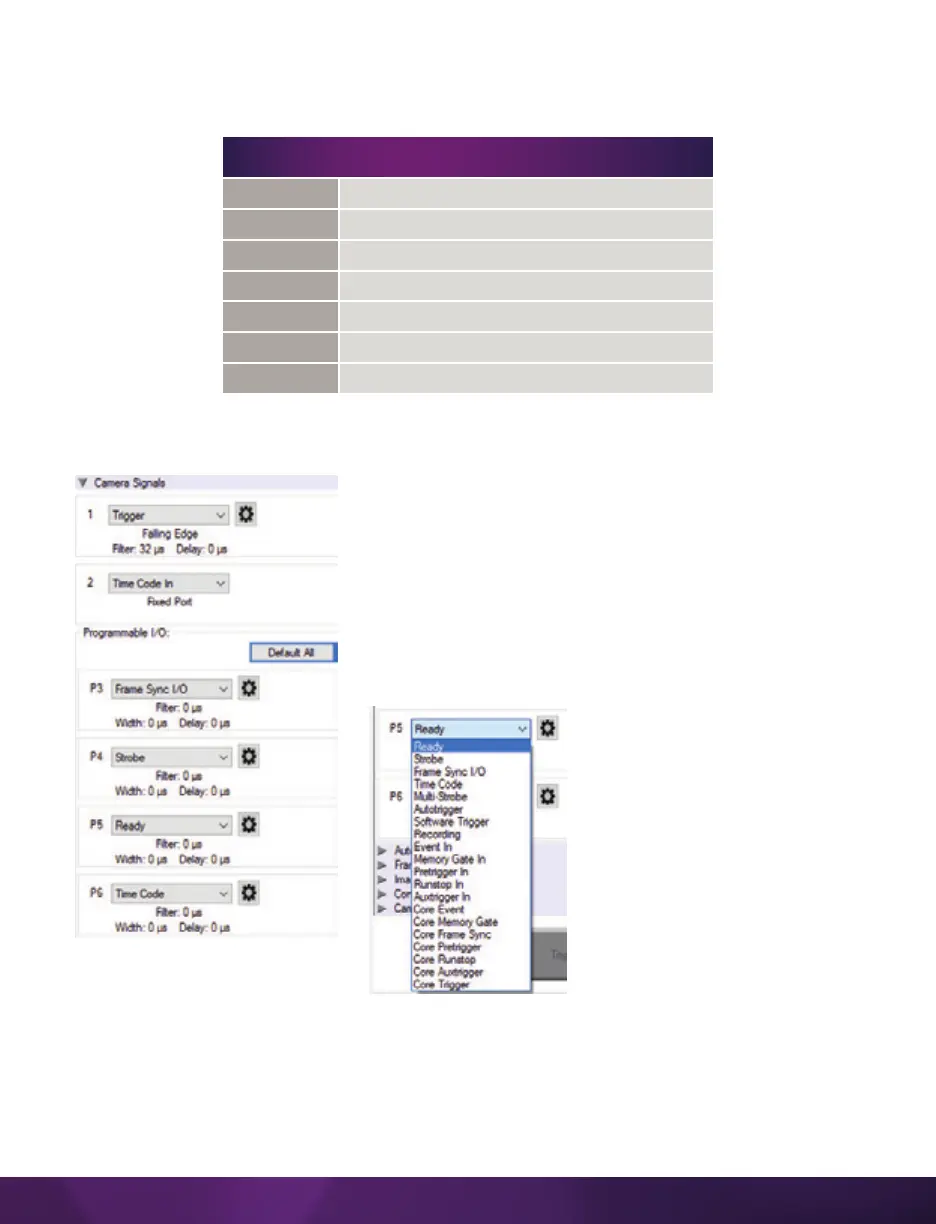
The ‘Camera Signals’ menu, located in the ‘Live’
tab, provides access to and control over these
Programmable I/O signals. All listed signals are
not active, including ‘Runstop’ and ‘Mstrobe.’
A summary of the current signal settings is found
under the pull-down menu associated with each port.
By clicking ‘Default All,’ PCC will reassign the factory-
assigned defaults for the Programmable I/O signals.
PULSE PROCESSOR CONTROL
After selecting the signal assignment, further configuration is possible by clicking
the gear symbol next to each port. The ‘Pulse Control’ menu is opened, as shown on
the next page.
SIGNAL ASSIGNMENT
Port 1
Trigger (fixed)
Port 2
Timecode-in (fixed)
Port 3 (P3)
Prog I/O-Default F-Sync
Port 4 (P4)
Prog I/O-Default Strobe
Port 5 (P5)
Prog I/O-Default Ready
Port 6 (P6)
Prog I/O Default Timecode-out
Range Data
Yes, dedicated Fischer port



 To Next Page