EasyManua.ls Logo

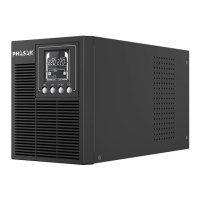
Phasak PH 7266 - User Manual

Default Icon
28 pages
Go to English
Print Icon
To Next Page IconTo Next Page
Loading...
Sistema de Alimentación Ininterrumpida
Sistema de Alimentação Ininterrupta
Uninterruptible Power Supply
Manual de uso | Manual de utilização | User Manual
ES
PT
EN
Seguridad y armonía
ININTERRUMPIDA
SAI ONLINE
VA
1060
880
© 2017. PHASAK
UPS ONLINE
ONLINE UPS
PH 7266 | PH 7288 | PH 7210
660

Questions and Answers

  • M
    Matthew DelgadoAug 11, 2025
    What to do if outlets do not provide power to equipment connected to Phasak UPS?
    • T
      Thomas ThorntonAug 11, 2025
      If the outlets on your Phasak UPS aren't providing power, it could be due to a tripped circuit breaker from an overload. To resolve this, turn off the UPS, unplug one or more connected devices, and unplug the UPS power cord. Then, press the circuit breaker knob. Another cause may be discharged batteries. In this case, allow the unit to recharge for at least 4 hours.
  • Q
    qcopelandAug 22, 2025
    Why Phasak PH 7266 UPS doesn’t turn on?
    • G
      Gregory BrockAug 22, 2025
      If your Phasak UPS doesn't turn on, first turn the UPS off, wait 10 seconds, and then turn it back on. The on/off switch is designed this way to prevent damage from rapidly turning it off and on. Also, ensure the UPS is connected to a 120Vac 50/60Hz outlet.
  • Z
    Zachary RollinsAug 30, 2025
    How to fix Phasak PH 7266 when it does not perform expected runtime?
    • K
      Kristina MercadoAug 30, 2025
      If your Phasak UPS isn't providing the expected runtime, it might be because the batteries are not fully charged. Recharge the battery by leaving the UPS plugged in.

Phasak PH 7266 Specifications

General IconGeneral
BrandPhasak
ModelPH 7266
CategoryUPS
LanguageEnglish

Related product manuals