Place on a flat Surface
Place the sound bar horizontally on a flat surface such as a TV unit or shelves and align it centrally
with the TV screen. Allow some space between the speaker and the wall. Don’t place inside a
cabinet or an a walled shelf. Follow this guidance for best sound output and good airflow around the
sound bar.
Positioning the Sound Bar
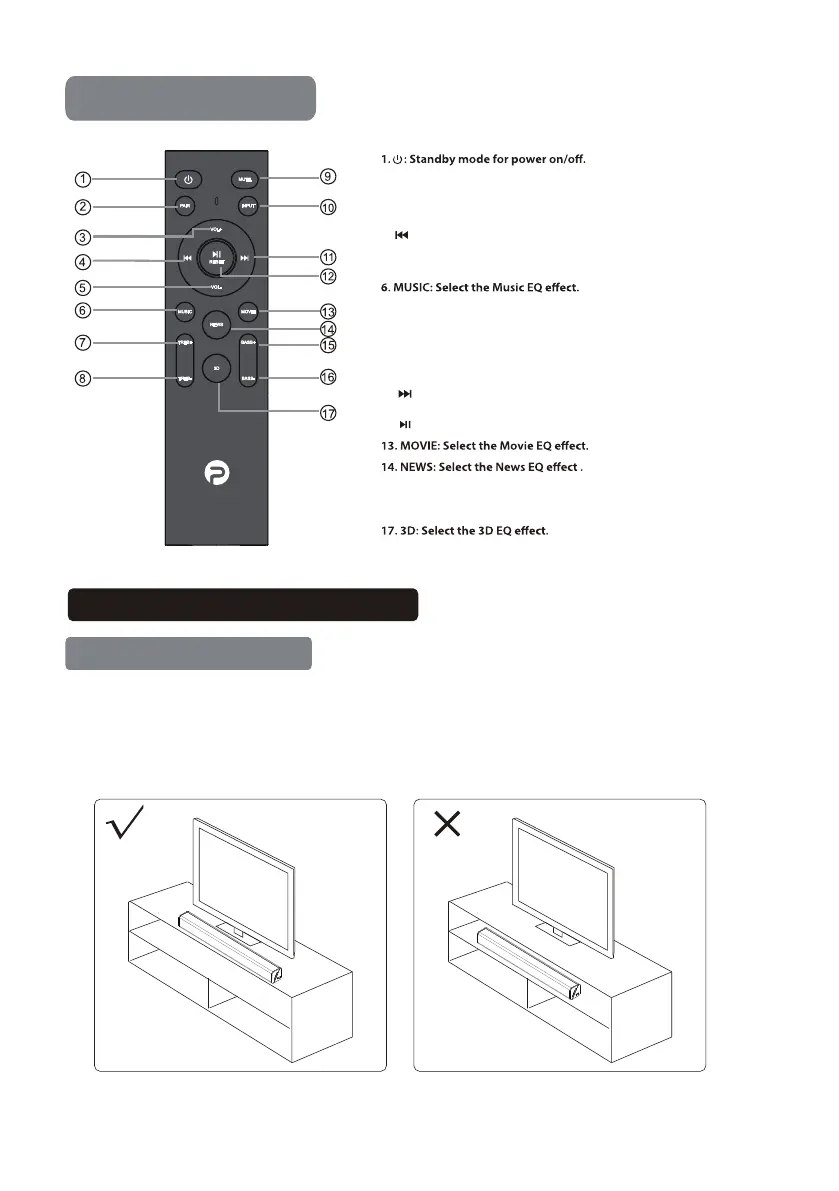
Remote Control
Remote Control
2. PAIR: Connect or disconnect to the pairing device.
(Press the button more than 2 seconds).
3. Volume+: Master volume up
4. : Pre button: Previous program (Only work under USB & BT mode
of smartphone).
(Only work under USB & BT mode of smartphone).
5. Volume - : Master volume down
7. TR+: Treble volume up.
8. TR-: Treble volume down.
9.MUTE: Mute mode.
10.INPUT: Input mode(AUX/USB/HDMI TV(ARC)/OPT/BT
11. : Next button: Next program. (Only work under USB & BT mode of
smartphone).
12. : Play/Pause
15. Bass +
16. Bass -
10.INPUT: Input mode(AUX/USB/HDMI TV(ARC)/OPT/BT).
11. : Next button: Next program. (Only work under USB and BT mode).
12. : Play/Pause (Only work under USB and BT mode).


 To Next Page