EasyManua.ls Logo

Philco 116 - Before Operating; OPERATING INSTRUCTIONS; Starting Operation; Selecting the Wave Band

Philco 116
8 pages
Print Icon
To Next Page IconTo Next Page
To Previous Page IconTo Previous Page
Loading...
PHILCO
M 0
DEL
16
INSTRUCTIONS
Before
Operating
Locate
the
radio
at
a suitable place in the
room
, w
ith
due
con
sideration to co
n-
venience
of
o
peration
, appearance, tone,
and
handy
connection to
the
aeria
l t
ermi
nals
and
an
electric supply outlet. For b
est
tone,
th
e set sho
uld
be a sho
rt
di
st
ance
from
the wall.
Re
mo
ve all
cardb
o
ard
p
ac
king
mat
erial,
pa
c
king
ta
gs, etc.,
fr
om the c
has
sis.
Plac
e
the knobs
(furni
shed in the envelope with
th
es
e ins
truction
s) on
th
e co
ntro
l s
hafts.
Note
that
the
"Stati
on Sel
ec
tor"
and
"Slow-speed
Tuning"
knobs
(see
c
ut)
are
different
from
the o
ther
s.
The
fo
rmer
goes
on
the
thick
(rear)
po
rtion
of
the
tuning
shaft
and
the
latter
on
th
e
thin
porti
on.
Push
knobs
(except
the
Slow-speed
Tuning
Knob)
on
to
within
about
ilr inch
of
the
face
of
the
panel.
Insert
the
electric plug into
the
nearest
electric supply outlet.
Be
sure
the
c
ur
r
ent
is
of
the
co
rr
ect vo
lta
ge
and
fr
e
qu
en
cy
(cy
cles), as called for on
the
namep
l
ate
on chassis.
OPERATING INSTRUCTIONS
'Starting
Operation
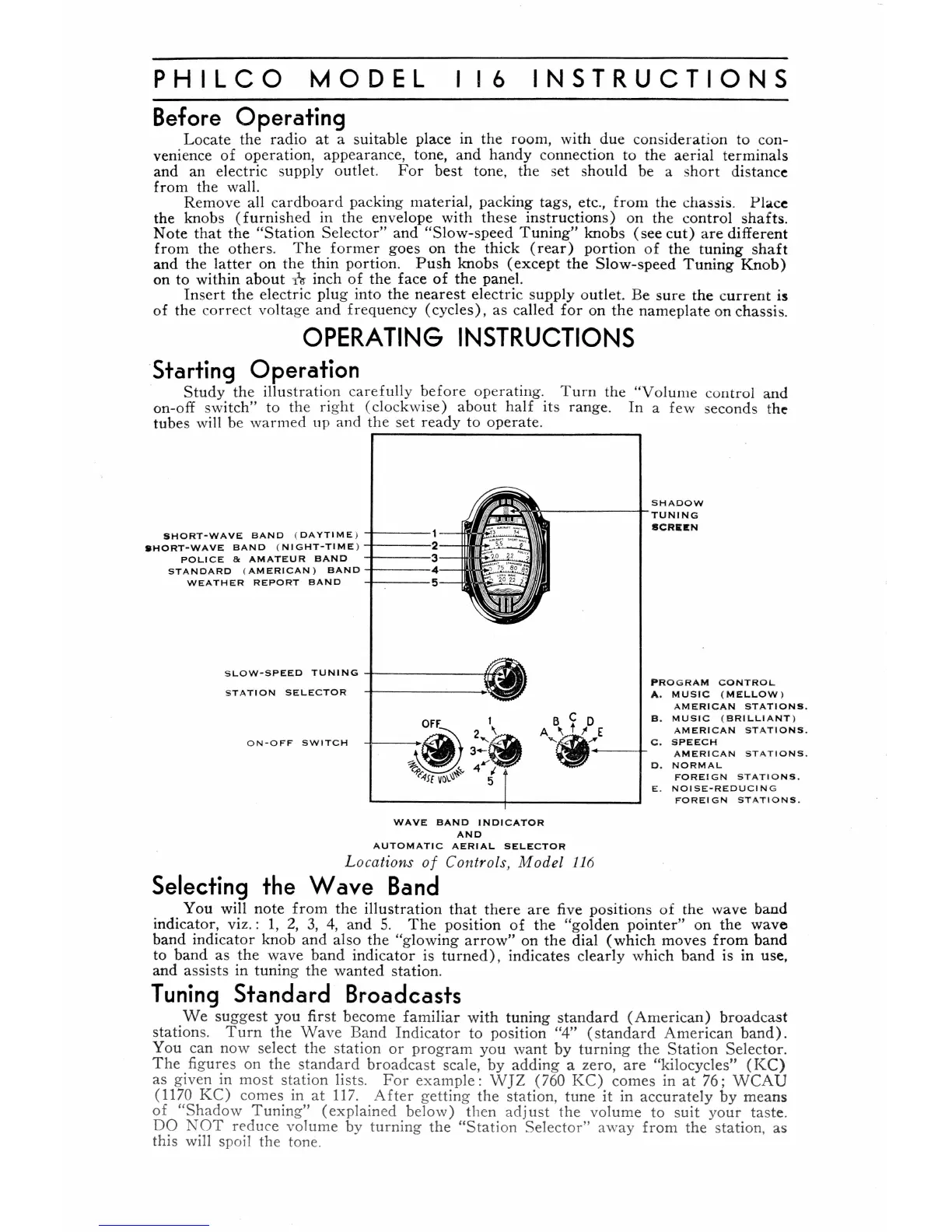
Stud
y
th
e illu
str
ation ca
ref
ully
befo
re operating. Tu
rn
the
"Vo
lume control a
nd
on-o
ff
sw
it
ch" to the rig
ht
(clockwise) abo
ut
hal
f
it
s ra
nge
.
In
a
few
seconds t
he
tubes will be warmed up and
th
e
set
ready
to o
perate
.
SHORT
~
WAVE
BAND
(
DAYT
IM
E ) +
--
--
1
SHORT-WAVE
BAND
(
NI
G
HT-TIME
}
...J..
--
--
2-
-
POLI
CE
Be
AMATEUR
BAND
S T
ANDAR
D (
AMERICAN
)
BAND
-f---
-
·4-
-
WEATHER
REPORT
BAND
S
LO
W -
SPEED
TUNING
...J-
-
---
--
-1/,
~
S
TATION
SELE
C
TOR
O
N-
O
FF
S W I
TCH
WAVE
BAND
INDI
C
ATOR
AND
A
UT
O
MATI
C
AER
IAL
SELECTOR
L oc
ati
on
s of Con
tr
ois, M
ode
l
11
6
Selecting
the
Wave
Band
PRO
G
RAM
C
ON
TR
OL.
A.
MU
SI C (
MELLOW
)
AMERI
C
AN
ST
ATIO
NS
.
B.
MUS
IC (
BRILLIANT
)
AMERI
C
AN
S
TA
TIO
NS.
0 .
NORMA
L
F
OREI
G N S
TA
TI
O
NS.
E.
N O I
SE-R
E
DUCI
N G
F'
ORE
I G N
STAT
I O
NS
.
You will
not
e from
th
e
illustr
ati
on
th
at
ther
e
ar
e five positions
of
th
e wave
ba
nd
indic
at
or, vi
z.:
1,
2,
3,
4,
a
nd
S.
Th
e p
os
ition
of
th
e
"go
lden
po
int
er" on the
wa
ve
band
indicat
or
knob
and
also
th
e
"g
l
ow
i
ng
ar
row"
on the dial (which m
oves
fr
om
band
to b
an
d as t
he
w
ave
band indic
at
or
is
turn
ed
),
indica
tes
cl
ear
ly which b
and
is in use,
and
assists in
tun
ing
th
e wanted s
tat
ion.
Tuning
Standard
Broadcasts
We su
gg
est
yo
u first become
fam
iliar w
ith
tunin
g st
andar
d
(American)
broad
c
as
t
stations.
Turn
the
Wave
Band
In
dicator to
pos
ition "
4"
(sta
nd
a
rd
American
band)
.
You can now sel
ect
th
e
sta
tion
or
program
yo
u
want
by
turn
ing
th
e
Stati
on
Selector.
Th
e figures
on
the
stan
d
ard
broadca
st scal
e,
by
adding
a zero,
are
"kilo
cycles"
(K
C)
as
given in
most
station
lists.
For
examp
le :
WJZ
(760
KC)
com
es
in
at
76;
WCA
U
(1170
KC)
comes
in
at
117
.
After
gett
ing
th
e
sta
tion,
tune
it
in accu
rately
by
me
ans
of
"Shadow
Tuning"
(explain
ed
below)
th
en
adj
u
st
the
volu
me
to
s
uit
yo
ur
tas
te
.
DO
NOT
r("duce volume by
turn
ing
the
"St
ation
Selecto
r"
away
from
the station, as
this will spoil the tone.

Related product manuals