10
How to Use the On Screen Display (OSD)
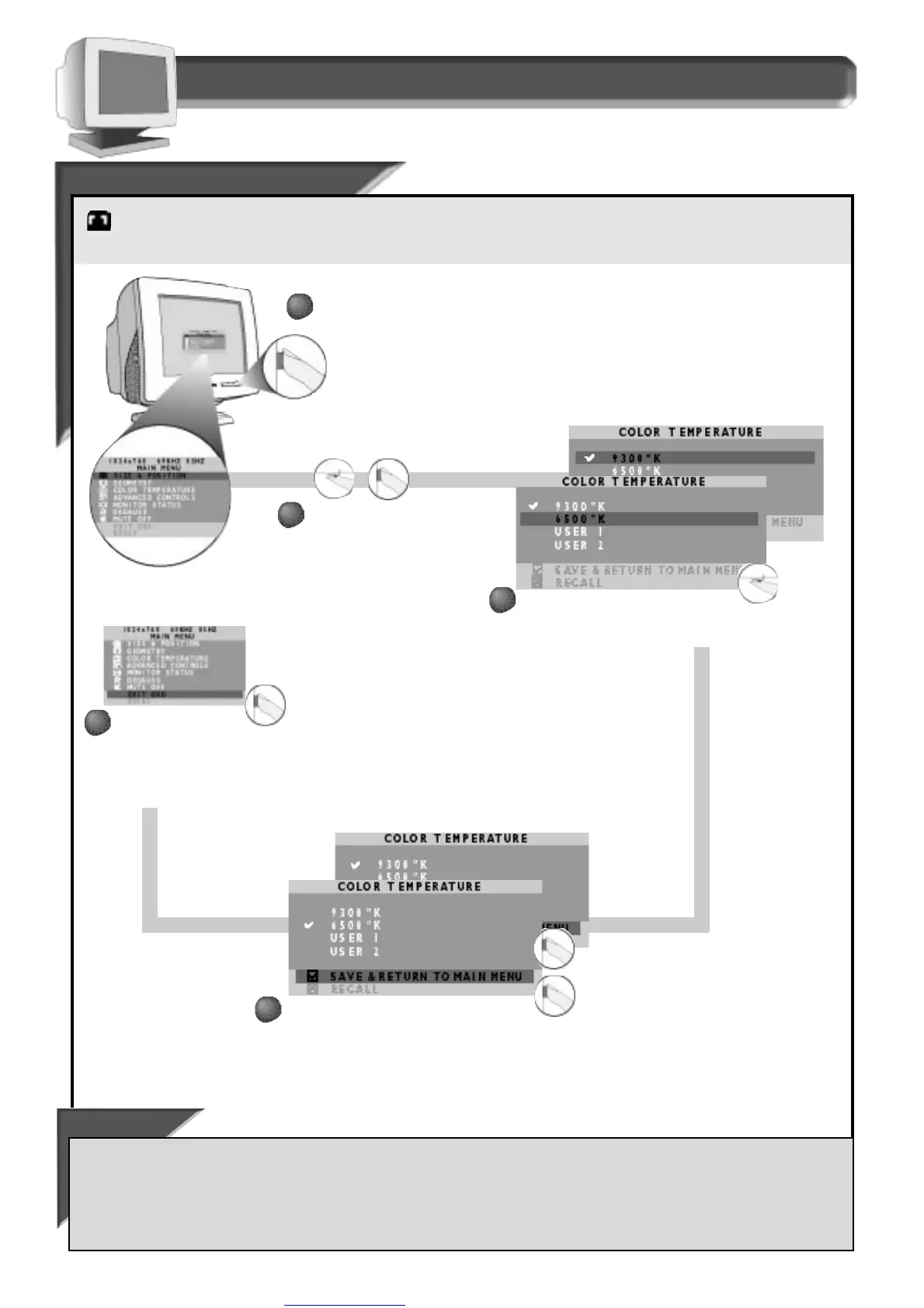
Color Temperature window
9300˚ K / 6500˚ K
9300˚ K / 6500˚ K
Your monitor has two preset options you select: 9300˚ K or 6500˚ K. Computer Aided Design (CAD) usually works best with the 9300˚ K setting.
Desktop Publishing (DTP) usually works best with the 6500˚ K setting. The screen will change as you scroll between these two settings. Select
the one that works best for you, or set up your own setting under U
SER 1 or USER 2 on the next page.
Smart Help
After returning to Main Menu . . .
. . . to continue to U
SER
1 or U
SER
2,
turn the ROTARY knob until COLOR TEMPERATURE is highlighted. Next, follow steps 2 - 7 under COLOR TEMPERATURE on the
next page.
. . . to select the other preset setting (9300˚ K or 6500˚ K),
press the OSD button and repeat steps 2 -5.
Press the ON SCREEN
DISPLAY button.
1
1
Turn the ROTARY knob
until the C
OLOR
TEMPERATURE window
is highlighted. Then
press the O
N SCREEN
DISPLAY button.
Press the ON SCREEN DISPLAY button. A
checkmark appears by your selection. Press the O
N SCREEN
DISPLAY button a second time to save your selection.
Turn the ROTARY knob until 9300˚ K or
6500˚ K is highlighted.
Note: a checkmark
appears beside the current selection.
2
2
3
3
4
4
After the preset setting
is saved, the on screen
display automatically
returns to the Main
Menu. To exit, press the O
N
SCREEN DISPLAY button.
5
5



 To Next Page