A
fter blocking specific channels there
may come a time when you want to
clear all the channels so they can be
viewed. The following steps explain
how to CLEAR ALL blocked channels.
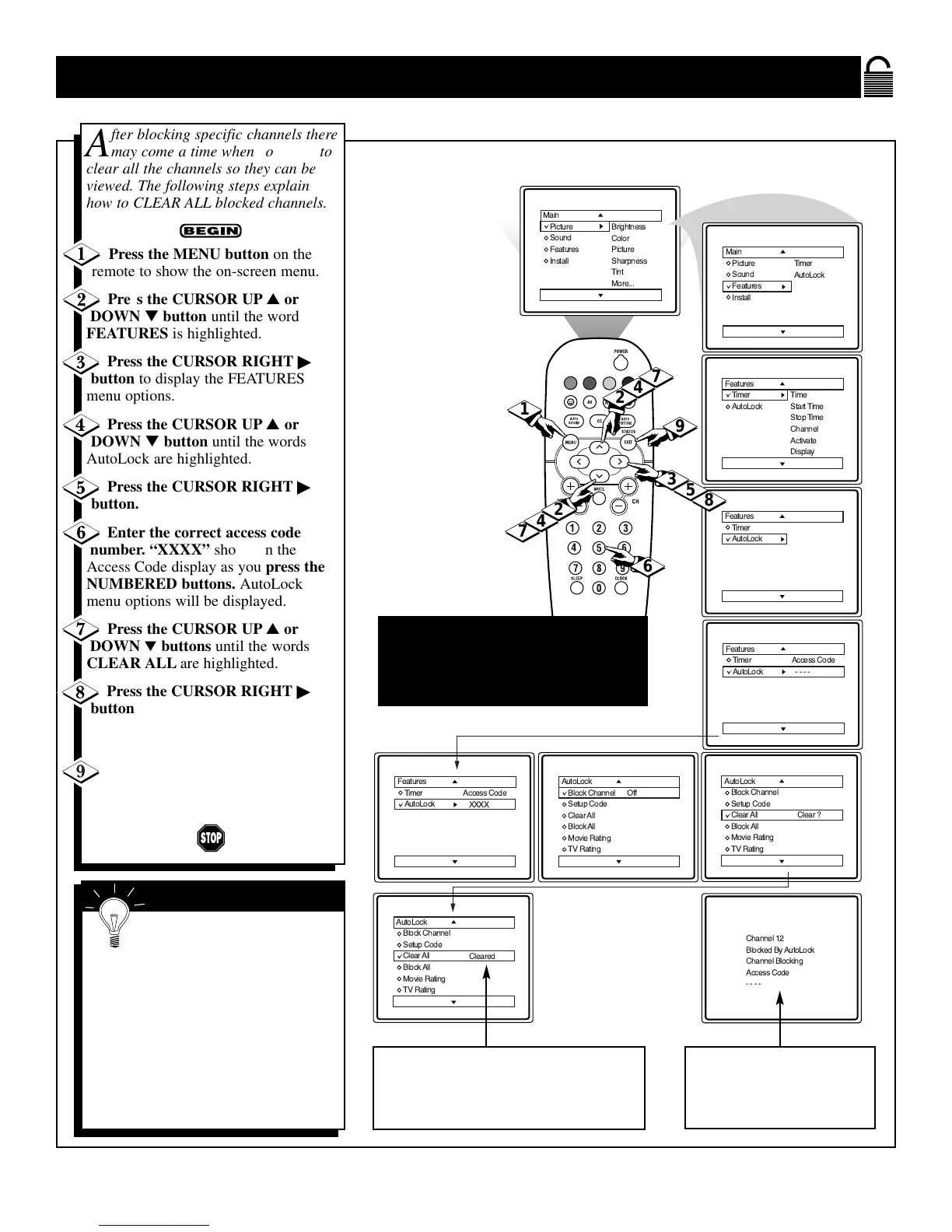
Press the MENU button on the
remote to show the on-screen menu.
Press the CURSOR UP ▲ or
DOWN ▼ button until the word
FEATURES is highlighted.
Press the CURSOR RIGHT ©
button to display the FEATURES
menu options.
Press the CURSOR UP ▲ or
DOWN ▼ button until the words
AutoLock are highlighted.
Press the CURSOR RIGHT ©
button.
Enter the correct access code
number. “XXXX” shows on the
Access Code display as you press the
NUMBERED buttons. AutoLock
menu options will be displayed.
Press the CURSOR UP ▲ or
DOWN ▼ buttons until the words
CLEAR ALL are highlighted.
Press the CURSOR RIGHT ©
button to clear all blocked channels.
The Clear All option will read,
“Cleared.”
When finished, press the STATUS
/EXIT button to remove the menu
from the TV’s screen.
NOTE: Remember, if you ever forget
your Access Code, the 0,7,1,1 access
code is the default code or a way to
reset the code when the current access
code is not known.
If you tune to a blocked chan-
nel and enter your Access Code
to view the channel, ALL blocked chan-
nels will be viewable until the TV is
powered OFf and then turned back ON.
When the TV is powered back ON, the
previously blocked channels will be
blocked again.
CLEAR ALL will not work with the
Movie and TV Ratings. These options
must be reset individually.
SMART HELP
The Clear All option when activated
will unblock ALL blocked channels. It
will not affect programming blocked
by the Movie or TV Rating options.
Or, enter your Access
Code to view a tuned
channel that is blocked
with Block Channel.







 To Next Page