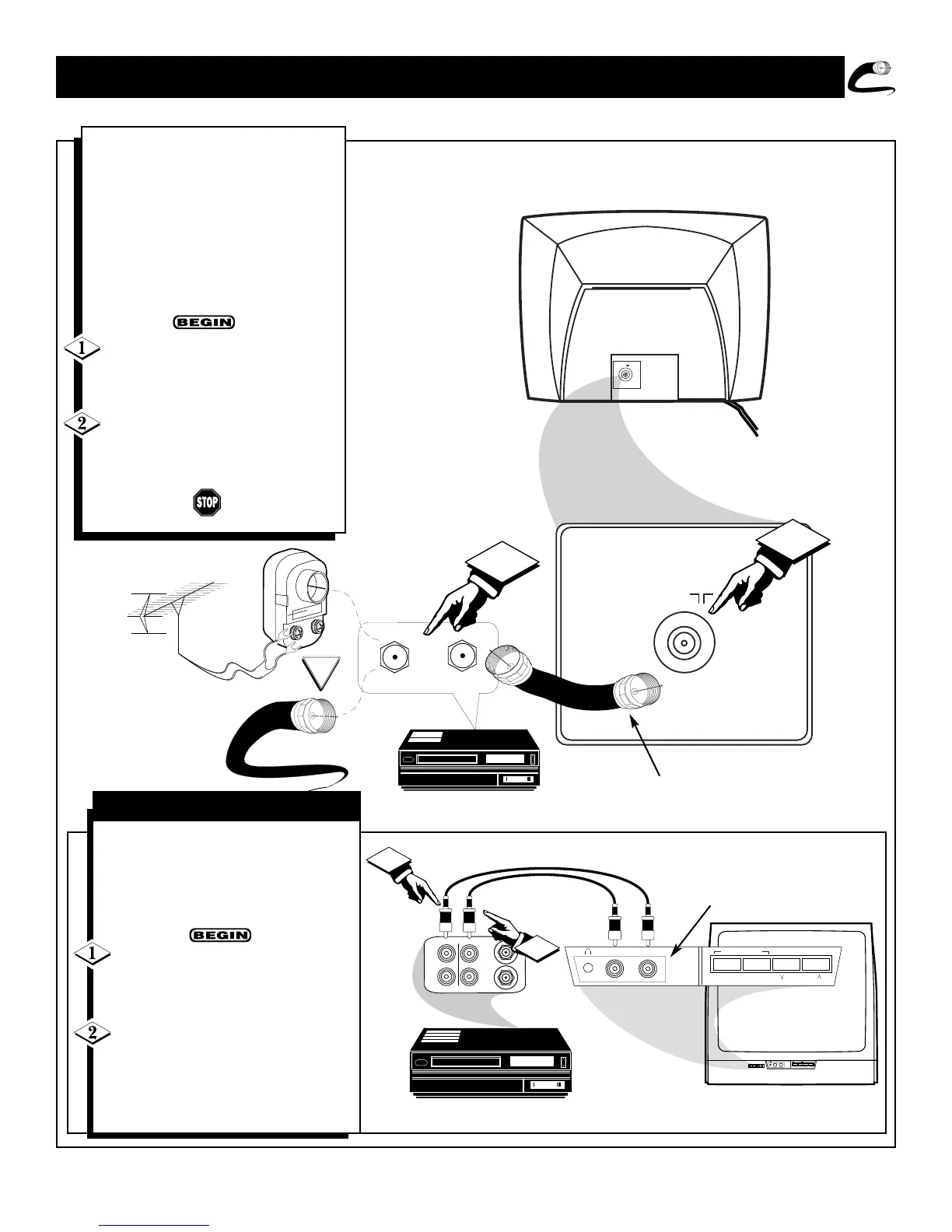
IN FROM ANT.
T
he basic Antenna, or Cable TV,
to VCR to TV connection is
shown to the right. For more infor-
mation on other hookups (possible
when Cable Converter/Descrambler
boxes are included) refer to your
accessory VCR and Cable
Converter Owner's Manual for
details.
Connect your Antenna or Cable
TV signal to the IN FROM
ANT(enna) plug on the VCR.
Connect the OUT TO TV plug on
the VCR to the 75Ω plug on the TV
(connecting cable supplied with the
VCR.)
Round Cable
75Ω Supplied with VCR
Outdoor
VHF/UHF
Antenna
300 to 75Ω
Ohm Adapter
Cable TV signal
Back of TV
A
udio and Video Front Mono inputs
are available for a quick connection
of a VCR or to playback video from a
camera. Use the AV button on the
remote to tune to the Front A/V Inputs.
Connect the yellow video cable from
the Video output on the VCR/Camera to
the Video input located on the FRONT of
the TV.
Connect the audio cables (red and
white) from the Audio outputs on the
VCR/Camera to the Audio input located on
the front of the TV. Note: The use of the
“Y” adapter will have to be used if the
VCR or Camera has stereo audio outputs.
VCR or accessory device
Front A/V Mono Input Jacks
Video Cable
Audio Cable
Front of TV
FRONT A/V INPUTS







 To Next Page