30
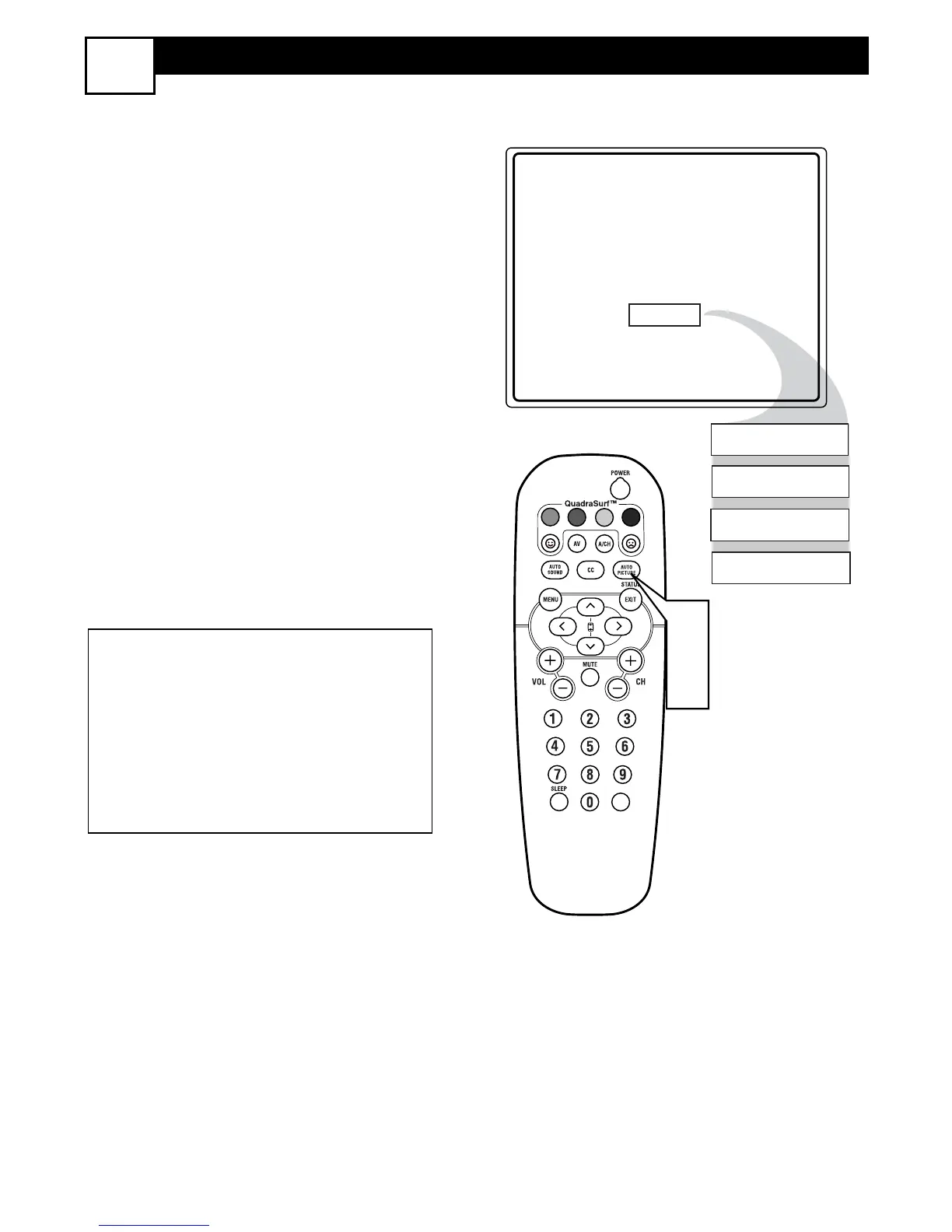
USING THE AUTOPICTURE™ CONTROL
26
W
hether you’re watching a movie or
a sporting event, your TV has auto-
matic video control settings matched for
your current program source or content.
1
Press the AUTO PICTURE button
on the remote control. The current
Auto Picture setting will be displayed
on the screen.
2
Press the AUTO PICTURE button
repeatedly to select either PER-
SONAL, MOVIES, SPORTS,
WEAK SIGNAL, or MULTIMEDIA
picture settings.
NOTE: The way you choose to set the
Picture Menu Controls will become your
PERSONAL setting.
MOVIES - Preset picture options for watching
Video Tapes, or DVDs.
SPORTS - Preset picture options for watching
sporting events.
WEAK SIGNAL - Preset picture options for
watching programs where the reception is not
at its best.
MULTIMEDIA - Preset picture options for
use with video gaming.






 To Next Page