10
Connecting peripheral equipment
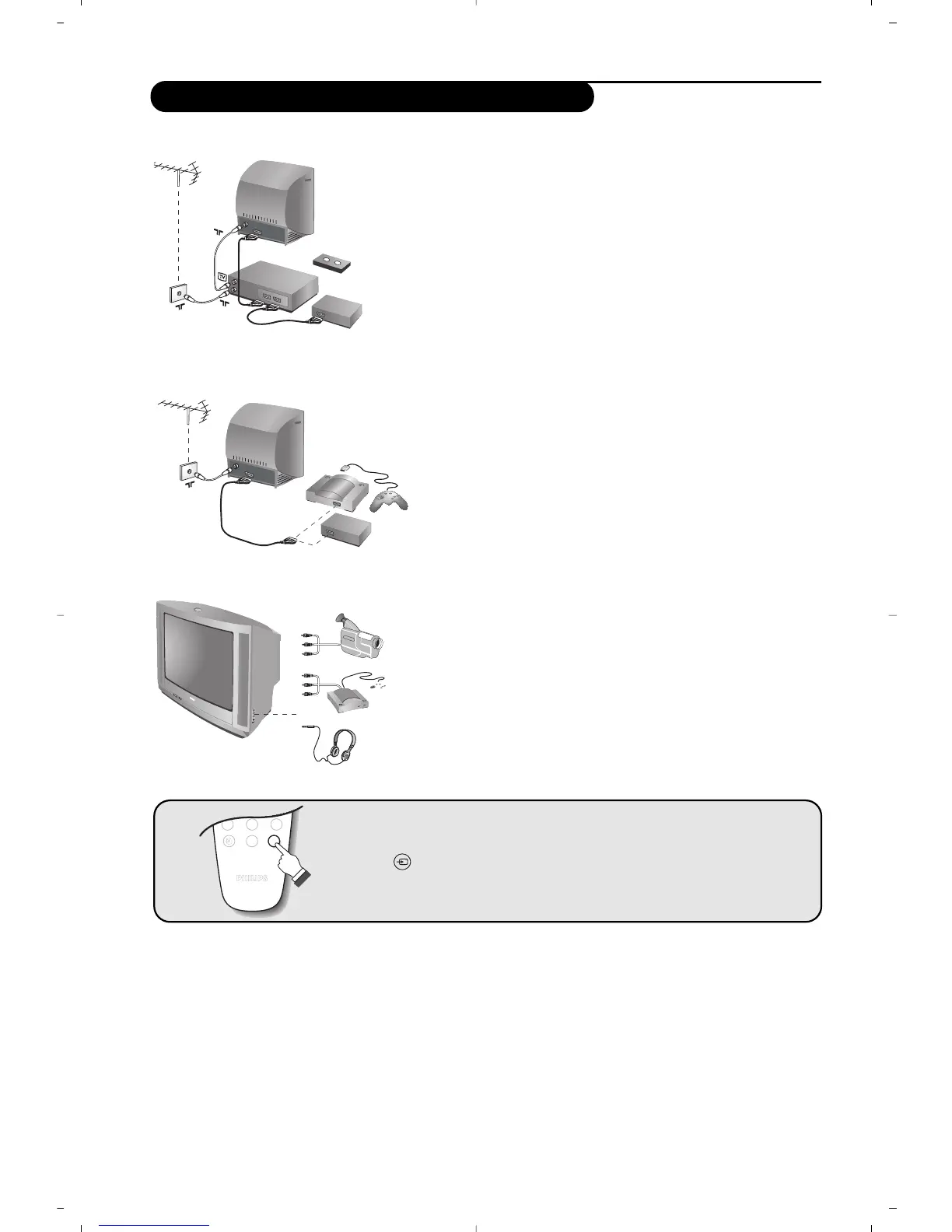
Carry out the connections shown opposite, using a good
quality euroconnector cable.
If your video recorder does not have a euroconnector socket, the only
connection possible is via the aerial cable.You will therefore need to
tune in your video recorder's test signal and assign it programme
number 0 (refer to manual store, p. 6).
To reproduce the video recorder picture, press
0.
Video recorder with decoder
Connect the decoder to the second euroconnector socket of
the video recorder.You will then be able to record scrambled
transmissions.
Video recorder
Satellite receiver, decoder, games, etc.
Make the connections as shown opposite.
Make the connections as shown opposite.
Headphones
When headphones are connected, the sound on the TV set
will be cut.The
@ ” # keys are used to adjust the
volume level.
The headphone impedance must be between 32 and 600 Ohms.
Other equipment
Side connections
To select connected equipment
Press the key to select EXT (and AV) for the side connections.
Most equipment (decoder, video recorder) carries out the switching itself



 To Next Page