EasyManua.ls Logo

Philips 239C4 Brilliance - Operating the Monitor

Philips 239C4 Brilliance
46 pages
Print Icon
To Next Page IconTo Next Page
To Previous Page IconTo Previous Page
Loading...
4
2. Setting up the monitor
2.1 Installation
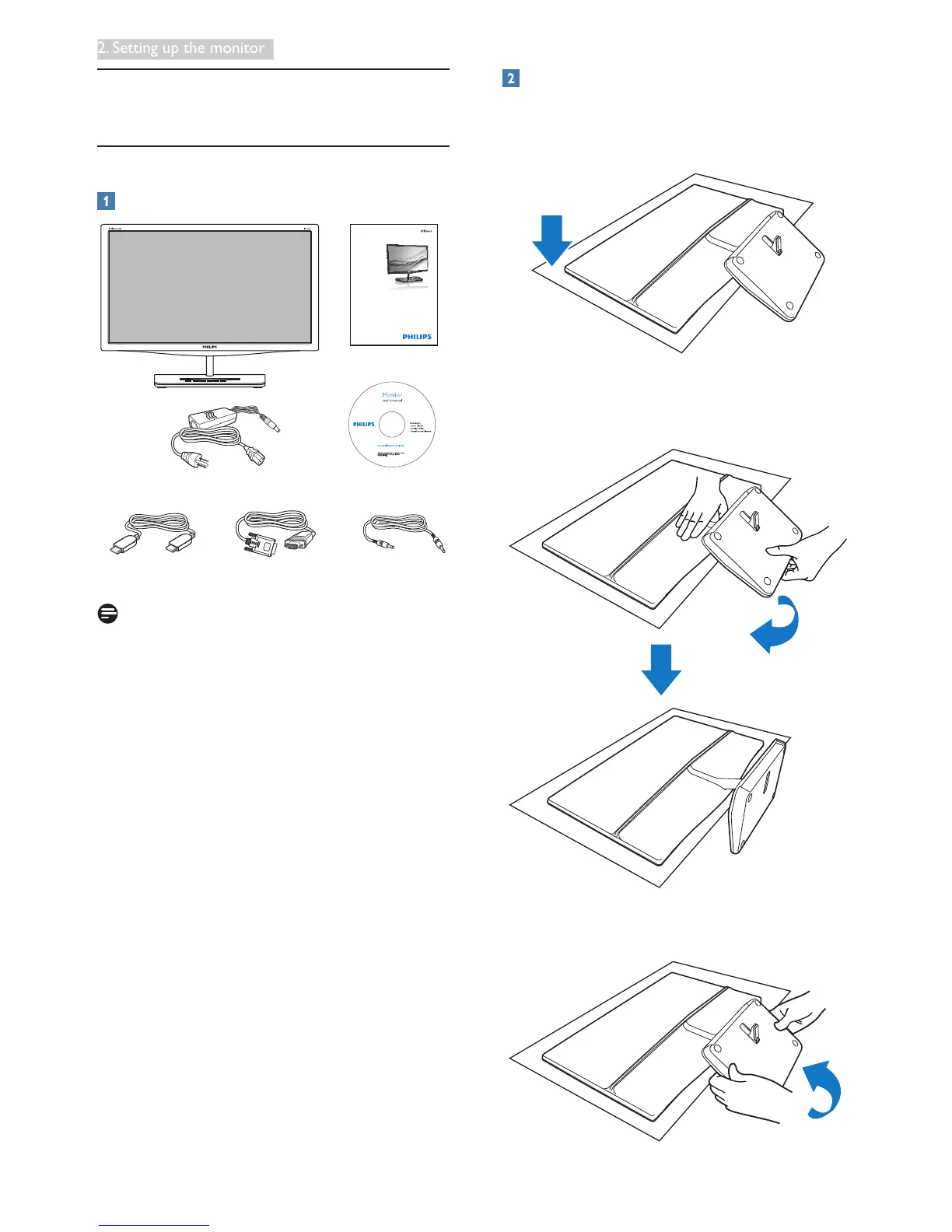
Package contents
VGA AudioHDMI (optional)
2
0
1
3
K
o
n
i
n
k
l
i
j
k
e
P
h
i
l
i
p
s
N
.
V
.
A
l
l
r
i
g
h
t
s
r
e
s
e
r
v
r
d
.
U
n
a
u
t
h
o
r
i
z
e
d
d
u
p
l
i
c
a
t
i
o
n
i
s
a
v
i
o
l
a
t
i
o
n
o
f
a
p
p
l
i
c
a
b
l
e
l
a
w
s
.
M
a
d
e
a
n
d
p
r
i
n
t
e
d
i
n
C
h
i
n
a
.
V
e
r
s
i
o
n
M
4
2
3
9
C
Q
2
T
F
7
0
G
2
3
C
1
8
1
3
1
6
A
AC/DC Adapter
Quick
Start
239C4
Register your product and get support at
www.philips.com/welcome
Note
Use only the AC/DC adapter model:
Philips ADPC1965, ADS-65LSI-19-1 19065G
Installation
1. Place the monitor face down on a smooth
surface. Pay attention not to scratch or
damage the screen.
2. Hold the monitor and base with both
hands. Gently bend the base vertically
down to a fixed angle.
3. To retain the monitor, bend the base
vertically up.

Related product manuals