2.2 Operating the monitor
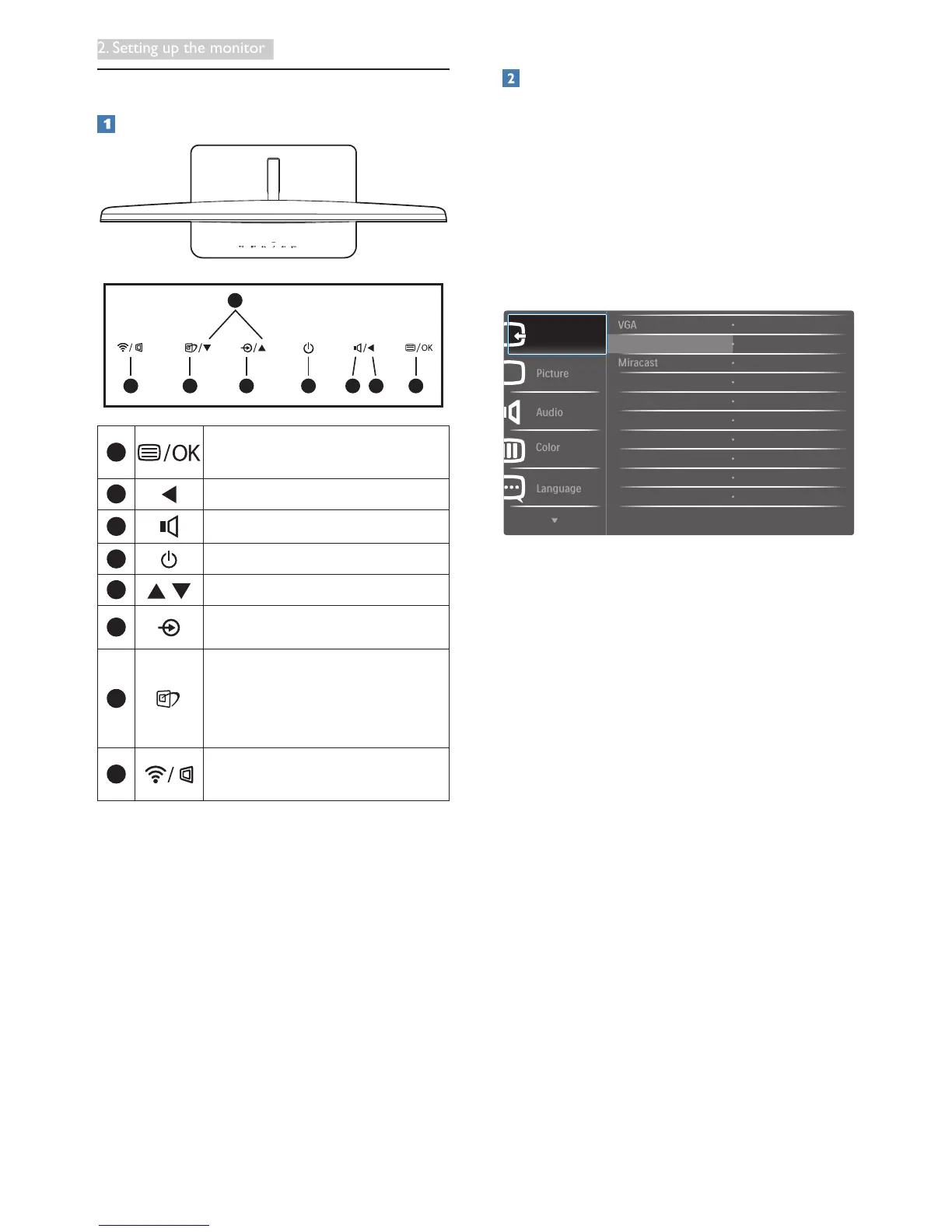
Description of the control buttons
5
6 4
2 1
3
7
8
1
Access the OSD menu
.
Confirm the OSD adjustment.
2
Return to previous OSD level.
3
Adjust volume.
4
Switch the power ON or OFF.
5
Adjust the OSD menu.
6
Change the signal input source.
7
SmartImage
hot key
. There are
7 modes to select: Text, Office,
Photo, Movie, Game, Economy,
Off.
8
Switch the input sources
between Miracast and VGA.
Description of the On Screen Display
What is On-Screen Display (OSD)?
On-Screen Display (OSD) is a feature in all
Philips LCD monitors. It allows an end user to
adjust screen performance or select functions
of the monitors directly through an on-screen
instruction window. A user friendly on screen
display interface is shown as below:







 To Next Page