8
2. Setting up the monitor
243V7QDA/243V7QJA
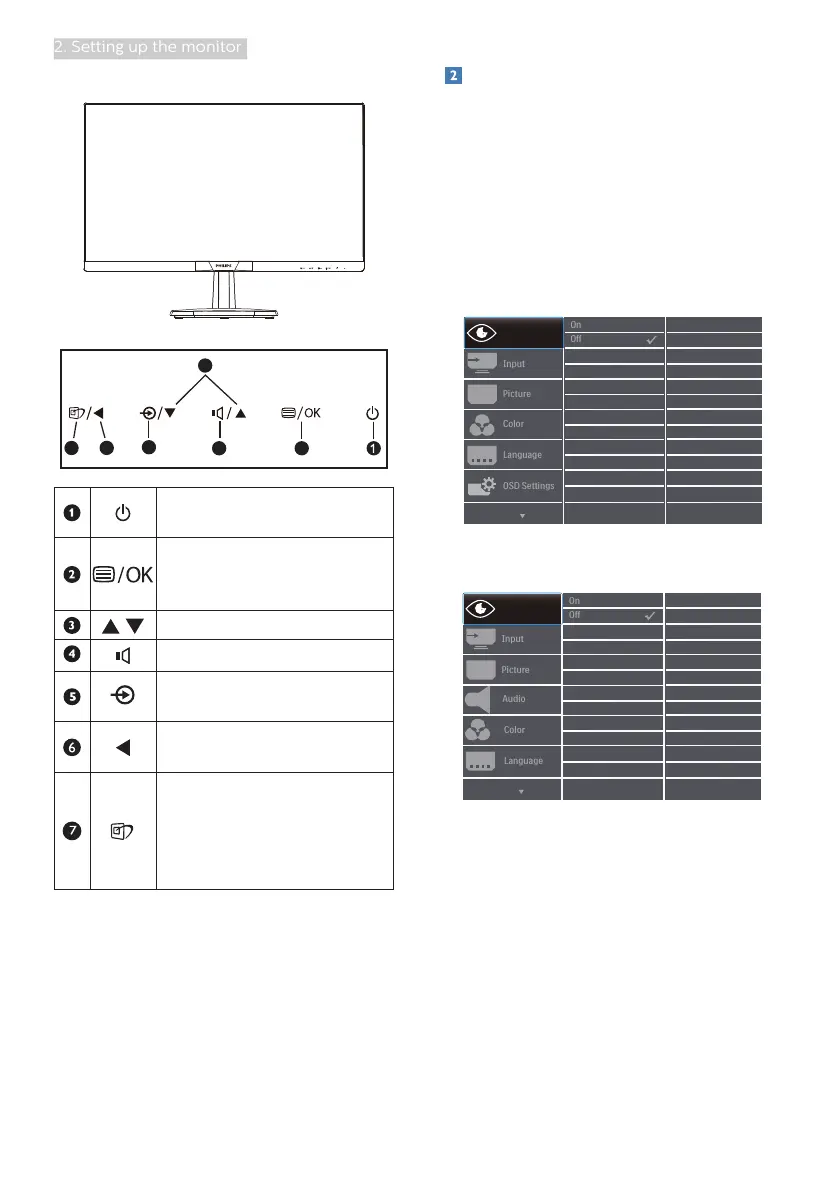
3
5
24
67
Switch monitor’s power ON
and OFF.
Access the OSD menu
.
Confirm the OSD
adjustment.
Adjust the OSD menu.
Adjust the speaker volume.
Change the signal input
source.
Return to previous OSD
level.
SmartImage. There are
multiple selections:
EasyRead, Office, Photo,
Movie, Game, Economy,
LowBlue Mode and Off.
Description of the On Screen Display
What is On-Screen Display (OSD)?
On-Screen Display (OSD) is a feature in
all Philips LCD monitors. It allows an end
user to adjust screen performance or
select functions of the monitors directly
through an on-screen instruction
window. A user friendly on screen
display interface is shown as below:
243V7QS
243V7QDS/243V7QDA/243V7QJA/
243V7QHS


 To Next Page