Need help?
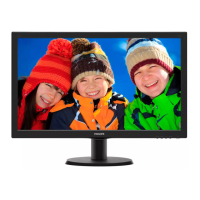
Do you have a question about the Philips 243V5LAB Series and is the answer not in the manual?
Lists detailed technical parameters of the monitor, including display and connectivity.
Details supported resolutions and their corresponding frequency settings.
Provides crucial safety precautions, operating guidelines, and maintenance advice for the monitor.
Guides on unpacking, assembling, and initial setup of the monitor.
Instructions for connecting the monitor to a computer via various input ports.
Explains how to optimize image quality using features like SmartContrast and software.
Summarizes physical and visual characteristics of the LCD panel.
Provides dimensions and weight specifications for the monitor module.
Lists the extreme operating limits for the monitor's electrical and environmental parameters.
Details the electrical specifications for the LCD electronics and backlight unit.
Outlines optical performance metrics like color, contrast, response time, and viewing angle.
Visual representation of the monitor's LCD panel components and their interconnections.
Detailed block diagram of the TFT LCD panel's internal signal flow.
Illustrates the functional blocks and connections on the monitor's main control board.
Depicts the logic flow of the monitor's firmware and operational states.
Detailed circuit diagram for the main logic and processing board.
Circuit diagram for the external power adapter board.
Circuit diagram and component layout for the monitor's control key board.
Step-by-step guide for installing software and drivers for monitor configuration.
Procedure for writing DDC/EDID data using specific tools and devices.
Instructions on how to access and perform factory mode adjustments on the monitor.
Troubleshooting guide for issues related to the main board, starting with "No Power".
Troubleshooting flow chart for diagnosing "No picture" issues.
Troubleshooting flow chart for diagnosing "White screen" issues.
Troubleshooting guide for diagnosing "No Backlight" issues.
Troubleshooting guide for issues related to the monitor's key pad and OSD.
Bill of Materials for the specific model, listing all components and their part numbers.
 General
| Screen Size | 23.6 inches |
|---|---|
| Panel Type | TN |
| Brightness | 250 cd/m² |
| Contrast Ratio | 1000:1 |
| Response Time | 5 ms |
| Refresh Rate | 60 Hz |
| Aspect Ratio | 16:9 |
| Viewing Angle (H/V) | 170°/160° |
| VESA Mount | 100 x 100 mm |
| Resolution | 1920 x 1080 (Full HD) |
| Ports | VGA, DVI |
| Built-in Speakers | Yes |
| Weight | 3.6 kg |

 To Next Page