6
3
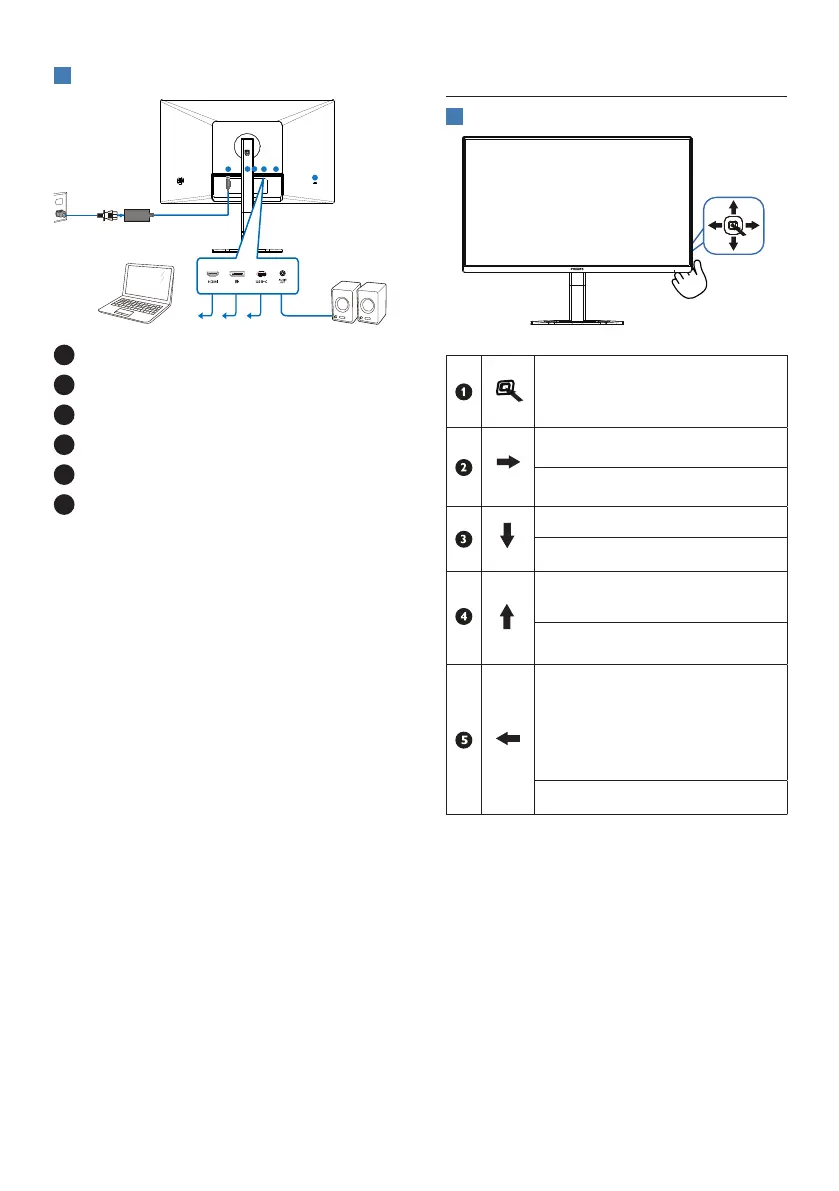
Connecting to your PC
1
4 5
6
2 3
1
AC/DC power input
2
HDMI input
3
DisplayPort input
4
USB-C
5
Audio Out
6
Kensington anti-theft lock
Connect to PC
1. Connect the power cord to the back
of the monitor rmly.
2. Turn o your computer and unplug
its power cable.
3. Connect the monitor signal cable to
the video connector on the back of
your computer.
4. Plug the power cord of your
computer and your monitor into a
nearby outlet.
5. Turn on your computer and monitor.
If the monitor displays an image,
installation is complete.
2.2 Operating the monitor
1
Description of the control buttons
Press to switch power on.
Press more than 3 seconds to
switch power o.
Access the OSD menu
.
Conrm the OSD adjustment.
Adjust the Brightness.
Adjust the OSD menu.
Change the signal input
source.
Adjust the OSD menu.
SmartImage Game menu.
There are multiple selections:
FPS, Racing, RTS, Gamer1,
Gamer2, LowBlue Mode,
EasyRead and O.
Return to previous OSD level.


 To Next Page