19
3.5 Daisy-chain function
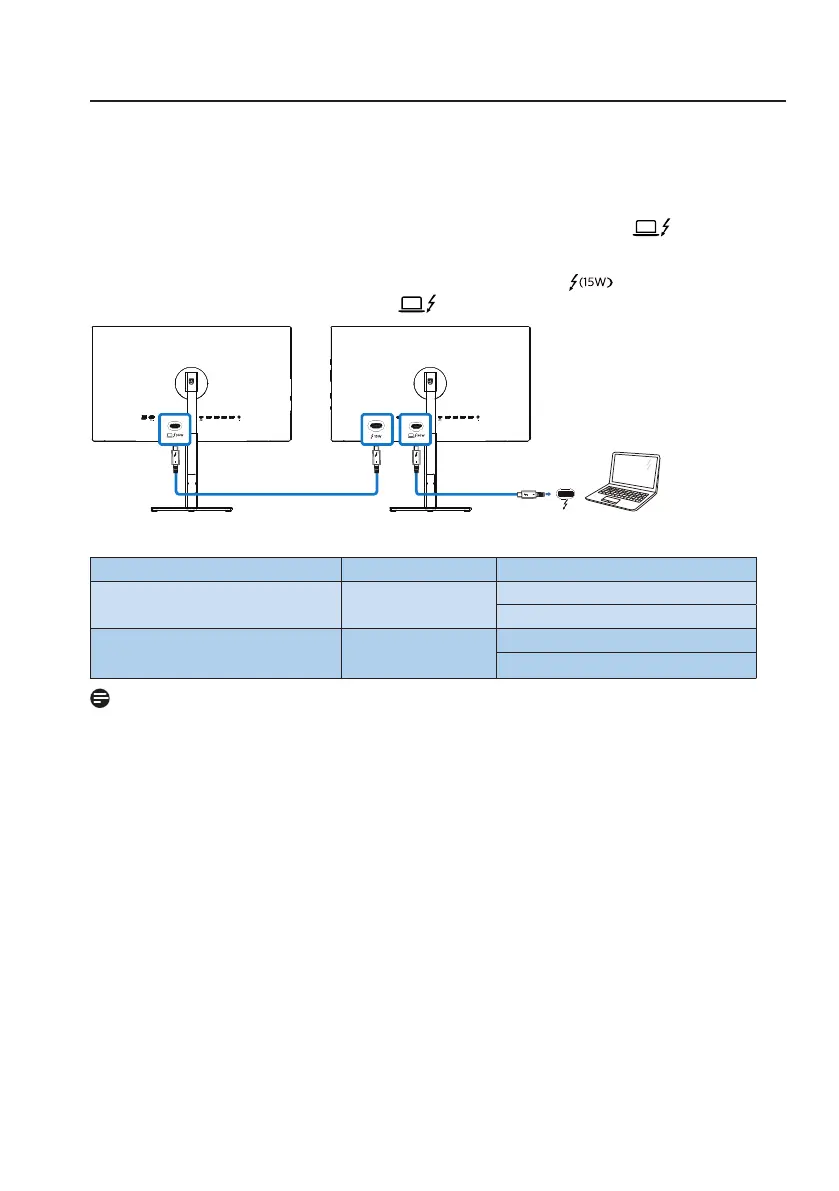
Thunderbolt™ 4 supports Daisy Chain. If your laptop /Desktop/Display Monitor
supports Thunderbolt™ 4, you can use Thunderbolt™ 4 for multi-screen
connections (Daisy Chain).
To daisy-chain monitors, rst to check below:
1. Connect the Thunderbolt™ 4 cable to the Thunderbolt input (96W) port
on the first monitor and to your PC.
2. Connect an another cable to the Thunderbolt output port on the first
monitor , and Thunderbolt input (96W) port on the secondary monitor.
Thunderbolt
Display Resolution input Link Rate Display Resolution output
3840 x 2160 @30Hz HBR2/HBR3
3840 x 2160 @30Hz
3840 x 2160 @60Hz
3840 x 2160 @60Hz HBR2/HBR3
3840 x 2160 @30Hz
3840 x 2160 @60H
Note
• The maximum number of connectible monitors may vary depending on GPU
performance.
• To enable HDR on the monitor, make sure the connected monitor is in
extended mode from your PC.
• To turn on HDR function: Extend the display by choosing extended mode on
the setting of your laptop/PC.
Alternatively, duplicate the displays by selecting Clone mode on your laptop/
PC.





 To Next Page