Directions for Use
EN 6 L04E AA3.
3. Directions for Use
You can download this information from the following website:
http://www.philips.com/support
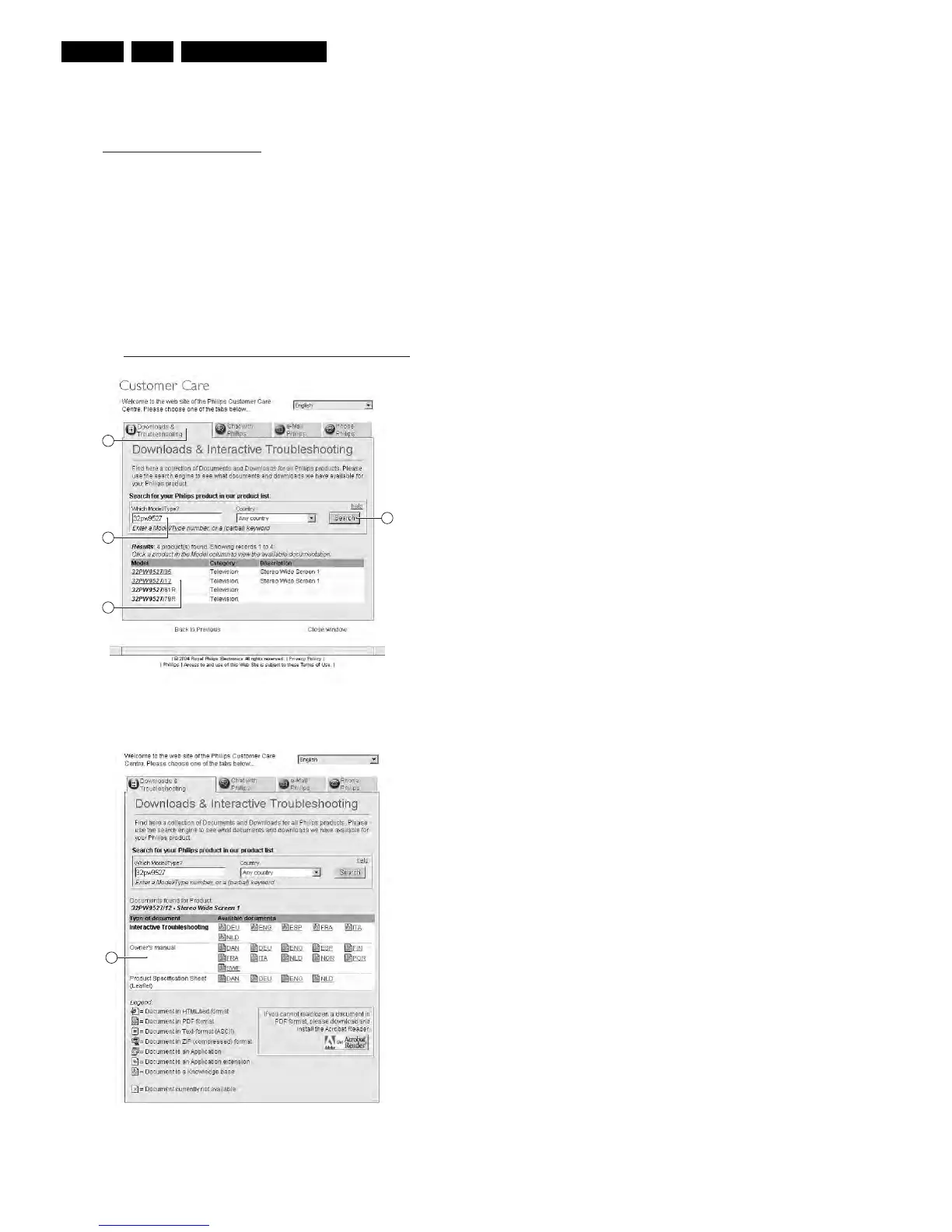
1. Click on “Downloads and Troubleshooting” [1].
2. Fill in the TV model/type number in the field “Which Model/
Type?” [2] and click on “Search” [3].
Note: The correct model/typenumber can be found on the
rear cover of the set. If you do not have the complete
model/typenumber, just fill in e.g. “32PW95” or “PW95” (do
not use wildcards).
3. When results are returned, click on the desired model/
typenumber under “Model” [4].
4. Now, click on the “Owner's manual” [5] in the desired
language. To read/open the PDF files you can download
and install the free Acrobat Reader
http://www.adobe.com/products/acrobat/readstep2.html
Figure 3-1 Screenshot DFU website (1)
Figure 3-2 Screenshot DFU website (2)
1
2
4
3
E_06532_015.eps
050404
5
E_06532_016.eps
050404





 To Next Page