4
i On Screen information
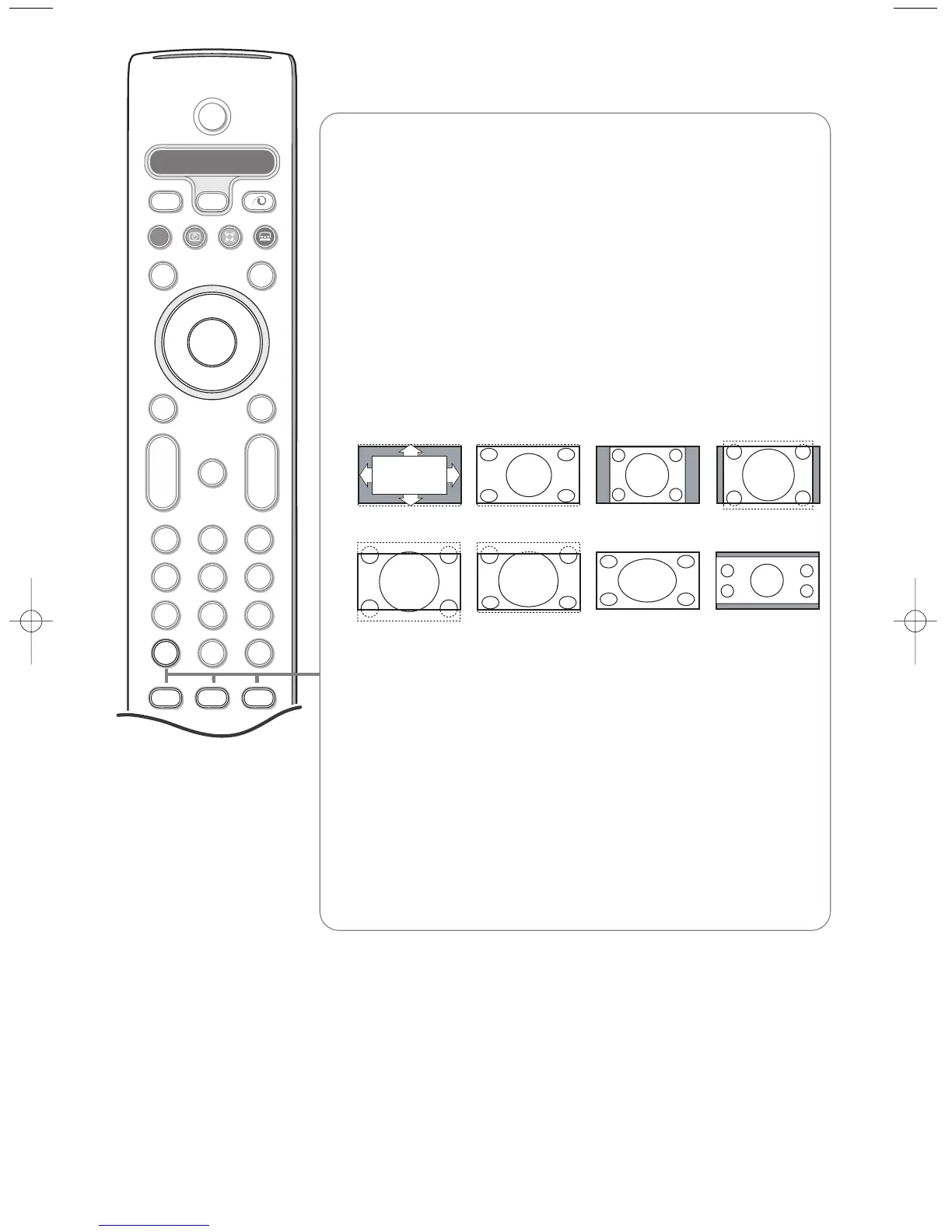
Press to display (when available) information about the selected TV
channel and programme.
Menu/Remote control info
When a menu is on screen, press i to display info on the selected menu
item.While the menu info is displayed, press any key to display remote
control info.The normal function of the key is not executed.
b no function
h Active control see p. 11.
q Picture format
Press this key repeatedly or press the cursor up/down to select another
picture format:Auto format, Super zoom, 4:3, Movie Expand 14:9, Movie
Expand 16:9, Subtitle zoom,Wide screen or 16:9.
Auto format makes the picture fill the screen as much as possible.
In case of subtitles in the bottom black bar,Auto format makes the
subtitles visible.
In case of a broadcaster logo in the corner of the top black bar, the logo
disappears from the screen.
Super zoom removes the black bars on the sides of 4:3 programs with
minimal distortion.
When in Movie Expand 14:9, Movie Expand 16:9, Super zoom or Subtitle
zoom picture format, you can make subtitles visible with the cursor
up/down.
Note:With signals via EXT5 or the VGA IN connector less picture formats are
selectable.
Auto format Super zoom 4:3 Movie Expand 14:9
Movie Expand 16:9 Subtitle zoom Wide screen 16:9


 To Next Page