江南家电维修论坛会员专用!
http://bbs.520101.com
Mechanical Instructions
EN 8 TPT1.1HA LA4.
4.3 Assy/Panel Removal
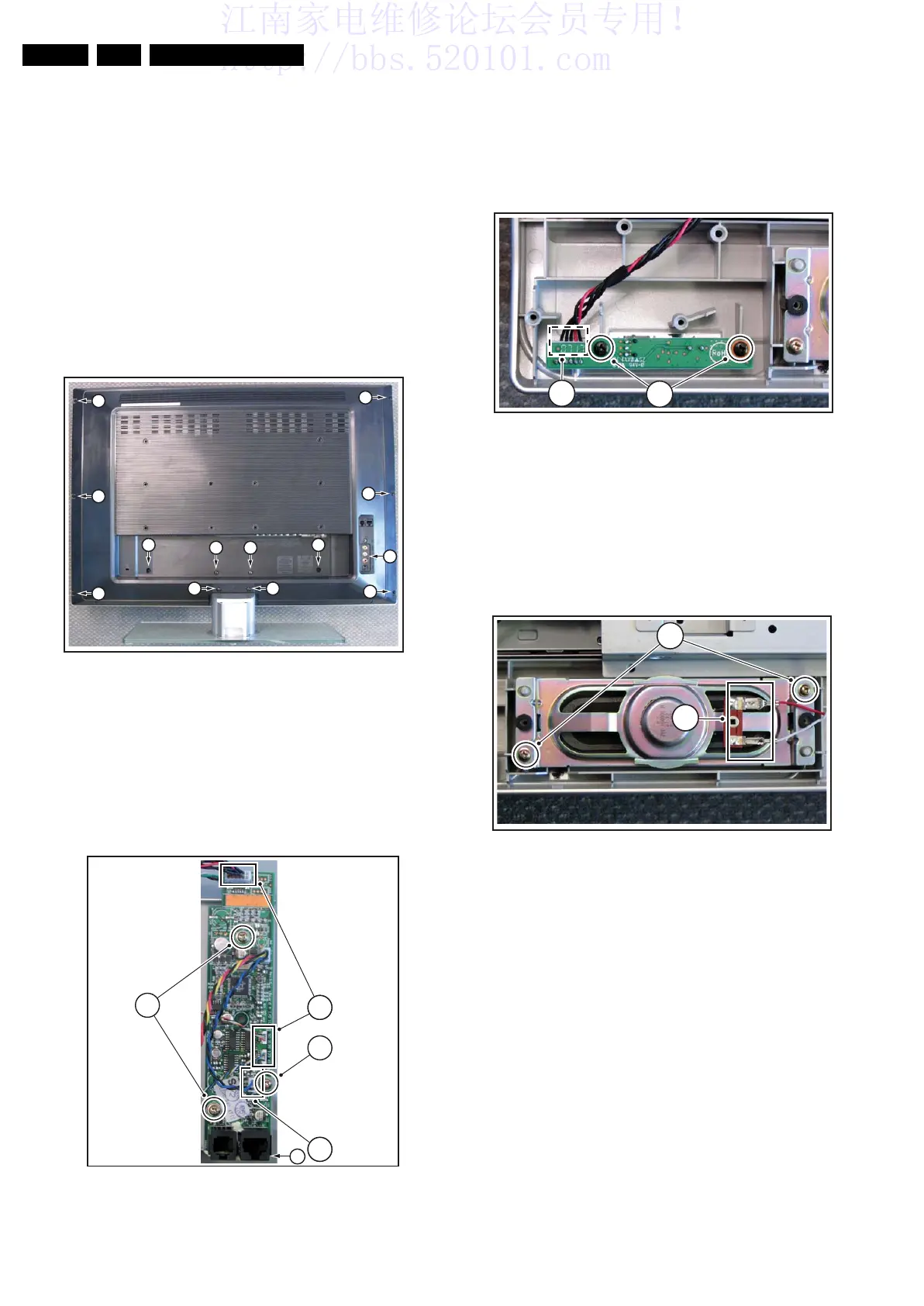
4.3.1 Stand and Back Cover removal
Warning: Disconnect the mains power cord before you remove
the rear cover.
Refer to figure “Stand and Back Cover removal” for details.
1. Place the TV set upside down on a table top, using the
foam bars (see part “Foam Bars”).
Caution: do not put pressure on the display, but let the
monitor lean on the speakers or the Front cover.
2. Remove the screws [1] that secure the stand.
3. Pull down the stand to remove it.
4. Remove the screws [2} that secure the rear cover.
5. Lift the rear cover from the bottom side up from the cabinet.
Figure 4-3 Stand and Back Cover removal
4.3.2 I-Board removal
Refer to figure “I-Board removal” for details.
1. Disconnect the connectors [1] from the panel.
2. Remove the fixation screws [2].
3. Gently release the glued bottom side [3] of the panel and
lift the panel out of the bracket.
Figure 4-4 I-Board removal
4.3.3 IR and LED Panel removal
Refer to figure “IR and LEDl Panel removal” for details.
1. Disconnect the connector [1] from the panel.
2. Remove the fixation screws [2].
3. Take out the panel.
When defective, replace the whole unit.
Figure 4-5 IR and LED Panel removal
4.3.4 Speaker removal
Refer to figure “Speaker removal” for details.
1. Disconnect the connectors [1] from the speaker.
2. Remove the fixation screws [2].
3. Take out the speaker.
When defective, replace the whole unit.
Figure 4-6 Speaker removal
H_17010_004.eps
180907
1
2 2
1
1
2
2
2
2
2
2
2
1
H_17010_009.eps
180907
2
2
1
1
3
H_17010_015.eps
180907
1
2
H_17010_006.eps
180907
2
1






 To Next Page