Studio 32/39HFL2808D/12 Page | 9
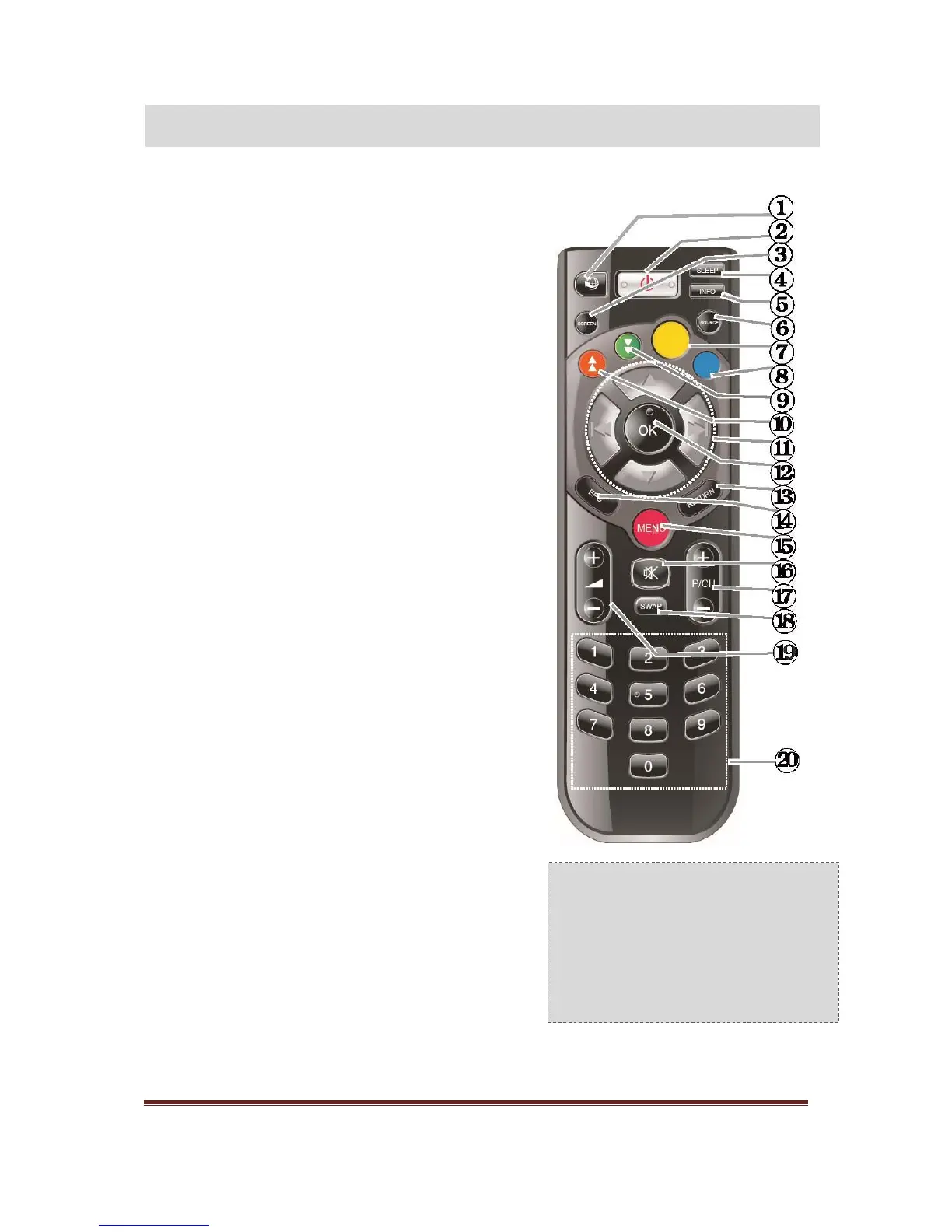
1 Teletext / mix
2 Standby
3 Image Size
4 Sleep Timer
5 Info/ Reveal (in TXT mode)
6 Source selection
7 Yellow button/Current language (in DVB Channel) /
Mono-Stereo Dual I-II (in Analog Channel)
8 Blue button
9 Green button
10 Red button
11 Navigation buttons / Subpage (in TXT mode)
12 OK / Hold (in Text mod) /Channel List
13 Return /Back /Index page (in TXT mode)
14 Electronic Programme Guide
15 Menu on/off
16 Mute
17 Programme up/down
18 Previous Programme/ Now (in EPG mode)
19 Volume up/down
20 Numeric buttons
Digital Teletext (for UK only)
Press RED button to view digital teletext information.
Operate it with the coloured buttons, cursor buttons and
OK button. The operation method may differ depending
on the contents of the digital teletext. Follow the
instructions displayed on digital teletext screen.







 To Next Page