6
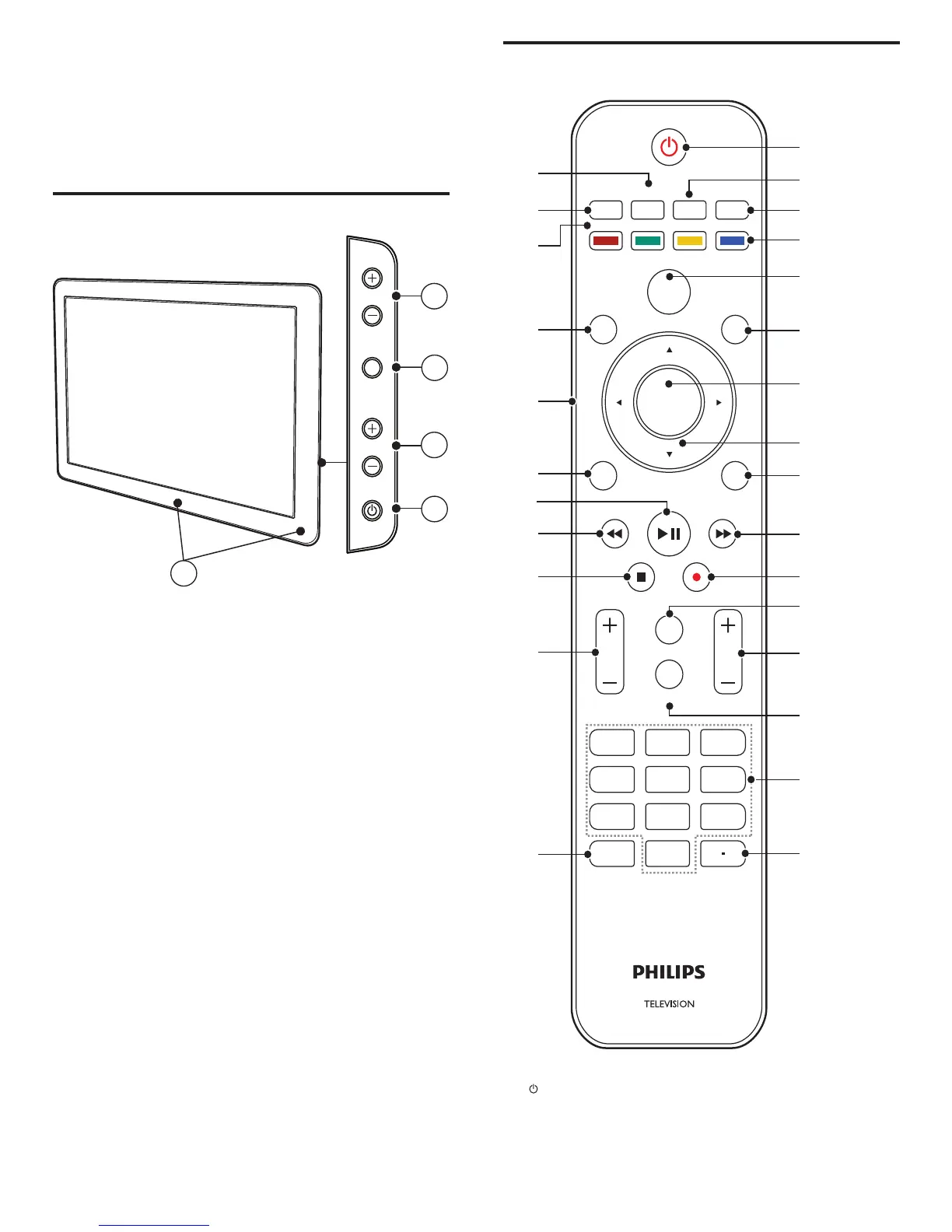
Remote control
ACTIVE
DEMO
TV
FAV
SLEEP
CONTROL
SOURCE
OPTIONSAUTO
MODE
MENU
OK
EXIT
MUTE
FORMAT
123
INFO
CH
456
789
PREV. CH
0
a
b
c
d
e
f
g
h
i
j
k
l
m
n
o
p
q
r
s
t
v
u
x
y
z
{
BACK
VOL
w
a ( Standby-On )
Switches the TV on or off. The TV is not powered off completely
unless it is physically unplugged.
b FAV
Displays a list of all channels marked as favorite.
3 Your TV
Congratulations on your purchase, and welcome to Philips! To fully
benefi t from the support that Philips offers, register your product at
www.philips.com/welcome.
Side controls and indicators
a Standby indicator / remote control sensor (location may vary)
b POWER : Switches the TV on or off. The TV is not powered off
completely unless it is physically unplugged.
c CHANNEL +/ - : Switches to the next or previous channel.
d MENU : Toggles the main menu on or off.
e VOLUME +/- : Increases or decreases volume.
2
3
5
4
POWER
CHANNEL
MENU
VOLUME
1
EN












 To Next Page