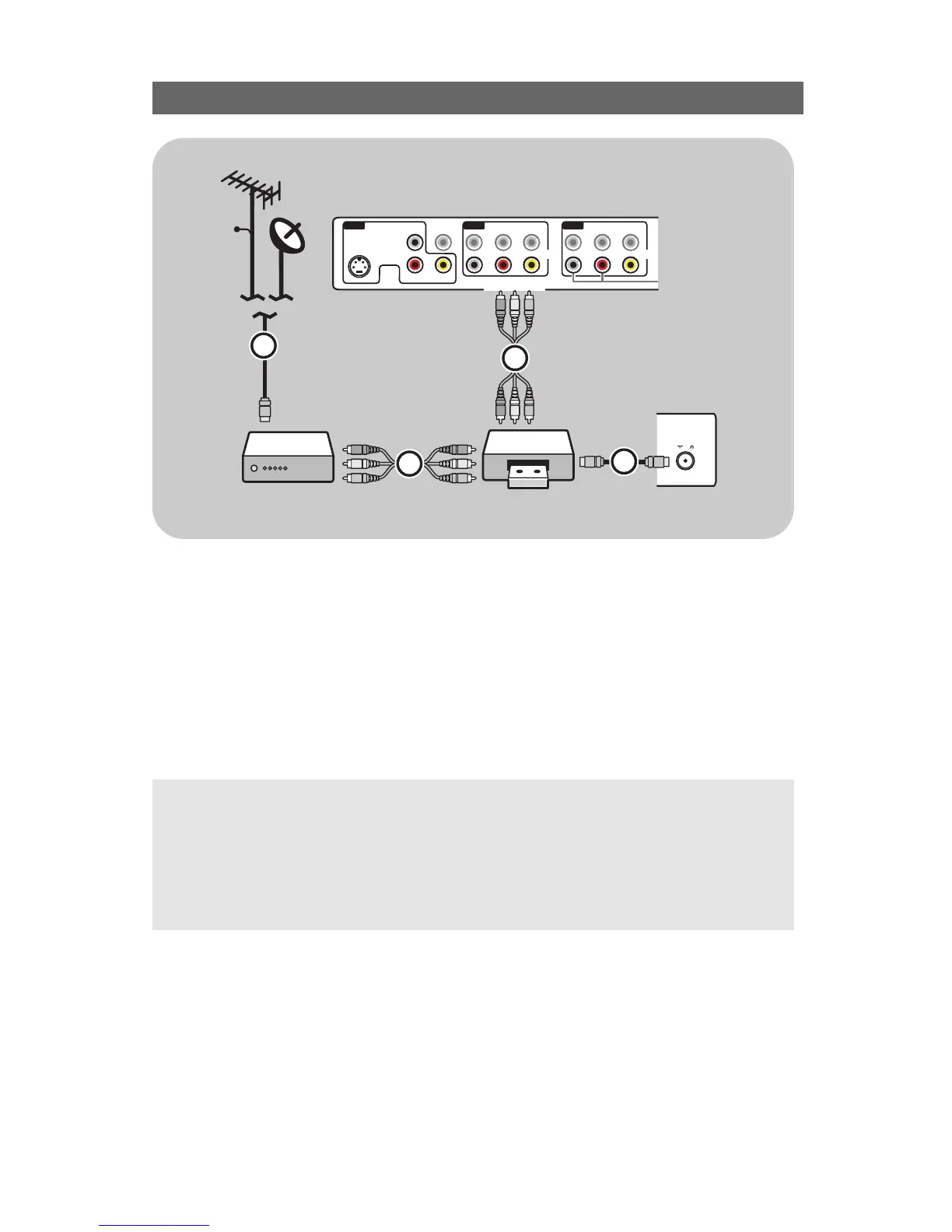
1. Connect the satellite antenna cable or the Cable TV cable 1 to the satellite receiver’s or cable
box’s
IN jack.
2. Connect the AV cables 2 to the satellite receiver’s or cable box’s
AV OUT jacks and to the
recorder’s
AV IN jacks.
3. Connect the Video,Audio Left and Right (only for stereo sound) recorder AV cables 4 to the
VIDEO, AUDIO L and R input AV1,AV2 or AV3 jacks on the TV.
4. Connect another RF cable 3 from the output out of your recorder to the TV’s input
CABLE/ANTENNA 75 Ω x jack.
5. Select the equipment you have connected in the Setup menu, Select your source, p. 20 and link
it to the
AV connector you have connected your equipment to.
Notes:
- cables are often color-coded to connectors. Connect red to red, white to white....
- if your recorder has an S-VHS video jack:
For improved picture quality, connect an S-video cable with the
S-VIDEO input of AV3 and connect
the audio cables to the
AUDIO L and R input jacks of AV3.
When using the S-VIDEO connector do not connect any device to the AV3 VIDEO jack;
- in case of mono equipment, only the left loudspeaker reproduces sound.
Use a mono to stereo adapter (not supplied) for sound reproduction via all internal loudspeakers.





 To Next Page