30
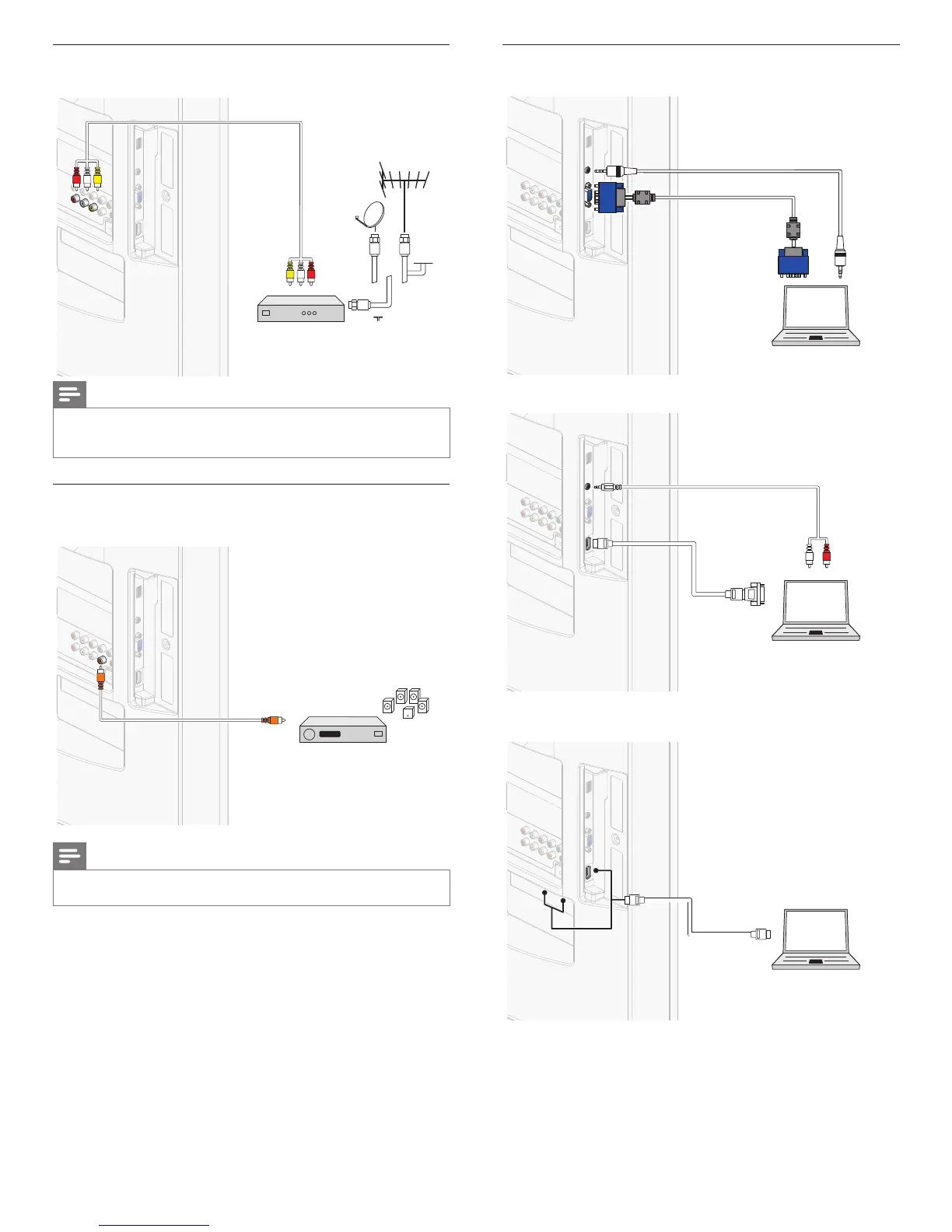
Connecting a PC
If you connect a PC with a VGA connector at the back.
IN
IN
OUT
PC
IN
IN
VGA
VGA
STEREO MINI-PLUG AUDIO
If you connect a PC with a HDMI-DVI connector.
OUT
IN
IN
IN
PC
DVI OUT
IN
IN
IN
HDMI 3 IN only
If you connect a PC with an HDMI or Display Port (HDMI-Display Port
conversion cable) connector.
PC
IN
IN
IN
IN
OUT
HDMI
HDMI
Connecting a set-top box via a composite connector and
analog audio
OUT
IN
IN
RF IN
audio L
set-top box
cable
Note
• Only the left loudspeaker reproduces sound for mono equipment. Use a mono to
stereo adapter (not supplied) for sound reproduction via all internal loudspeakers.
• When you connect cables, match the cable colors to the connectors on the TV.
Connecting a digital home theater amplifi er using a
digital audio coaxial cable
IN
OUT
OUT
digital home theater amplifi er
digital home theater amplifi er
DIGITAL AUDIO
Note
• Due to Copyright restrictions, the broadcaster may choose to mute PCM audio over
Digital Audio Output for certain channels, shows or segments during the broadcast.
EN











 To Next Page