6 EN
Remote control
*
b
c
a
d
e
ho
p
r
q
s
i
j
k
lm
n
g
f
*This button does not function on this unit.
3 Your TV
Congratulations on your purchase, and welcome to Philips! To fully
benefi t from the support that Philips offers, register your product at
www.philips.com/support
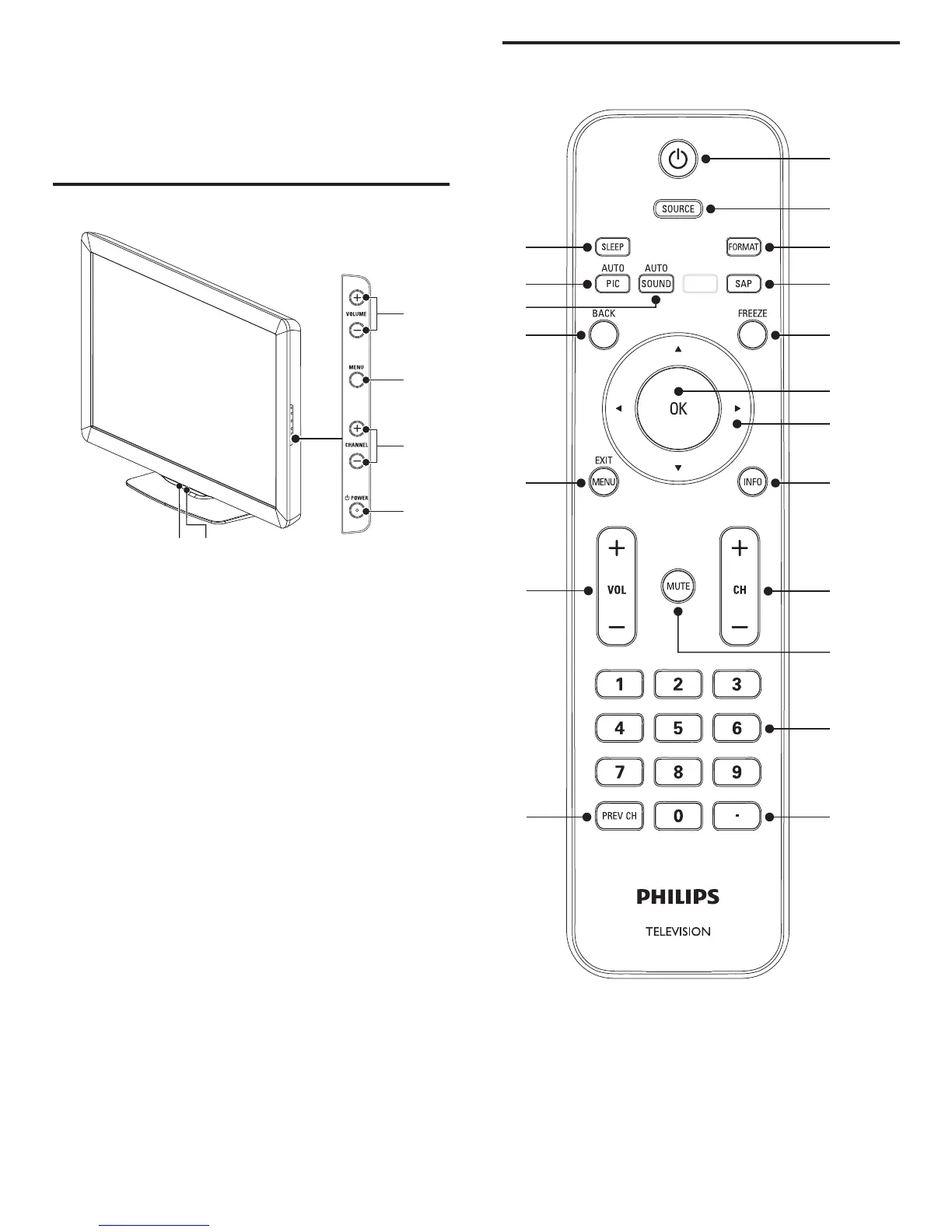
Side controls and indicators
f
e
d
c
a
b
a Ambient light sensor
When in
[
Home
]
mode, this TV will automatically adjust the
brightness based on the ambient light. If there is a sudden change
in TV brightness, it may be due to changes in the room lighting
conditions (sunshine / lamps), or an object blocking the light sensor
on the front of the TV. Please ensure the room lighting is stable and
the light sensor is not blocked.
b Standby indicator / remote control sensor
c
.
POWER
Switches the TV on or puts it in standby mode. The TV is not
powered off completely unless it is physically unplugged.
d CHANNEL + / −
Switches to the next or previous channel.
e MENU
Toggles the main menu on or off.
f VOLUME + / −
Increases or decreases volume.











 To Next Page