EasyManua.ls Logo

Philips 42HF9320A - Adjusting Picture Settings

Philips 42HF9320A
62 pages
Print Icon
To Next Page IconTo Next Page
To Previous Page IconTo Previous Page
Loading...
18 Use more of your TV
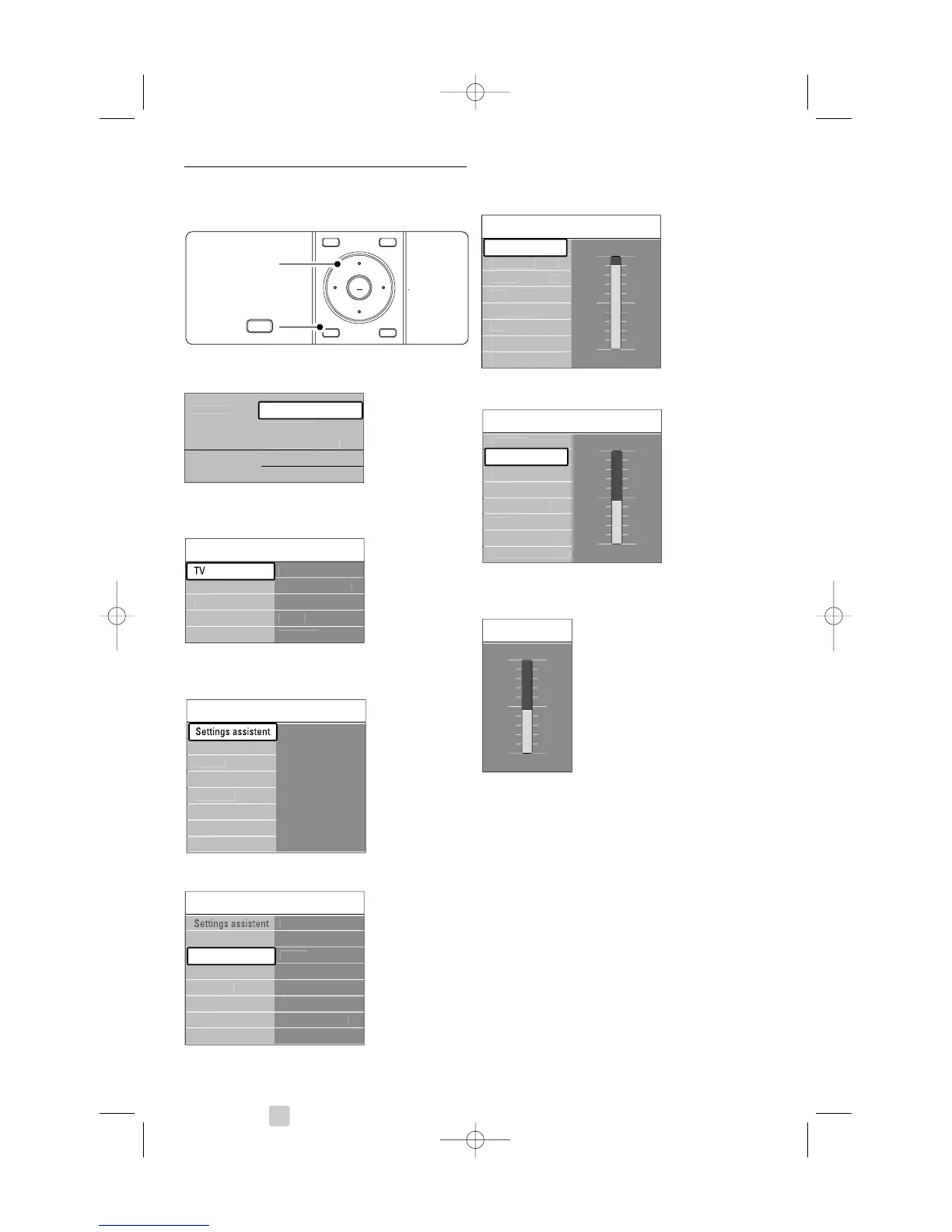
5.2.2 Use of the menu
Learn to use the menus with this example.
Press Menu on the remote control.
The main menu appears on the screen.
® Press navigation key right to enter the TV
menu.
ÒPress navigation key right to enter the TV
settings menu.
Press navigation key down to select Picture.
º Press navigation key right to enter the picture
settings.
Press navigation key down to select Brightness.
Press navigation key right to enter the
Brightness setting.
Press navigation key up or down to adjust the
setting.
ÚPress navigation key left to return to the Picture
settings or press Menu to quit the menu.
rNote:
More choices come available when digital channels
are installed and broadcasted.

OK
LIST
OPTION
a
GUIDE
DEMO
MENU
b
BROWSE
®
MENU
BROWSE
T
e
l
e
vi
s
i
on
M
u
ltim
ed
i
a
TV
m
e
n
u
C
hannel lis
t
Pro
g
ramm
e
g
uid
e
TV settin
g
s Pi
c
t
u
r
e
C
ontras
t
Bri
g
htness
P
e
rf
ec
t Pix
e
l H
D
C
olou
r
H
ue
Soun
d
Ambili
g
h
t
...
Shar
p
ness
Tin
t
R
ese
t t
o
s
t
a
n
da
r
d
Pi
c
t
u
r
e
Pi
c
t
u
r
e
C
ontras
t
C
olou
r
H
ue
P
e
rf
ec
t Pix
e
l H
D
HD N
a
t
u
r
a
l M
o
ti
on
Shar
p
ness
Tin
t
Bri
g
htness
90
52
0
4
47
C
ontras
t
Pi
c
t
u
r
e
Bri
g
htness
C
ontras
t
C
olou
r
H
ue
P
e
rf
ec
t Pix
e
l H
D
HD N
a
t
u
r
a
l M
o
ti
on
Shar
p
ness
Tin
t
Bri
g
htness
98
52
0
4
47
Bri
g
htness
TV
m
e
n
u
TV settin
g
s
Settin
g
s assistan
t
Rese
t t
o
s
t
a
n
da
r
d
Pi
c
t
u
r
e
Soun
d
Ambili
g
h
t
Fea
t
u
r
es
Software u
p
dat
e
In
s
t
a
ll
a
ti
on
settin
g
s
TV settin
g
s Settin
g
s assisten
t
Start no
w
Soun
d
Ambili
g
h
t
R
ese
t t
o
s
t
a
n
da
r
d
Pi
c
t
u
r
e
2675.1 eng 03-08-2007 14:51 Pagina 18

Related product manuals