EasyManua.ls Logo

Philips 42HF9320A - Connecting DVD Players and Receivers

Philips 42HF9320A
62 pages
Print Icon
To Next Page IconTo Next Page
To Previous Page IconTo Previous Page
Loading...
40 Connections
7.3 Connect your devices
The connections shown in this section are
recommendations for the most used cases.
Other solutions may be possible.
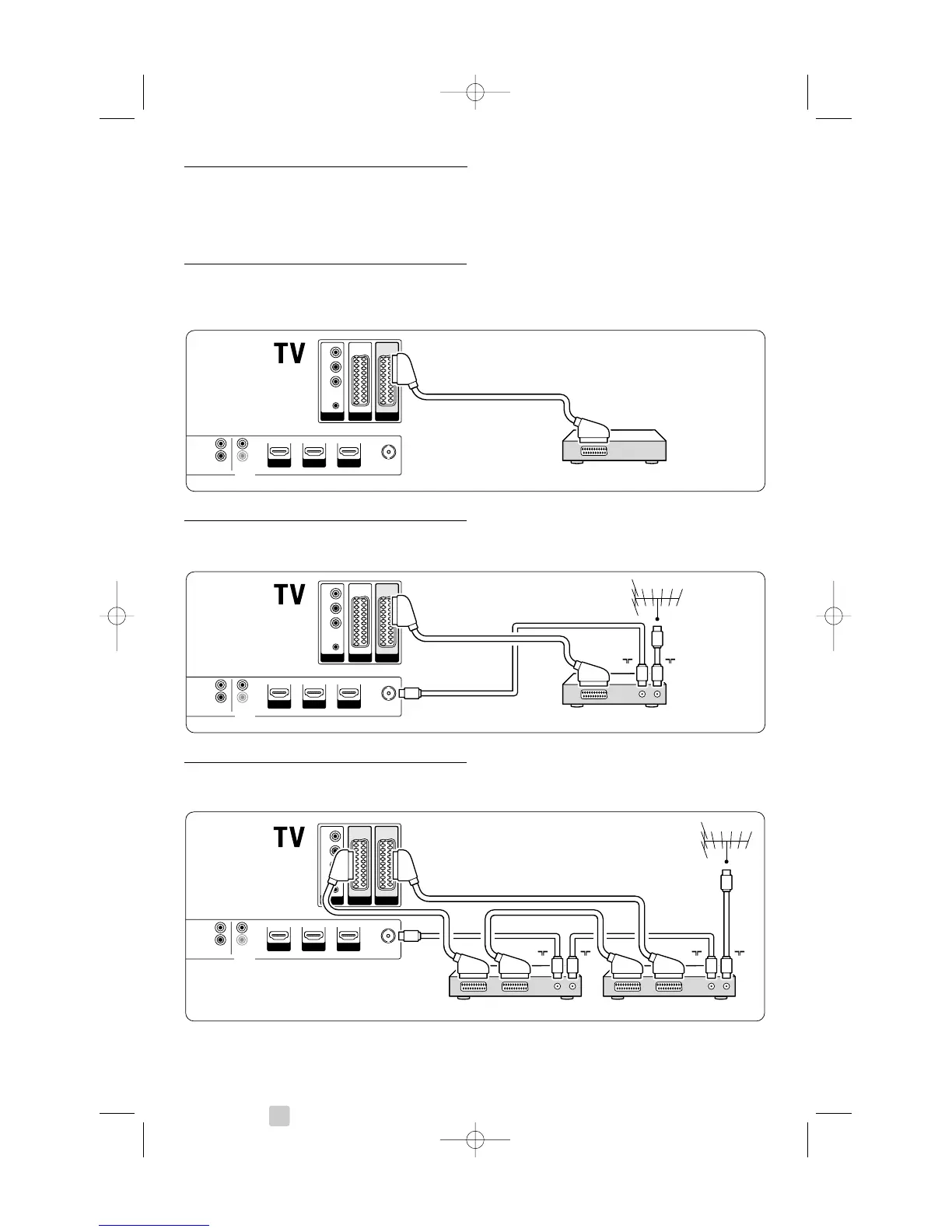
7.3.1 DVD player
Use a scart cable to connect the device to the
EXT1 input at the back of the TV.
7.3.2 DVD Recorder or Digital Receiver
Use a scart cable and 2 antenna cables.
7.3.3 DVD Recorder and Digital Receiver
Use 3 scart cables and 3 antenna cables.

EXT 3
Y
Pb
Pr
AUDIO
L/R
HDMI 3HDMI 1 HDMI 2
EXT 1EXT 2
AUDIO OUT
L
R
OUT
IN
ANTENNA
DIGITAL
AUDIO
Receiver / Cable boxDVD Recorder
IN
OU
T
I
N
OUT
EXT 3
Y
Pb
Pr
AUDIO
L/R
HDMI 3HDMI 1 HDMI 2
EXT 1EXT 2
DVD Player
AUDIO OUT
L
R
OUT
IN
ANTENN
A
DIGITAL
AUDIO
EXT 3
Y
Pb
Pr
AUDIO
L/R
HDMI 3HDMI 1 HDMI 2
EXT 1EXT 2
DVD Recorder / Digital receiver
AUDIO OUT
L
R
OUT
IN
ANTENN
A
DIGITAL
AUDIO
IN
OUT
2675.1 eng 03-08-2007 14:51 Pagina 40

Related product manuals