The
MONITOR OUT
connector can be used for a daisy chaining or to
record programs from your TV 6.
Only when a recorder is connected to
MONITOR OUT it is possible to
record an analog program from your TV.
See Record with your recorder, p. 33.
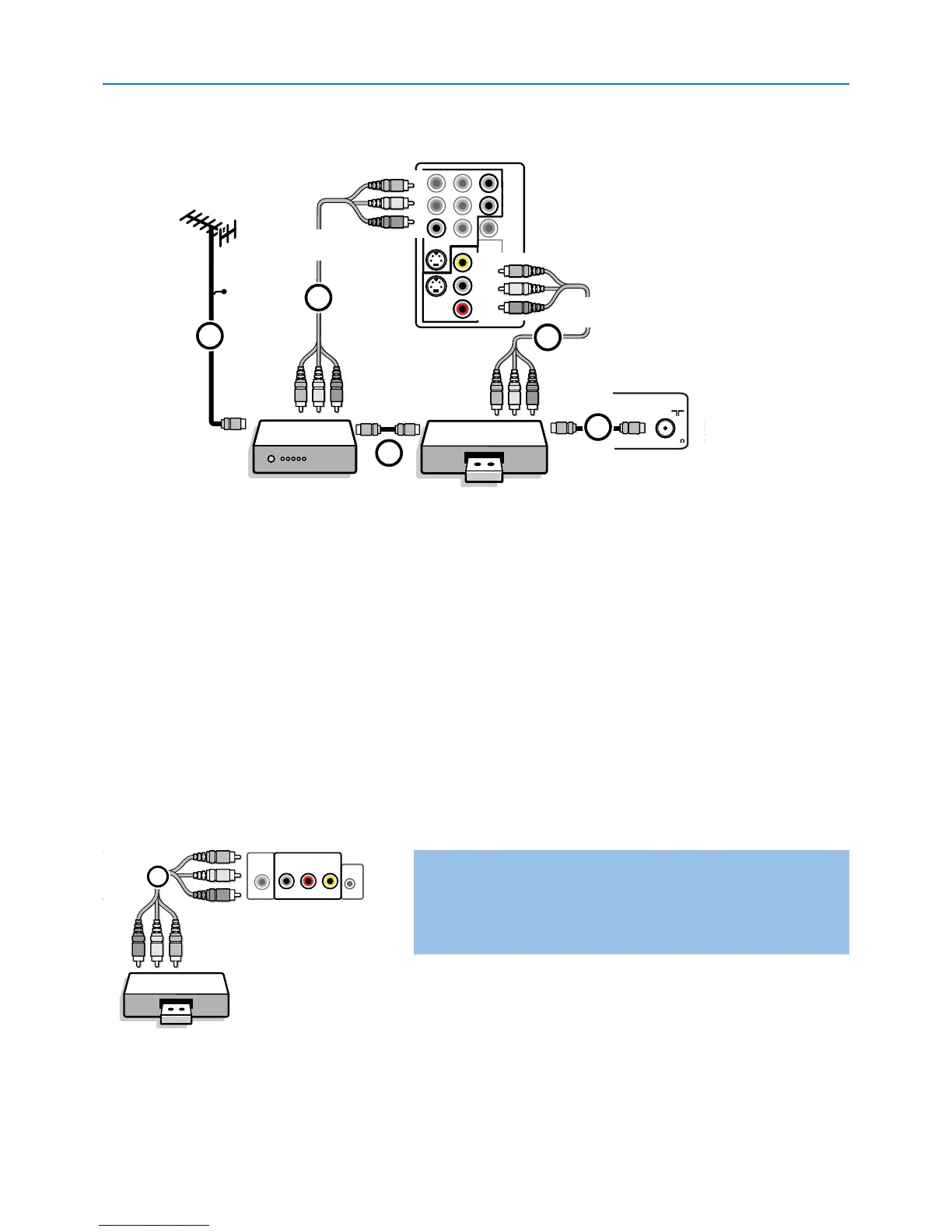
& Connect the RF antenna cable 1 of the RF IN socket of your other AV device.
é Connect the RF output of the AV device to the RF input of the recorder 2.
“ Connect another RF cable 4 from the output OUT of your recorder to the TV’s input CABLE/ANTENNA 75 Ω x jack.
‘ To obtain better quality, also connect the Video or S-Video,Audio left and Audio right cables of both devices to AV1 (VIDEO or
S-VIDEO, AUDIO L and R,) 3 and to AV2 (VIDEO or S-VIDEO, AUDIO L and R) 5.
Notes:
- In case of mono equipment, only the left loudspeaker reproduces sound.
Use a mono to stereo adapter (not supplied) for sound reproduction via all internal loudspeakers.
- When using the
S-VIDEO connector do not connect any device to the AV2 VIDEO or AV1 VIDEO input.
Recorder and other A/V devices






 To Next Page