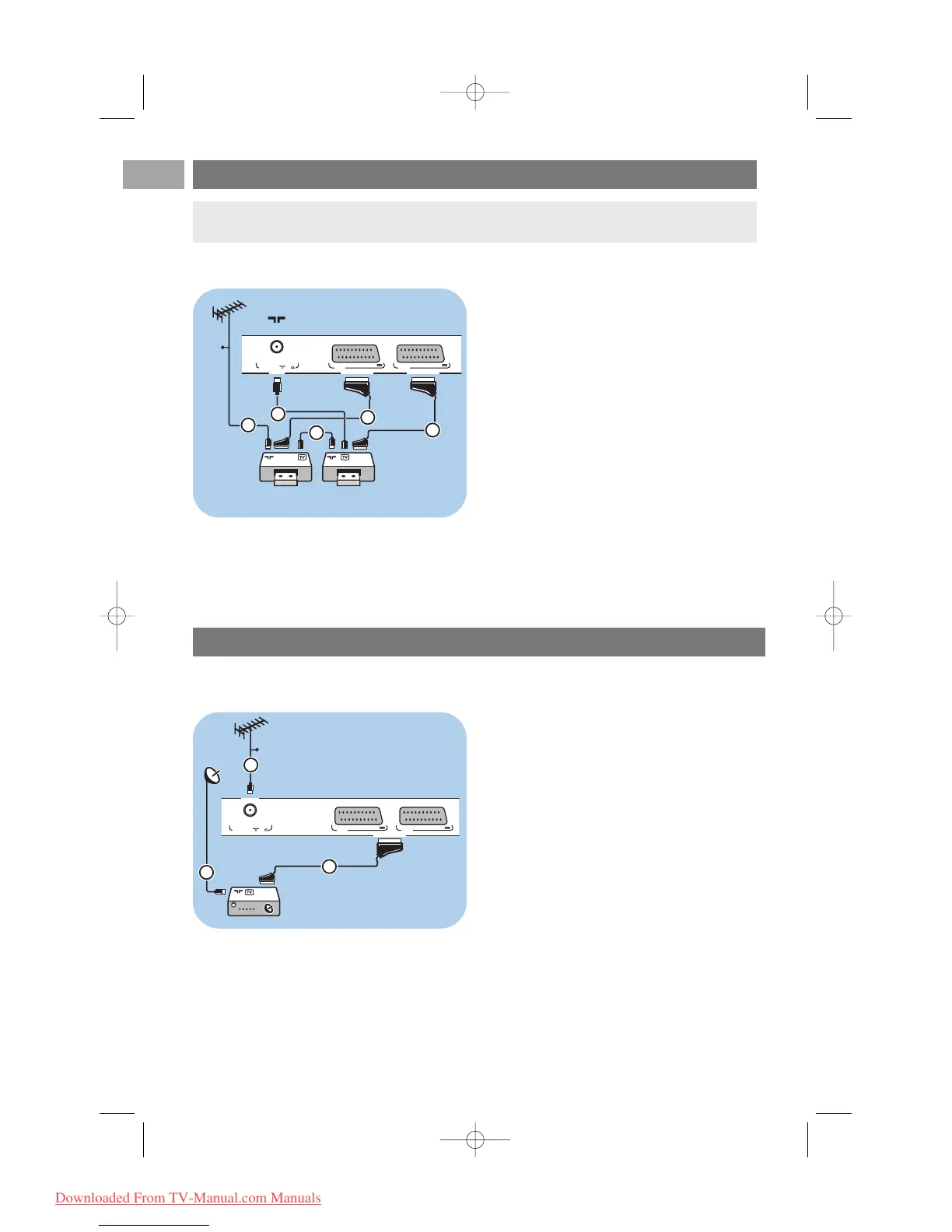
Connect two VCRs or VCR and DVD recorder
With eurocables
1. Connect the aerial cables 1 and 2 as
shown.
2. Connect your VCRs or DVD-recorder to
EXT1 and 2 with the eurocables 4 and 5.
3. Select the equipment you have connected in
the Installation menu, Select your connections,
p. 33 and link it to
EXT1 or 2.
With aerial cables only
1. Connect the aerial cables 1, 2 and 3 as
shown.
2. Tune in your recorder’s testsignal and store the
testsignal under programme number 0.
See Analogue: manual installation, p. 30.
See also the handbook of your recorder.
EN
50
With a eurocable
1. Connect the aerial cables 1 and 2 as
shown.
2. Connect your satellite receiver to
EXT1 and 2
with a eurocable 3.
3. Select the equipment you have connected in
the Installation menu, Select your connections,
p. 33 and link it to
EXT1 or 2.
With Component Video connectors
See Connect a DVD player, a satellite receiver
or a HD receiver, p. 51.
Connect a satellite receiver
Note:you can not record signals from equipment connected to the YPbPr input.











 To Next Page