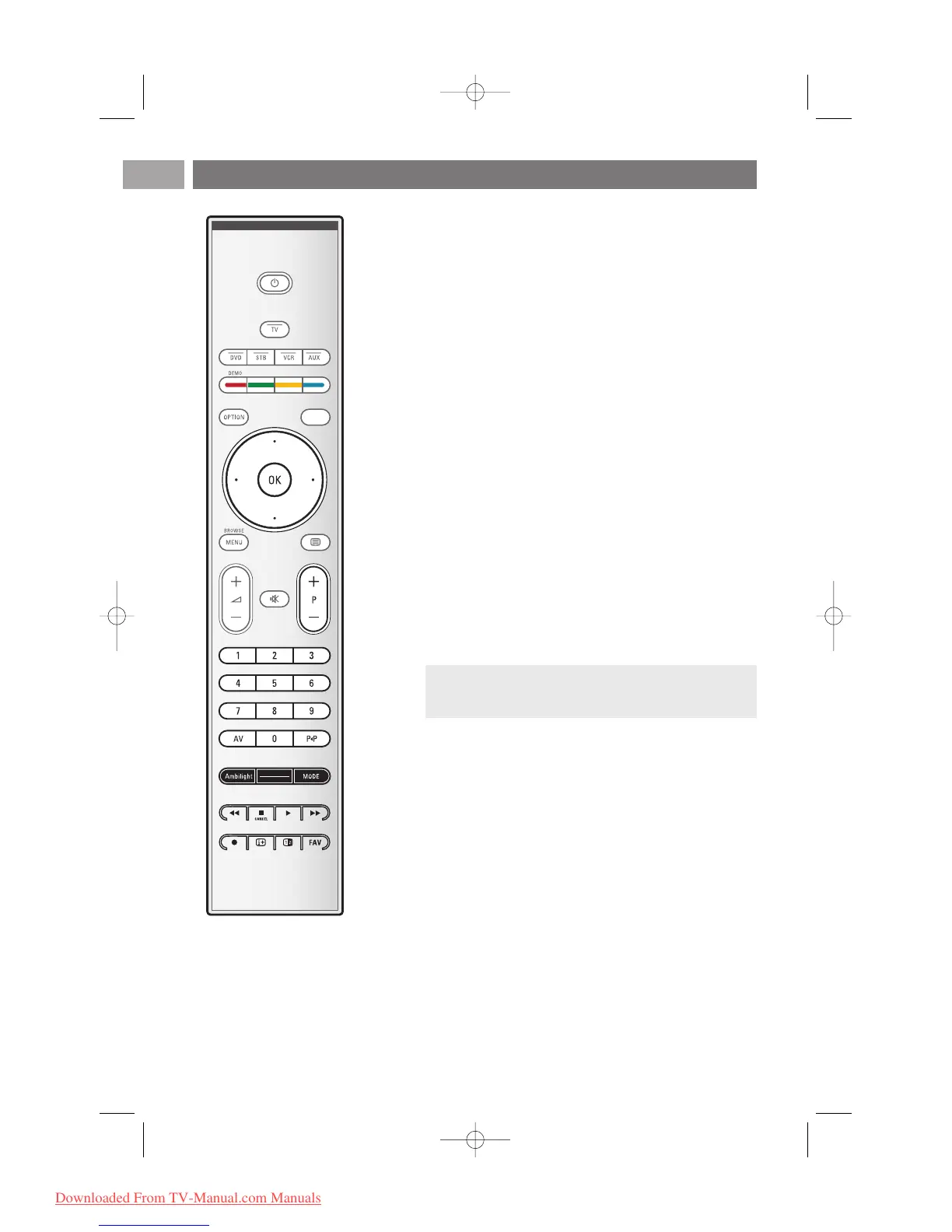
V Volume
Press + or - to adjust the volume.
¬ Mute key: interrupt the sound or restore it.
+P- Channel selection
- to browse through the TV channels and sources stored
and marked in the Favourite channels lists;
- to select a page in Teletext mode;
- to quickly browse through the lists in the menus;
- to switch the TV on from standby mode.
0/9 Digit keys
To select a TV channel between 0 and 999.
AV Select your peripherals
See Installation menu, Select your connections, p. 33.
0 Previous channel
Press to alternate between the currently viewed and the
previously viewed TV channel.
Ambilight - MODE
Ambilihgt:press to switch Ambilight On or Off. For the
Ambilight settings, see Use of the TV menu settings, Enjoy
Ambilight, p. 21.
MODE:press this key repeatedly to toggle through the
Ambilight modes.
Ò ‡ π † Audio and Video equipment keys
See Audio and Video equipment keys, p. 57.
See Multimedia browser functional keys, p. 42.
‡
CANCEL
Only for UK: Digital text/Interactive services.
Press this key to cancel those special services (and the
function bar at the bottom of the screen).
® no function
iOn screen information
Press to display (when available) information about the
selected TV channel and programme.
Use of the remote control RC4401/01 - RC4420/01 (Continued)
EN
6












 To Next Page