25
ENGLISH
_________________________
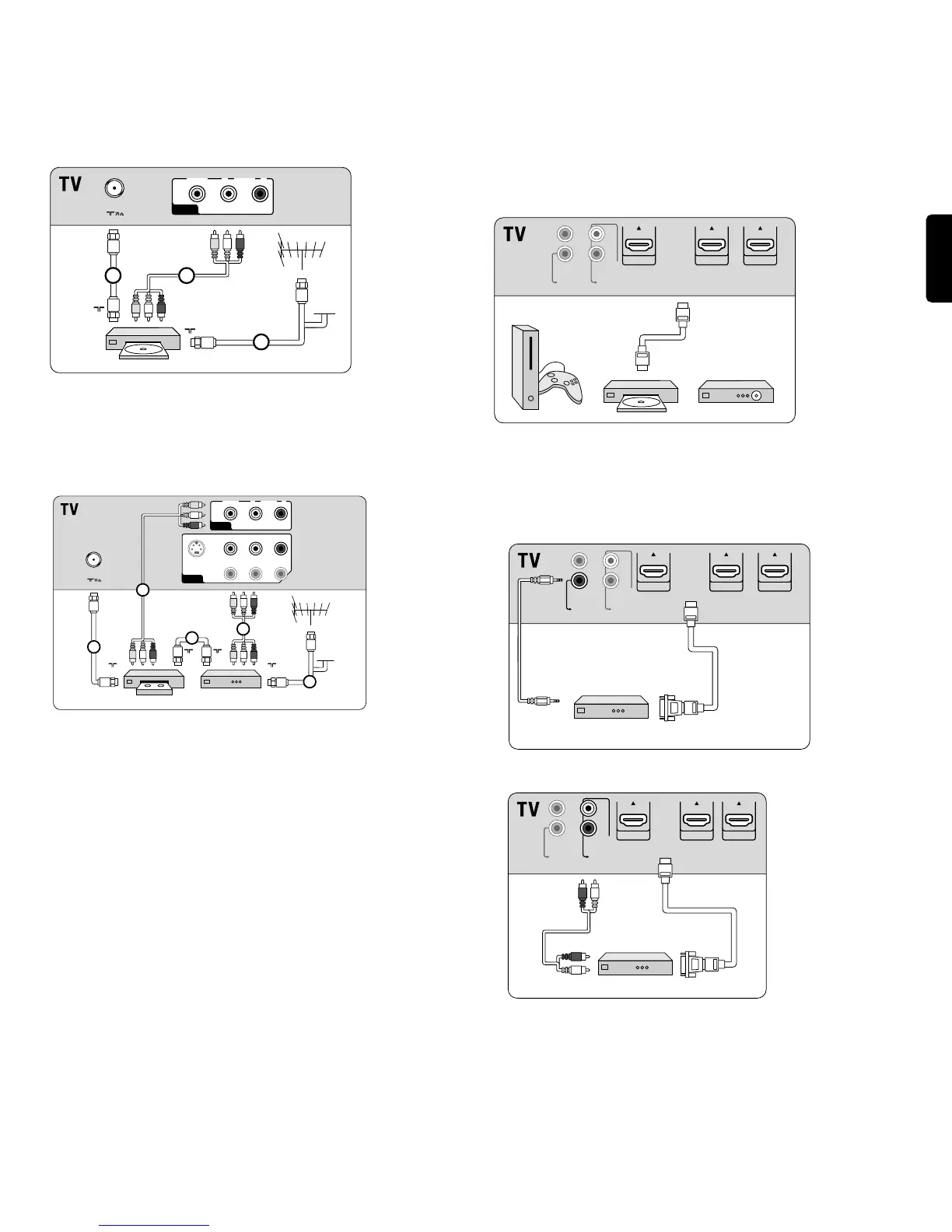
11.3 Connect a recorder (VCR / DVD-R)
) Do not place your recorder too close to the screen as some
recorders may be susceptible for signals.
________________________
11.4 Connect a recorder (VCR / DVD-R)
and a second A/V device
If your recorder has an S-VHS video jack: for improved picture quality,
connect a S-Video cable with the
S-VIDEO input and connect the audio
cables to the
AUDIO L and R input jacks of AV1.
ç When using the
S-VIDEO connector do not connect any device to
the
AV1 video jack.
In case of mono equipment, only the left loudspeaker reproduces sound.
Use a mono to stereo adapter (not supplied) for sound reproduction via
all internal loudspeakers.
_______________________
11.5 Connect a DVD player/DVD recorder, Set top box,
game console,... with a HDMI (High Definition
Multimedia Interface) connector
à HDMI is the leading new standard for Digital Video and audio
interconnection.
Sound and picture interruptions ? See Chapter 12 Problems.
_________________________
11.6 Connect a DVD player/DVD recorder, Set top box,
game console,... with a DVI connector
11.6.1 With DIGITAL AUDIO OUT
11.6.2 With ANALOG AUDIO OUT








 To Next Page