1 -
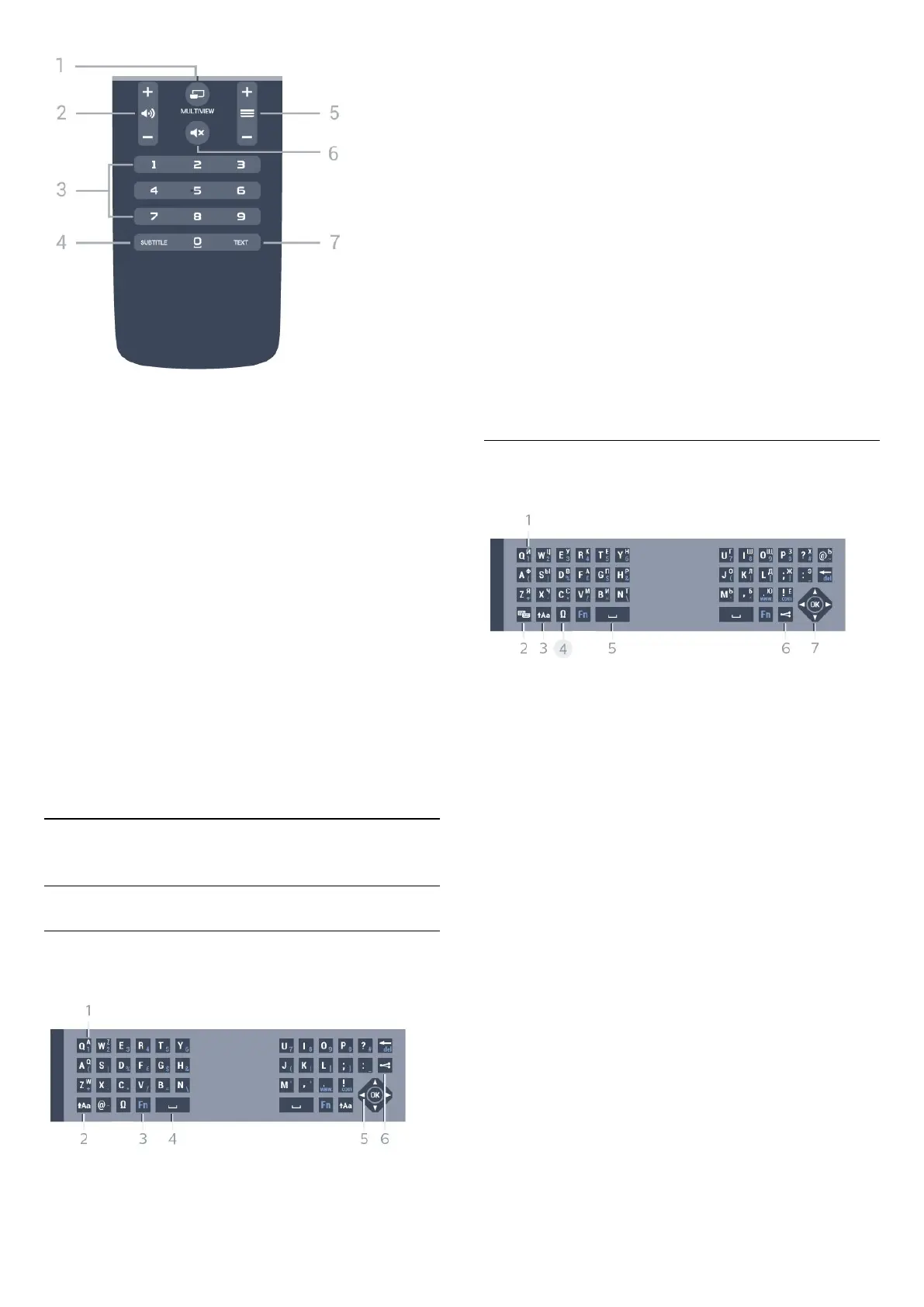
MULTIVIEW
To open an extra small screen.
2 -
Volume
To adjust the volume level.
3 - Number keys
To select a channel directly.
4 - SUBTITLE
To switch Subtitles on, off or on during mute.
5 -
Channel
To switch to the next or previous channel in the
channel list. To open the next or previous page in
Text/Teletext. To start the next or previous chapter on
a disc.
6 -
Mute
To mute the sound or to restore it.
7 - TEXT
To open or close Text/Teletext.
6.2
Keyboard
Overview
Qwerty and Azerty
Overview of a Qwerty/Azerty keyboard.*
1 - Azerty character
Character position if the keyboard layout is set to
Azerty.
2 -
Shift
To type uppercase characters.
3 - Ω Special characters
To open the onscreen keyboard to select accented
characters or symbols.
4 - Fn key
To type a number or punctuation character.
5 -
Spacebar
6 - Navigation and OK
7 -
Share this
To share online what you are watching at the
moment.
* Your remote control has a Qwerty / Azerty or a
Qwerty / Cyrillic keyboard, depending on your region.
Qwerty and Cyrillic
Overview of a Qwerty/Cyrillic keyboard.*
1 - Cyrillic characters
Characters available when the keyboard is switched
to Cyrillic.
2 -
Cyrillic keyboard switch
To switch the keyboard to the Cyrillic characters or
back to Qwerty.
3 -
Shift
To type uppercase characters.
4 - Ω Special characters
To open the onscreen keyboard to select accented
characters or symbols.
5 - Fn key
To type a number or punctuation character
6 -
Spacebar
7 -
Share this
To share online what you are watching at the
moment.
8 - Navigation and OK
* Your remote control has a Qwerty/Azerty or a
Qwerty/Cyrillic keyboard, depending on your region.
24



 To Next Page