6.14
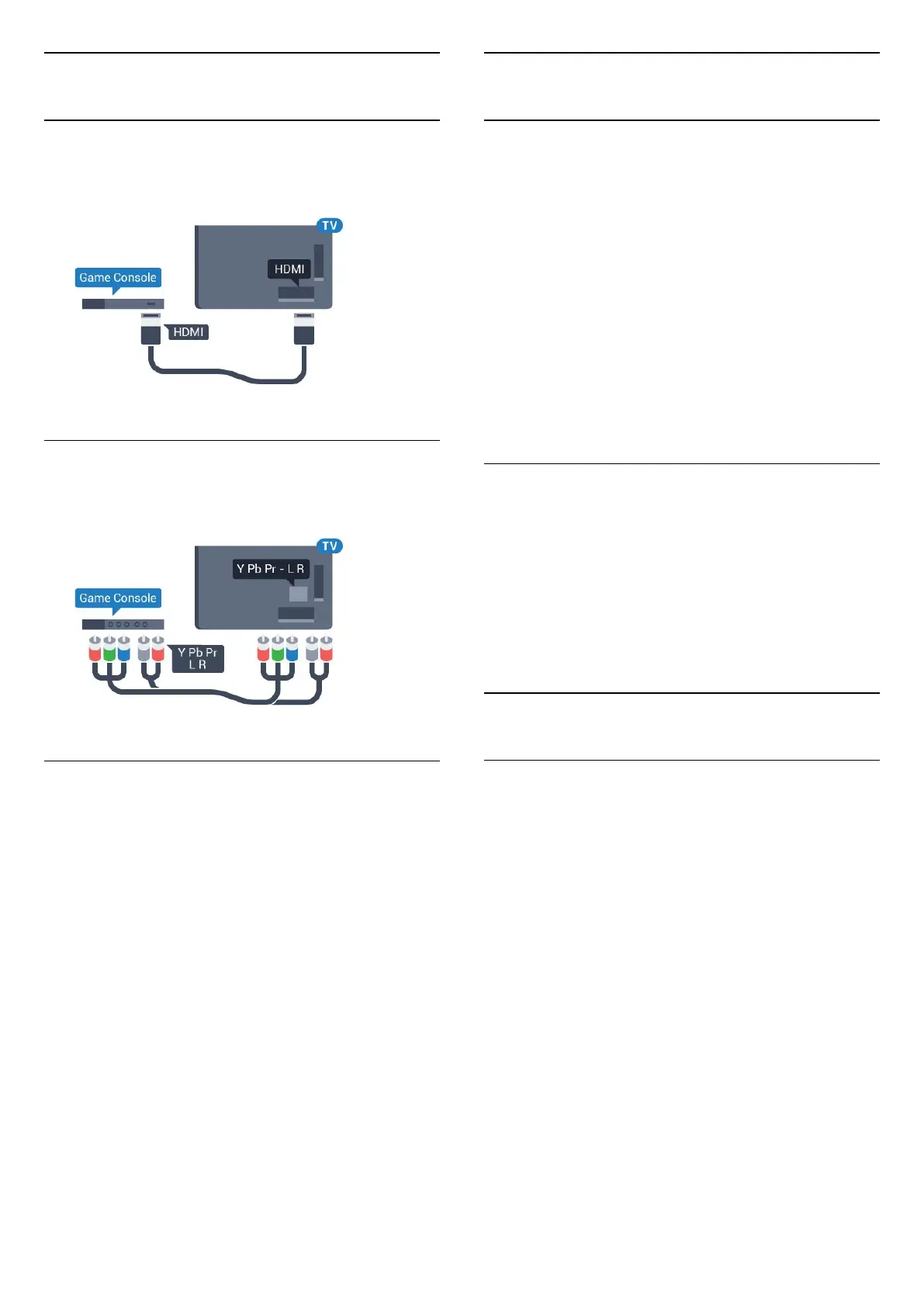
Game Console
HDMI
For best quality, connect the game console with a
High speed HDMI cable to the TV.
Y Pb Pr
Connect the game console with a component video
cable (Y Pb Pr) and an audio L/R cable to the TV.
Best Setting
Before you start playing a game from a connected
game console, we advice you to set the TV in the
ideal setting Game.
To set the TV to the ideal setting…
1 - Press
, select All Settings and press OK.
2 - Select Picture and press
(right) to enter the
menu.
3 - Select Picture Style > Game.
4 - Press
(left) repeatedly if necessary, to close
the menu.
6.15
Gamepad
Connect a Gamepad
To play games from the Internet on this TV, you can
connect a selected range of wireless Gamepads. You
can use Gamepads with a USB nano receiver or
gamepads with Bluetooth.
To connect a Gamepad with a USB nano receiver…
1 - Plug in the small nano receiver in one of the USB
connections on the side of the TV. The wireless nano
receiver comes with the Gamepad.
2 - If the Gamepad is switched on, you can use the
Gamepad.
You can connect a second Gamepad in the second
USB connection on the side of the TV.
Problems
To solve possible interference with other wireless
devices on TV…
• Use a USB extension cord and move the nano
receiver about 1 meter away from the TV.
• Alternatively, you can use a powered USB hub
connected to the TV and plug in the nano receivers in
the USB hub.
6.16
USB Hard Drive
What You Need
If you connect a USB Hard Drive, you can pause or
record digital TV broadcasts (DVB broadcasts or
similar).
Minimum Disk Space
• To Pause
To pause a broadcast, you need a USB 2.0
compatible Hard Drive with a minimum of 4GB disk
space.
• To Record
To pause and record a broadcast, you need a
minimum of 250GB disk space.
28




 To Next Page