
 Need help?
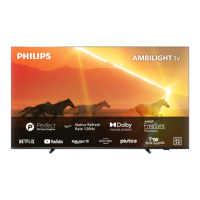
Do you have a question about the Philips 55PML9507 and is the answer not in the manual?
Explains the TV's Home screen and channel management.
Describes how to access and manage apps and the Smart TV Collection.
Emphasizes reading safety instructions before using the TV.
Provides a detailed overview of all keys on the remote control.
How to use voice commands to search for content on the TV.
Details on powering the TV on and switching it to standby mode.
Steps to install TV channels, including antenna setup.
Steps for automatic and manual channel updates via antenna.
Connecting and using USB Hard Drives for pausing or recording TV.
Setting up both wired and wireless network connections.
Overview of apps, their sources, and installation requirements.
Using Google Play for movies, TV shows, music, and games.
Locking apps for children or setting up restricted profiles.
How to launch the internet browser and navigate websites.
Selecting and switching to different connected devices.
Pairing, selecting, and removing Bluetooth devices.
Customizing picture settings like style, color, contrast, and sharpness.
Selecting preset sound styles or customizing personal sound modes.
Basic steps to enable or disable the Ambilight feature.
Selecting Ambilight styles to follow video, audio, or lounge lighting.
Setting the clock, region, and language preferences.
Managing Android-specific settings like apps and storage.
Scheduling and performing TV programme recordings.
Using the Pause TV function to temporarily stop and resume broadcasts.
Selecting Ambilight styles to follow video, audio, or lounge lighting.
Updating TV software via the Internet or USB.
Running diagnostic tests to troubleshoot TV issues.
Critical safety precautions regarding electricity, heat, and physical hazards.
Hazards related to batteries, including ingestion and leakage.
 General
| Color name | Gun metal gray |
|---|---|
| Stand type | Legs stand |
| Product color | Gray |
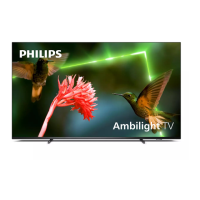
| Ambient lighting | Yes |
| Panel mounting interface | 300 x 200 mm |
| Screen shape | Flat |
| Response time | - ms |
| Display diagonal | 55 \ |
| Display brightness | - cd/m² |
| Display technology | LED |
| Native aspect ratio | 16:9 |
| Native refresh rate | 120 Hz |
| LED backlighting type | Mini LED |
| Display diagonal (metric) | 139 cm |
| Supported graphics resolutions | 3840 x 2160 |
| Display refresh rates supported | 60 Hz, 120 Hz |
| Motion interpolation technology | - |
| Programming period | 8 day(s) |
| Game features | Auto Low Latency Mode (ALLM), Variable Refresh Rate (VRR) |
| Processor cores | 4 |
| AMD FreeSync type | FreeSync Premium Pro |
| Teletext standards | Hyper-text |
| Audio formats supported | AAC, FLAC, MP3, WAV, WMA, WMA-PRO |
| Image formats supported | BMP, GIF, HEIF, JPEG, PNG |
| Video formats supported | AVI, HEVC/H.265, MKV, MPEG1, MPEG2, MPEG4, VP9 |
| Subtitle formats supported | ASS, SMI, SRT, SSA, SUB, TXT |
| High Dynamic Range (HDR) technology | Dolby Vision, Filmmaker Mode, High Dynamic Range 10 (HDR10), High Dynamic Range 10+ (HDR10 Plus), Hybrid Log-Gamma (HLG) |
| Music apps | Spotify, YouTube Music |
| Video apps | Amazon Prime Video, Apple TV, BBC iPlayer, Disney+, YouTube |
| Smart modes | IMAX Enhanced |
| Operating system version | TV 11 |
| App distribution platform | Google Play |
| Operating system installed | Android |
| Tuner type | Analog & digital |
| Analog signal format system | PAL, SECAM |
| Digital signal format system | DVB-C, DVB-S, DVB-S2, DVB-T, DVB-T2, DVB-T2 HD |
| Sound modes | AI Sound |
| Audio decoders | DTS, Dolby Atmos, Dolby Digital, DTS-HD, Dolby MS12 |
| RMS rated power | 40 W |
| HDMI version | 2.0/2.1 |
| PC in (D-Sub) | No |
| RF ports quantity | 2 |
| USB 2.0 ports quantity | 3 |
| Ethernet LAN (RJ-45) ports | 1 |
| USB 3.2 Gen 1 (3.1 Gen 1) Type-A ports quantity | 0 |
| Wi-Fi standards | Wi-Fi 5 (802.11ac) |
| Bluetooth version | 5.0 |
| Cables included | AC |
| Package type | Box |
| Package depth | 840 mm |
| Package width | 1360 mm |
| Package height | 160 mm |
| Package weight | 24500 g |
| AC input voltage | 220 - 240 V |
| AC input frequency | 50 - 60 Hz |
| Energy efficiency scale | A to G |
| Power consumption (standby) | 0.3 W |
 Weight and Dimensions
| Stand depth | 279.6 mm |
|---|---|
| Stand width | 727 mm |
| Depth (with stand) | 254 mm |
| Width (with stand) | 1231.4 mm |
| Height (with stand) | 732 mm |
| Weight (with stand) | 19700 g |
| Depth (without stand) | 86.1 mm |
| Height (without stand) | 712 mm |
| Weight (without stand) | 19300 g |



 To Next Page