
 Need help?
Do you have a question about the Philips 55PUS6503 and is the answer not in the manual?
Find your TV's model and serial number for registration and support.
Instructions for updating your TV's software via the Internet or a USB drive.
Essential safety instructions and tips for optimal TV placement.
Learn how to record live TV broadcasts and schedule future recordings.
Pause live TV broadcasts and resume them at your convenience.
Connect your TV to a home network for internet access and Smart TV capabilities.
Step-by-step guide for wireless and wired network connections to your router.
Solutions for when the TV does not switch on, has startup sounds, or returns to standby.
Diagnose and resolve problems with picture quality, no sound, or poor audio.
Critical safety guidelines to prevent electric shock, fire, injury, and product damage.
 General
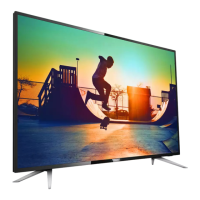
| Screen shape | Flat |
|---|---|
| Response time | - ms |
| Display diagonal | 55 \ |
| Display brightness | - cd/m² |
| Display technology | LED |
| Peak luminance ratio | 65 % |
| Supported video modes | 2160p |
| Display diagonal (metric) | 139 cm |
| Screen format adjustments | 16:9 |
| Supported graphics resolutions | 3840 x 2160 |
| Motion interpolation technology | - |
| RMS rated power | 20 W |
| DVI port | No |
| HDMI ports quantity | 3 |
| DVI-D ports quantity | 0 |
| USB 2.0 ports quantity | USB 2.0 ports have a data transmission speed of 480 Mbps, and are backwards compatible with USB 1.1 ports. You can connect all kinds of peripheral devices to them. |
| Audio Return Channel (ARC) | Yes |
| Component video (YPbPr/YCbCr) in | 1 |
| AC input voltage | 220 - 240 V |
| AC input frequency | 50 - 60 Hz |
| Power consumption (standby) | 0.3 W |
| Power consumption (typical) | 86 W |
| Package depth | 160 mm |
| Package width | 1360 mm |
| Package height | 860 mm |
| Package weight | 20500 g |
| USB ports quantity | 2 |
| Annual energy consumption | 126 kWh |
| Product color | Black |
| Mercury content | 0 mg |
| Panel mounting interface | 300 x 200 mm |
| Processor cores | 4 |
| Audio formats supported | AAC, MP3, WAV, WMA, WMA-PRO |
| Image formats supported | BMP, GIF, JPEG, PNG, PNS |
| Video formats supported | AVI, HEVC, MKV, MPEG1, MPEG2, MPEG4, VC-1, VP9, WMV9 |
| Subtitle formats supported | SMI, SRT, SUB, SUP, TXT |
| Operating temperature (T-T) | 5 - 35 °C |
| Tuner type | Analog & digital |
| Analog signal format system | NTSC, PAL, SECAM |
| Digital signal format system | DVB-S2, DVB-T, DVB-T2, DVB-T2 HD, ISDB-C, ISDB-S |
| Video apps | YouTube |
| Programming period | 8 day(s) |
| Firmware upgradeable via | Auto upgrade wizard, Network, USB |
 Weight and Dimensions
| Stand width | 768 mm |
|---|---|
| Depth (with stand) | 227.4 mm |
| Height (with stand) | 742.2 mm |
| Weight (with stand) | 15300 g |
| Depth (without stand) | 81.4 mm |
| Width (without stand) | 1244.2 mm |
| Height (without stand) | 719 mm |
| Weight (without stand) | 15100 g |








 To Next Page