65BDL3550Q
13
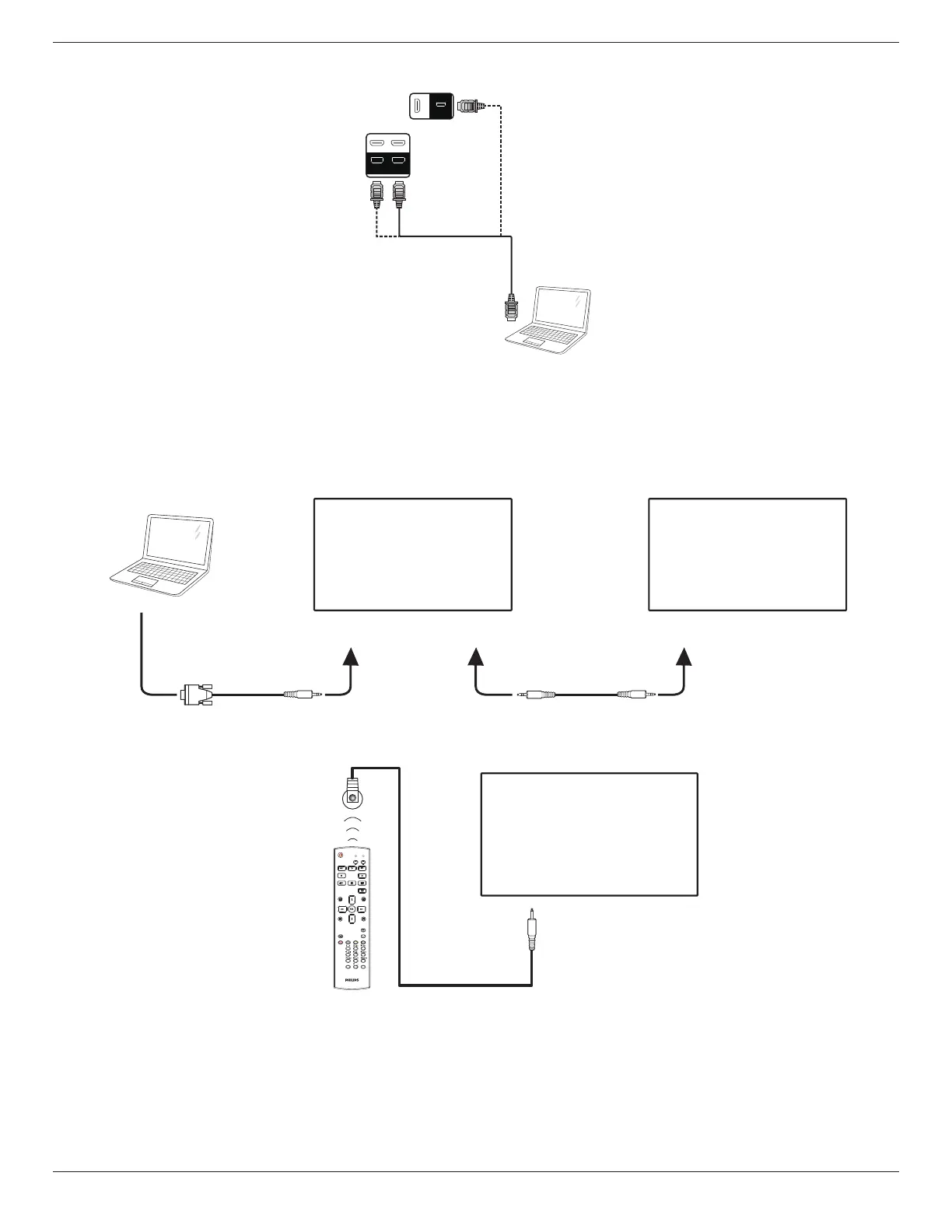
3.2.3. Using HDMI input
HDMI Out
[HDMI IN]
HDMI1 IN
HDMI2 IN
PC
3.3. Connecting Multiple Displays in a Daisy-chain Configuration
You can interconnect multiple displays to create a daisy-chain conguration for applications such as a menu board.
3.3.1. Display control connection
Connect the [RS232C OUT] connector of DISPLAY 1 to the [RS232C IN] connector of DISPLAY 2.
DISPLAY 1 DISPLAY 2
PC
[RS-232C IN]
[RS-232C]
[RS-232C OUT] [RS-232C IN]
3.4. IR connection
FORMAT
SOURCE
INFOLIST
OPTIONSADJUST
VOL
NORMAL
ID
ID SET ENTER
DISPLAY 1
[IR IN]
External
IR Receiver
NOTE:
This display’s remote control sensor will stop working if the [IR IN] is connected.


 To Next Page