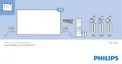
What You Need
Interactive TV is only available on digital TV channels.
To enjoy the full benefits of Interactive TV, you need
a high-speed (broadband) Internet connection to the
TV.
HbbTV
If a TV channel offers HbbTV pages, you must first
switch on HbbTV in the TV settings to view the pages.
1 - Press
, select All Settings and press OK.
2 - Select General Settings > Advanced > HbbTV
and press OK.
3 - Select On.
4 - Press
(left) repeatedly if necessary, to close
the menu.
If you want to avoid access to HbbTV pages on a
specific channel, you can block the HbbTV pages for
this channel only.
1 - Tune to the channel of which you want to block
the HbbTV pages.
2 - Press
OPTIONS and select HbbTV on This
Channel.
3 - Select Off.
40




 To Next Page