EasyManua.ls Logo

Philips 75PFL5704 - User Manual

Philips 75PFL5704
78 pages
Print Icon
To Next Page IconTo Next Page
Loading...
Telev isions
5704 series
75PFL5704
EN
User manual
FR
Manuel d'utilisation
Register your product and get support at
www.philips.com/support
EN For further assistance, please call the customer support in your
country or check the Philips website for chat support.
To obtain assistance, contact Philips customer care center;
In the U.S.A., Canada, Puerto Rico, or the U.S. Virgin Islands
1 866 309 5962
FR Pour plus de l'aide, s'il vous plaît contactez le service clientèle de
votre pays ou consultez le site Web de Philips pour obtenir une
assistance par chat.
Pour obtenir de l'aide, communiquez avec le centre de service à la
clientèle Philips au;
Dans le États-Unis, au Canada, à Puerto Rico ou aux Îles Vierges
américaines; 1 866 309 5962
EN Check the model name of the rating label on the back of your
TV to conrm if the TV is 75PFL5704/F7 A or 75PFL5704/F7
75PFL5704/F7 - Please start to read from p.41
75PFL5704/F7 A - Please start to read from next page
FR Vériez le nom du modèle de l'étiquette de classication à
l'arrière de votre téléviseur pour conrmer si le téléviseur est
75PFL5704/F7 A ou 75PFL5704/F7
75PFL5704/F7 A - Veuillez commencer a lire a partir de la page
suivante
75PFL5704/F7 - Veuillez commencer a lire a partir de la p.41

Table of Contents

Question and Answer IconNeed help?

Do you have a question about the Philips 75PFL5704 and is the answer not in the manual?

Overview

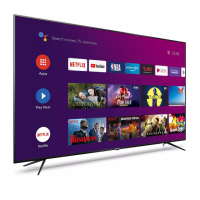
This document describes the Philips 5704 series Android TV, specifically models 75PFL5704/F7 A and 75PFL5704/F7. It functions as a smart television with integrated Google Assistant and Google Play access, offering a wide range of entertainment and connectivity options.

Function Description

The Philips 5704 series is an Android TV, providing access to movies, shows, games, and various applications from Google Play. It features the Google Assistant for voice control, allowing users to quickly access entertainment, get answers, and control smart devices. The TV supports DTV, Analog TV, and CATV, enabling users to access broadcast channels and cable/satellite TV services. It includes an autoprogram feature for automatic channel scanning and memorization, simplifying setup. Parental controls are available to restrict access to inappropriate programs. The TV also has a built-in closed caption decoder, MTS/SAP tuner for audio selection, auto standby, and a sleep timer. HDMI control (CEC) allows the TV to control other HDMI link devices.
Important Technical Specifications

  • Picture: UHD (Ultra HD) with 3840 x 2160 pixels at 60 Hz.
  • Diagonal Screen Size / Aspect Ratio: 74.5" / 16:9.
  • Viewing Angles: 178° (V) by 178° (H).
  • Built-in Tuner: ATSC (digital) / NTSC (analog).
  • Sound: Mono, Stereo.
  • Power Output (RMS watts): 10 W x 2.
  • Equalizer: 5 band.
  • Picture Format: Automatic / Full / Unscaled / 4:3 / Movie expand for SD (4:3 source), HD (16:9 source), and UHD.
  • Channel Coverage:
    • Over-the-Air DTV (ATSC): VHF 2~13, UHF 14~69 (each channel may have e.g. 2.1~2.9, 3.1~3.9, etc.).
    • Over-the-Air Analog (NTSC): VHF 2~13, UHF 14~69.
    • CATV (Analog NTSC): 2~13, A~W, W+1~W+94 (Analog W+1~W+84), A-5~A-1, 5A.
  • Tuning System: Channel frequency synthesized tuning system.
  • Connectivity:
    • Composite video input: 1.
    • HDMI input: 3 (selectable HDMI modes), supporting 480i/p, 720p, 1080i@60 Hz, 1080p, 2160p @24/30/60 Hz video signals, HDR10 signals, LPCM, AC3, DD+ digital audio signals, and PC-input video signal up to 4096 x 2160.
    • Analog audio L/R input: 1 (L audio / R audio).
    • PC input: Via HDMI and HDMI-DVI + Analog audio L/R.
    • USB: 1.
    • Wireless LAN: Supporting IEEE 802.11a/b/g/n/ac (2.4 GHz/5 GHz) wireless standards.
    • Ethernet port: 1.
    • Digital audio output: 1, supporting Dolby Digital.
    • Headphone output: 1/8" (3.5 mm).
  • Power Requirements: 120 V~ +/- 10%, 60 Hz +/- 0.5%.
  • Operating Temperature: 41 °F (5°C) to 104 °F (40 °C).
  • Wall Mount Bracket Kit (75PFL5704/F7 A): SANUS F80b, M8 x 0.787" (20 mm) screw dimension, VESA size 15.74" x 7.87" (400 x 200 mm).

Usage Features

  • Power On/Standby: The TV can be turned on and put into suspend standby mode by pressing the power button once. Holding the power button will put it into complete standby. Unplugging the AC power cord completely turns off the unit.
  • Volume Adjustment: Volume can be adjusted using the VOL +/- buttons on the TV or remote. Sound can be muted/unmuted using the MUTE button.
  • Channel Switching: Channels can be changed using CH +/- buttons or number buttons on the remote. For digital channels, the up/down navigation buttons can also be used.
  • External Device Viewing: Easily switch between TV and external devices (e.g., set-top box, Blu-ray player) by pressing the INPUT button and selecting the desired source.
  • Home Menu Access: The Home menu, accessed via the HOME button, provides quick access to apps, Live TV, input devices, settings, and the Google Play Store.
  • App Management: Download apps from the Google Play Store, rearrange channels, and move or delete applications from the Home menu.
  • Google Assistant: Activate the Google Assistant by pressing the Assistant button on the remote or by saying "Hey Google" (if supported by the model) to search for content, control the TV, and manage smart home devices.
  • Picture Format: Adjust the TV aspect ratio (Automatic, Full, Unscaled, 4:3, Movie expand) using the FORMAT button.
  • TV Screen Information: Display current channel and other program information by pressing the INFO button.
  • Options Menu: Access various TV settings (Picture style, Multi audio, Speakers, Power, Sleep time, Picture off, No Signal Auto Power Off, Closed captions, Settings) directly via the OPTIONS button.
  • Network & Internet: Configure Wi-Fi, connect via WPS, add new networks, enable scanning always available, and set up proxy and IP settings.
  • Live TV/Antenna: Add channels for the first time or additional channels, and view the channel list and program guide.
  • Parental Controls: Restrict programs or channels using a rating lock, with options for film and TV ratings (United States, Canada, Canada (French)). PIN code management is available.
  • Multi Audio: Select audio language for digital broadcasts (English, Español, Français) and choose between Mono, Stereo, or SAP for ATV.
  • Open Source Licenses: Information regarding open source software used in the TV.
  • Accounts & Sign-in: Register and manage Google Accounts for full access to Android TV features.
  • Device Preferences: Access settings for About (system update, TV registration), Device name, Restart, Status, Legal information, Model, Version, Software version, Netflix ESN, Android security patch level, Kernel version, Build, Date & time, Timer, Language, and Keyboard.
  • Inputs: View connected and standby inputs, manage HDMI control (CEC), device auto power off, TV auto power on, HDMI EDID Version, and CEC Device List.
  • Power Settings: Configure Sleep Timer, Picture off, and No Signal Auto Power Off.
  • Picture Settings: Adjust Picture style (User, Standard, Vivid, Sports, Movie, Game, Energy saving), Backlight, Brightness, Contrast, Color, Tint, Sharpness, Gamma, Color Temperature, Picture Format, Advanced Video settings (Noise reduction, MPEG artifact reduction, Dynamic contrast, Local Contrast Control, Film mode, Blue Stretch, Game Mode, PC Mode, HDMI RGB Range), Custom color management, 11 Point White Balance Correction, and Reset to Default.
  • Sound Settings: Configure Sound style (User, Standard, Vivid, Sports, Movie, Music, News), Balance, Equalizer Detail, Speakers (TV Speakers, External Audio System), Digital Output (Auto, Bypass, PCM, Dolby Digital Plus, Dolby Digital), SPDIF Delay, Auto Volume Control, and System sounds.
  • Storage & Reset: Perform a factory reset.
  • Screen Saver: Configure screen saver settings (Turn screen off, Backdrop, Colors), when to start (5, 15, 30 minutes, 1, 2 hours), and put device to sleep (30 minutes, 1, 3, 6, 12 hours, Never).
  • Location: Set location status (Use Wi-Fi to estimate location, Off).
  • Google Play Services: Manage Force stop, Uninstall updates, Enable or Disable, Storage used, Clear data, Clear cache, Clear defaults, Notifications, and Permissions.
  • Usage & Diagnostics: Turn On/Off usage and diagnostics data collection.
  • Accessibility: Configure Audio Description (Off/Minimum/Medium/Maximum, Speaker, Headphone, Volume, Pane and Fade, Audio for the Visually Impaired, Fader Control), High contrast text (On/Off), TalkBack (Google screen reader), Switch Access, and Text to speech.
  • Security & Restrictions: Manage Unknown sources (allow app installation from sources other than Play Store), Verify apps, Restricted Profile (create, enter, allowed apps, change PIN, delete).

Maintenance Features

  • Cleaning: Clean the front panel and exterior surfaces with a soft microfiber cloth or lens brush. Disconnect the AC power cord before cleaning. Avoid solvents, alcohol, insecticide liquid, or spraying liquids directly on the screen or exterior surfaces to prevent damage, shorts, electric shocks, or fire.
  • Servicing: If the unit is inoperative, do not attempt self-repair. Contact an authorized service center.
  • IR Signal Check: If the remote control is not working, use a digital or cell phone camera to check if it's emitting an infrared signal.
  • Product Recycling: The packaging is recyclable. Contact local authorities for recycling information. The TV contains recyclable and reusable materials; specialized companies can dismantle it at the end of its life. Dispose of the old TV according to local regulations.
  • Battery Disposal: Do not mix old and new batteries or different types of batteries. Dispose of used batteries according to local regulations, as they may contain heavy metals.
  • Moving/Shipping: Pack the unit properly following the carton diagram to avoid screen damage.

Philips 75PFL5704 Specifications

General IconGeneral
BrandPhilips
Model75PFL5704
CategoryLCD TV
LanguageEnglish

Related product manuals